[TOC]
Redfish Schema语法
JSON Schema 是一种用于描述和验证 JSON 数据结构的规范。它定义了 JSON 数据应具有的结构、类型和其他约束条件。
在北向映射器这里,Schema 主要是对 ReqBody 进行强制校验,对于 RspBody 没有强制校验。
在 POST、PATCH 等方法中本身就包含对请求体字段的校验规则,Schema 校验的严格程度要求不高于映射器配置文件的校验严格程度。
Schema 文件内被校验的字段不区分 Redfish 请求是哪种方法,如果有某个字段同时存在在 GET/POST/PATCH 方法中,在 Schema 文件中只定义一次。
JSON:
{
    "ReqBody": {
        "Properties": {
            "AccountLockoutThreshold": {
                "Type": "integer",
                "Validator": [
                    {
                        "Type": "Range",
                        "Formula": [
                            0,
                            6
                        ]
                    }
                ]
            }
        }
    }
}
Schema:
{
    "definitions": {
        "AccountLockoutThreshold": {
            "type": "integer",
            "minimum": 0,
            "maximum": 6 // 和映射器校验严格程度一致
            // "maximum": 5 // 比映射器校验更严格,不符合规范
        }
    }
}
Schema 文件检查脚本存放在 /rackmount/interface_config/redfish/schema_check 路径下。
执行总入口为:schema_checker.py
执行命令:python3 ./interface_config/redfish/schema_check/schema_checker.py
执行命令根据运行环境不同可能有差异。
[!NOTE]
映射器的配置语法和Schema的语法是不一样的,映射器是openUBMC自定义的,Schema的语法是标准规范语法。
关于Schema数据的配置可以看此文件:/rackmount/interface_config/redfish/schema_check/data_schemafile_schema.json
JSON Schema Draft:https://json-schema.org/specification.html
JSON Schema 验证器:https://www.jsonschemavalidator.net/
JSON Schema基本概念
- 是一个 描述 JSON 数据格式的 JSON 文档;
- 可以用来校验数据是否符合预期结构;
- 支持多种验证规则,如字段类型、必填项、最小/最大值等;
- 被广泛应用于 API 接口定义、配置文件校验、表单验证等场景。
Schema文件组成
我们现在有如下 Redfish uri 配置文件:
{
    "Resources": [
        {
            "Uri": "/redfish/v1/Chassis/:chassisid/PCIeDevices/:id",
            "Interfaces": [
                {
                    "Type": "GET",
                    "RspBody": {
                        "@odata.context": "/redfish/v1/$metadata#PCIeDevice.PCIeDevice",
                        "@odata.type": "#PCIeDevice.v1_12_0.PCIeDevice",
                        "Id": "${ProcessingFlow[2]/Destination/NodeID}",
                        "Oem": {
                            "{{OemIdentifier}}": "${Statements/GetOemPCIeDeviceInfo()}"
                        },
                        "PCIeInterface": {
                            "Maxlanes": "${Statements/GetMaxlanes()}",
                            "Oem":{
                                "{{OemIdentifier}}":{
                                    "CurrentSpeed": "${ProcessingFlow[2]/Destination/LinkSpeed}"
                                }
                            }
                        }
                    }
                }
            ]
        }
    ]
}
Schema 文件是通过 @odata.type 字段关联起来。如果是非 ==hw/huawei== 开头的文件,取 ==PCIeDevice.v1_12_0== 在全局搜索文件名即可。
通过搜索可以找到以下文件:pciedevice.v1_12_0.json。文件名为全小写。
对应的 Schema:
{
    "$id": "http://redfish.dmtf.org/schemas/v1/PCIeDevice.v1_12_0.json",
    "$ref": "#/definitions/PCIeDevice",
    "title": "#PCIeDevice.v1_12_0.PCIeDevice",
    "$schema": "http://redfish.dmtf.org/schemas/v1/redfish-schema-v1.json",
    "copyright": "Copyright 2014-2023 DMTF. For the full DMTF copyright policy, see http://www.dmtf.org/about/policies/copyright",
    "language": "en",
    "owningEntity": "DMTF",
    "release": "2020.4",
    "definitions": {
        "PCIeDevice": {
            "additionalProperties": false,
            "description": "PCIeDevice schema.",
            "patternProperties": {
                "^([a-zA-Z_][a-zA-Z0-9_]*)?@(odata|Redfish|Message)\\.[a-zA-Z_][a-zA-Z0-9_]*$": {
                    "description": "This property shall specify a valid odata or Redfish property.",
                    "type": [
                        "array",
                        "boolean",
                        "integer",
                        "number",
                        "null",
                        "object",
                        "string"
                    ]
                }
            },
            "properties": {
                "@odata.context": {
                    "$ref": "http://redfish.dmtf.org/schemas/v1/odata-v4.json#/definitions/context"
                },
                "@odata.type": {
                    "$ref": "http://redfish.dmtf.org/schemas/v1/odata-v4.json#/definitions/type"
                },
                "Id": {
                    "$ref": "http://redfish.dmtf.org/schemas/v1/Resource.json#/definitions/Id",
                    "readonly": true
                },
                "Oem": {
                    "$ref": "http://redfish.dmtf.org/schemas/v1/Resource.json#/definitions/Oem",
                    "description": "The OEM extension property.",
                },
                "PCIeInterface": {
                    "$ref": "#/definitions/PCIeInterface",
                    "description": "The PCIe interface details for this PCIe device.",
                    "versionAdded": "v1_3_0"
                },
            }
        },
        "PCIeInterface": {
            "additionalProperties": false,
            "description": "Properties that describe a PCIe interface.",
            "type": "object",
            "properties": {
                "Maxlanes": {
                    "description": "The number of PCIe lanes supported by this device.",
                    "maximum": 32,
                    "readonly": true,
                    "type": [
                        "integer",
                        "null"
                    ],
                },
                "Oem": {
                    "$ref": "http://redfish.dmtf.org/schemas/v1/Resource.json#/definitions/Oem",
                    "description": "The OEM extension property.",
                    "versionAdded": "v1_3_0"
                }
            }
        }
    }
}
Schema 文件常用关键字
| 关键字 | 说明 |
|---|---|
$id |
重要,用于唯一标识一个 JSON Schema。 |
$schema |
声明使用的 JSON Schema 的版本。 |
$ref |
引用语法。 |
title |
Schema 标题。 |
description |
描述 Schema 的用途。 |
definitions |
存放所有字段的定义信息。 |
properties |
当类型为 object 时,定义对象属性的键值对。 |
additionalProperties |
控制是否允许对象包含未在 properties 或 patternProperties 中定义的属性。 |
readonly |
表示一个字段是否为只读。 |
Oem |
比较特殊的关键字 |
$id
重要关键字,用于唯一标识一个 JSON Schema。
-
必须是一个合法的 URI(可以是 URL 或 URN)。
-
推荐使用 http URL 格式。
-
可以是本地文件路径(如
"/path/to/schema.json"),但不推荐。 -
不能重复。
-
可以被
$ref引用,在 ==hw/huawei== 开头 Schema 文件中没有使用。
$schema
声明该 Schema 使用的是哪个版本的 JSON Schema 规范。跳转到链接后可以看到对当前 Schema 文件格式校验的 Schema 文件。也就是 Schema 的 Schema。
$ref
一个引用语法。通过 $ref 可以引用内部已经定义的字段、外部已经定义的字段等。
放在最外层的 $ref 表示当前 Schema 应该指向哪个具体定义,这里是 #/definitions/PCIeDevice,属于内部引用。
内部引用:
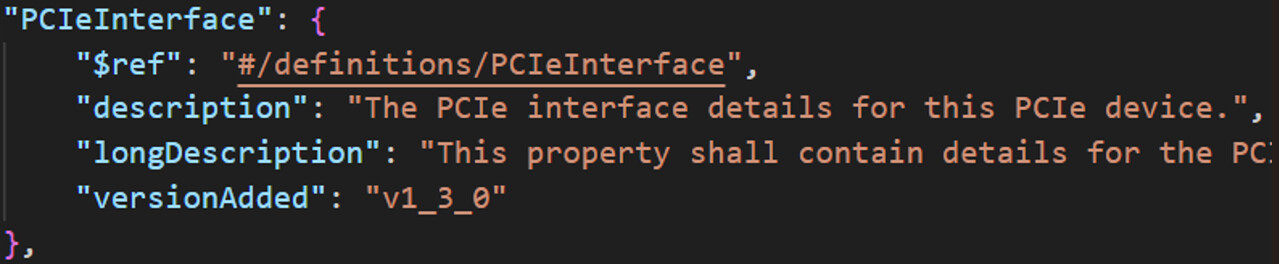
外部引用:可以是 URI/文件路径


title
Schema 标题,在 openUBMC 中作为 redfish 接口和 Schema 关联的依据。
Redfish 接口中 GET 方法的响应体会包含一个关键字段:@odata.type,该字段给出的内容需要和关联的 Schema 文件的 title 保持一致。否则会导致查找不到对应的 Schema 文件。
description
描述 Schema 的用途,按照华为的要求,每个字段都应该给出 description(longDescription)。
definitions
必要关键字,存放所有字段的定义信息。
properties
类型为 object 的字段下必要的字段,父字段其下的所有子字段都放在父字段的 properties 里面。
additionalProperties
控制是否允许对象包含未在 properties 或 patternProperties 中定义的属性,默认为 true。
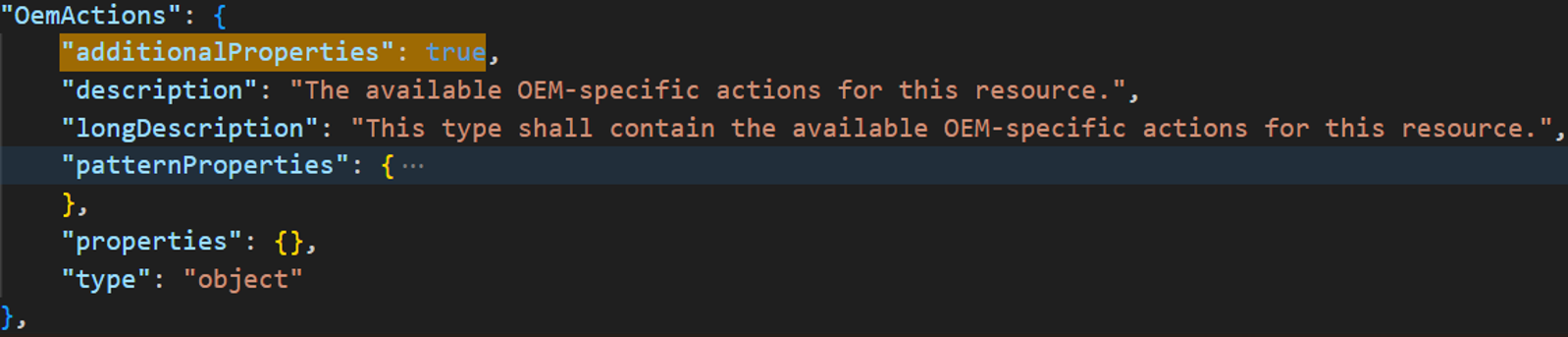
但大部分情况下都是设置为 false。谨慎配置为 true。
readonly
只存在于 GET 方法下的字段设置为 true,存在于 POST/PATCH 方法下的字段设置为 false。
Oem
Oem 字段为自定义字段,不允许在非 ==hw/huawei== 开头的文件中展开。展开定义需要放在 ==huawei== 开头的文件中。因为 @odata.type 字段关联到的都是 JSON Schema 规范,所以需要使用引用语法引用到外部展开(URI 或者 huawei 开头的文件中)。

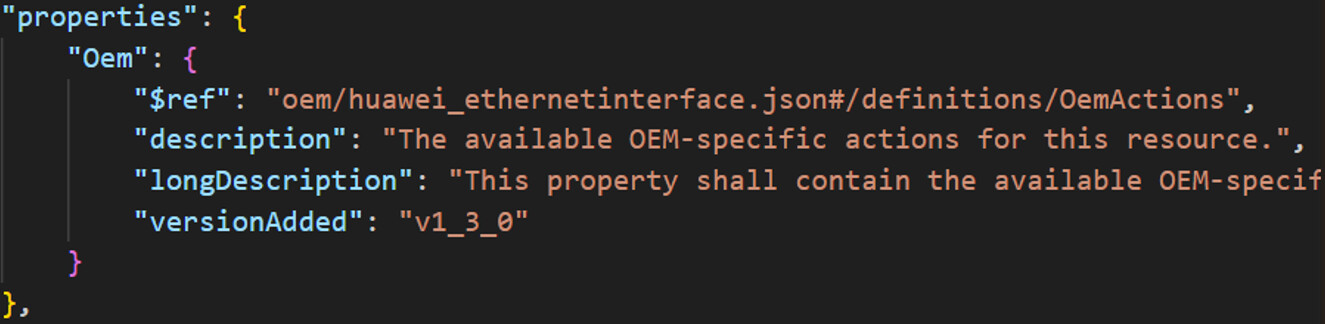
Oem 字段与层级无关。
Schema检查规则
Rule1语法校验
Rule 1-1
[Rule 1-1] Schema语法检查失败。
JSON Schema文件路径:/rackmount/interface_config/redfish/schema_tool/data_schemafile_schema.json
被检查的JSON文件路径:/rackmount/interface_config/redfish/static_resource/redfish/v1/schemastore/en
以 data_schemafile_schema.json 作为 Schema 对 Redfish Schema 文件做语法检查。
==hw== 开头全部自定义文件和 ==huawei== 开头的部分自定义文件跳过该检查。
Rule 1-2
[Rule 1-2] 自定义属性语法校验失败。
错误示例:
=============constraint errors found in file:
映射器文件: None
Schema文件: /home/community/components/rackmount/interface_config/redfish/static_resource/redfish/v1/schemastore/en/pciedevice.v1_12_0.json
[Rule 1-2]: 自定义属性语法校验失败, 映射器错误值: #/definitions/OemActions, 错误位置: URI: None, Type: None, 位置: None
解决方法:
Oem 相关属性属于自定义属性,不允许在非 ==hw/huawei== 开头的文件中展开。将展开位置移动到 ==hw/huawei== 开头的文件中即可。
Schema:
{
    "$id": "http://redfish.dmtf.org/schemas/v1/PCIeDevice.v1_12_0.json",
    "$ref": "#/definitions/PCIeDevice",
    "$schema": "http://redfish.dmtf.org/schemas/v1/redfish-schema-v1.json",
    "definitions": {
        "Actions": {
            "properties": {
                "Oem": {
                    "$ref": "#/definitions/OemActions" // error
                }
            },
            "type": "object"
        },
        "Links": {
            "properties": {
                "Oem": {
                    "$ref": "http://redfish.dmtf.org/schemas/v1/Resource.json#/definitions/Oem" // ok
                }
            },
            "type": "object"
        },
        "Oem": {
            "oem/huawei_pciedevice.json#/definitions/Oem" // ok
        },
Rule2约束性校验
Rule 2-1
[Rule 2-1] 资源定义完整性检查失败。
错误示例:
=============constraint errors found in file:
映射器文件: /home/community/components/rackmount/interface_config/redfish/mapping_config/Managers/EnergySavingService/EnergySavingService.json
Schema文件: /home/community/components/rackmount/interface_config/redfish/static_resource/redfish/v1/schemastore/en/energysavingservice.json
[Rule 2-1]: 资源定义完整性检查失败, 映射器错误值: /redfish/v1/Managers/:managerid/EnergySavingService, 错误位置: URI: /redfish/v1/Managers/:managerid/EnergySavingService, Type: None, 位置: Uri
解决方法:
Uri 没有被配置在 Schema,将 Uri 配置在 Schema 文件中即可。
Schema:
{
    "$schema": "http://redfish.dmtf.org/schemas/v1/redfish-schema.v1_1_0.json",
    "title": "#EnergySavingService.EnergySavingService",
    "$ref": "#/definitions/EnergySavingService",
    "definitions": {
        "EnergySavingService": {
            "$ref": "/redfish/v1/SchemaStore/en/EnergySavingService.v1_0_0.json#/definitions/EnergySavingService",
            //"uris": [
                //"/redfish/v1/Managers/{managerid}/EnergySavingService"
            //]
        }
    }
}
Redfish JSON:
{
    "Resources": [
        {
            "Uri": "/redfish/v1/Managers/:managerid/EnergySavingService",
            "Interfaces": [
                {
                    "Type": "GET",
                    "RspBody": {
                        "@odata.context": "/redfish/v1/$metadata#EnergySavingService.EnergySavingService",
                        "@odata.id": "/redfish/v1/Managers/1/EnergySavingService",
                        "@odata.type": "#EnergySavingService.v1_0_0.EnergySavingService",
                        "Actions": {}
                        }
                    },
                    "Statements": {},
                    "ProcessingFlow": []
                }
            ]
        }
    ]
}
Rule 2-2
[Rule 2-2] 资源方法有效性检查失败。
错误示例:
=============constraint errors found in file:
映射器文件: /home/community/components/rackmount/interface_config/redfish/mapping_config/Systems/DigitalWarranty/DigitalWarranty.json
Schema文件: /home/community/components/rackmount/interface_config/redfish/static_resource/redfish/v1/schemastore/en/hwdigitalwarranty.json
[Rule 2-2]: 资源方法有效性检查失败, 映射器错误值: patch, 错误位置: URI: /redfish/v1/Systems/:systemid/DigitalWarranty, Type: updatable, 位置: Interfaces/Type
解决方法:
Uri 方法在 Schema 入口文件中缺少对应属性配置,根据报错提示增加对应属性配置即可。
Schema:
{
    "$schema": "http://redfish.dmtf.org/schemas/v1/redfish-schema.v1_1_0.json",
    "title": "#HwDigitalWarranty.HwDigitalWarranty",
    "$ref": "#/definitions/HwDigitalWarranty",
    "definitions": {
        "HwDigitalWarranty": {
            "$ref": "/redfish/v1/SchemaStore/en/HwDigitalWarranty.v1_0_0.json#/definitions/HwDigitalWarranty",
            //"updatable": true,
            "uris": [
                "/redfish/v1/Systems/{systemid}/DigitalWarranty"
            ]
        }
    }
}
Redfish JSON:
{
    "Resources": [
        {
            "Uri": "/redfish/v1/Systems/:systemid/DigitalWarranty",
            "Interfaces": [
                {
                    "Type": "GET",
                    "RspBody": {}
                },
                {
                    "Type": "PATCH",
                    "ReqBody": {}
                }
            ]
        }
    ]
}
Rule 2-3
[Rule 2-3] 属性定义完整性检查失败。
错误示例:
=============constraint errors found in file:
映射器文件: /home/community/components/rackmount/interface_config/redfish/mapping_config/Chassis/Drives/Drives.json
Schema文件: /home/community/components/rackmount/interface_config/redfish/static_resource/redfish/v1/schemastore/en/oem/huawei_drive.json
[Rule 2-3]: 属性定义完整性检查失败, 映射器错误值: BootEnable, 错误位置: URI: /redfish/v1/Chassis/:chassisid/Drives/:driveid, Type: patch, 位置: ReqBody/Oem/{{OemIdentifier}}/BootEnable
解决方法:
确保在 Redfish JSON 中出现的所有属性都在 Schema 中完整定义。(http/uri链接定义或additionalProperties属性设置true除外。)
Schema:
{
    "definitions": {
        "Oem": {
            "type": "object",
            "properties": {
                "{{OemIdentifier}}": {
                    "$ref": "#/definitions/{{OemIdentifier}}",
                }
            }
        },
        "{{OemIdentifier}}": {
            "type": "object",
            "properties": {
                //"BootEnable": {
                    //"type": "boolean",
                    //"readonly": false
                //}
            }
        }
    }
}
Redfish JSON:
{
    "Uri": "/redfish/v1/Chassis/:chassisid/Drives/:driveid",
    "Interfaces": [
        {
            "Type": "PATCH",
            "ReqBody": {
                "Type": "object",
                "Required": true,
                "Properties": {
                    "Oem": {
                        "Type": "object",
                        "Properties": {
                            "{{OemIdentifier}}": {
                                "Type": "object",
                                "Properties": {
                                    "BootEnable": {
                                        "Type": "boolean"
                                    }
                                }
                            }
                        }
                    }
                }
            }
        }
    ]
}
Rule 2-4
[Rule 2-4] 属性类型定义一致性检查失败。
错误示例:
=============constraint errors found in file:
映射器文件: /home/community/components/rackmount/interface_config/redfish/mapping_config/Chassis/Drives/Drives.json
Schema文件: /home/community/components/rackmount/interface_config/redfish/static_resource/redfish/v1/schemastore/en/drive.v1_1_0.json
[Rule 2-4]: 属性类型定义一致性检查失败, 映射器错误值: string, 错误位置: URI: /redfish/v1/Chassis/:chassisid/Drives/:driveid, Type: patch, 位置: ReqBody/IndicatorLED/Type
解决方法:
Redfish JSON 中属性实际的类型不满足 Schema 对数据类型的定义,则报错。将类型修改一致即可。
Schema:
"IndicatorLED": {
    "anyOf": [
        {
            "$ref": "http://redfish.dmtf.org/schemas/v1/Resource.v1_1_0.json#/definitions/IndicatorLED"
        },
        {
            "type": "null"
        }
    ]
} // error
"IndicatorLED": {
    "type": "string",
    "enum": [
        "Blinking",
        "Off"
    ],
    "enumDescriptions": {
        "Blinking": "The Indicator LED is blinking.",
        "Off": "The Indicator LED is off."
    }
} // ok
Rule 2-5
[Rule 2-5] POST 请求的 requiredOnCreate 约束检查失败。
Rule 2-6
[Rule 2-6] GET 请求的 required 约束检查失败。
错误示例:
=============constraint errors found in file:
映射器文件: /home/community/components/rackmount/interface_config/redfish/mapping_config/Chassis/PCIeDevices/PCIeDevices.json
Schema文件: /home/community/components/rackmount/interface_config/redfish/static_resource/redfish/v1/schemastore/en/pciedevice.v1_12_0.json
[Rule 2-6]: GET请求的required约束检查失败, 映射器错误值: Name, 错误位置: URI: /redfish/v1/Chassis/:chassisid/PCIeDevices/:id, Type: get, 位置: RspBody
解决方法:
Schema 的 required 关键字提供必需属性的列表,但是 GET 方法的定义中没有该属性。
Schema:
"PCIeDevice": {
    "additionalProperties": false,
    "patternProperties": {},
    "properties": {},
    "required": [
        "@odata.id",
        "@odata.type",
        "Id",
        "Name"
    ],
    "type": "object"
},
Redfish JSON:
"RspBody": {
    "@odata.id": "/redfish/v1/Chassis/${Uri/chassisid}/PCIeDevices/${ProcessingFlow[2]/Destination/NodeID}",
    "@odata.type": "#PCIeDevice.v1_12_0.PCIeDevice",
    "Id": "${ProcessingFlow[2]/Destination/NodeID}",
}
GET 方法的响应体中缺少 "Name" 必须属性,报错。将该属性添加即可。
Rule 2-7
[Rule 2-7] PATCH 请求的 readonly 约束检查失败。
错误示例:
=============constraint errors found in file:
映射器文件: /home/community/components/rackmount/interface_config/redfish/mapping_config/Chassis/Drives/Drives.json
Schema文件: /home/community/components/rackmount/interface_config/redfish/static_resource/redfish/v1/schemastore/en/oem/huawei_drive.json
[Rule 2-7]: PATCH请求的readonly约束检查失败, 映射器错误值: BootEnable, 错误位置: URI: /redfish/v1/Chassis/:chassisid/Drives/:driveid, Type: patch, 位置: ReqBody/Oem/{{OemIdentifier}}/BootEnable
解决方法:
出现在 PATCH 方法中的属性都应该定义为 "readonly": false。
同时出现在 PATCH 和 GET 方法中的属性定义为 "readonly": false。
只出现在 GET 方法中的属性定义为 "readonly": true。
Rule3关联配置完整性校验
Rule 3-1
[Rule 3-1] schema 关联的 JSONSchemas 节点检查失败。
Schema基本数据类型
JSON Schema 中通过 type 关键字来描述数据的类型,定义了7种基本数据类型。
- string
- number
- integer
- object
- array
- boolean
- null
type 关键字可以用字符串或者数组来描述,字符串从以上7种数据类型中取值;数组必须由以上7种数据类型的字符串组成,表明 type 可以是数组中表示的任意数据类型。
[!NOTE]
这里要注意,JSON 中,除了
true、false和null外,其余都使用字符串表示。
string类型
JSON:
{
	"RspBody": {
        "FunctionType": "RAID Card"
        // "FunctionType": "${ProcessingFlow[4]/Destination/FunctionType}"
    }
}
Schema:
{
    "definitions": {
        "FunctionType": {
            "type": "string"
        }
    }
}

"FunctionType": "1234567" //ok
"FunctionType": 1234567   //error
"FunctionType": ""        //ok
"FunctionType": "null"    //error
除了对 string 做类型校验外,还可以针对数据做更细致的校验。
Length
使用 minLength 和 maxLength 关键字描述字符串的最小和最大长度,对应值为非负整数。设字符串长度为 x。
minLength: 表示 x >= minLength
maxLength: 表示 x <= maxLength
{
    "definitions": {
        "phoneNum": {
            "type": "string",
            "minLength": 11,
            "maxLength": 11
        }
    }
}

"phoneNum": "1234567" //error
"phoneNum": "19900010002" //ok
Regular Expressions
使用 pattern 关键字可以用正则来限定字符串的内容,具体语法见 Regular Expressions Syntax 章节。
{
    "definitions": {
        "phoneNum": {
            "type": "string",
            "minLength": 11,
            "maxLength": 11,
            "pattern": "^182" //以182开头的手机号
        }
    }
}

"phoneNum": "19900010002" //error
"phoneNum": "18200010002" //ok
Format
format 关键字用于描述字符串的格式,默认为注释,不具有校验规则。
format 和 validator 组合使用可校验字符串的格式,使 format 具有断言功能而不仅是注释。
format 有内置类型定义:
Date and time
- “date-time”:用于表示例如
2025-06-26T20:20:39+00:00 - “time”:用于表示例如
20:20:39+00:00 - “date”:用于表示例如
2025-06-26 - “duration”:用于表示一段时间,例如
P3D可以表示3天时间
- “email”
- “idn-email”
Hostname
- “hostname”
- “idn-hostname”
IP Adress
- “ipv4”
- “ipv6”
Resource identify
- “uuid”
- “uri”
- “uri-reference”
- “iri”
- “iri-reference”
Uri template
- “uri-template”
JSON Pointer
- “json-pointer”
- “relative-json-pointer”
Regular Expressions
- “regex”
JSON:
{
    "RspBody": {
    	"@odata.id": "/redfish/v1/Systems/${Uri/Systemid}/GetAbc"
    }
}
Schema:
{
    "definitions": {
        "@odata.id": {
            "type": "string",
            "format": "uri"
        }
    }
}
Numeric
number类型
number 用于表示任意数字,包括整形和浮点型。
JSON:
{
    "RspBody": {
		"Presence": 1
    }
}
Schema:
{
    "definitions": {
        "Presence": {
            "type": "number"
        }
    }
}

"score": 60.5     //ok
"score": 60.0     //ok
"score": 1234567  //ok
"score": "60.5"   //error
"score": -1.2     //ok
integer类型
integer 用于表示整形。
JSON:
{
    "RspBody": {
		"ServerIndex": 1024
    }
}
Schema:
{
    "definitions": {
        "ServerIndex": {
            "type": "integer"
        }
    }
}

"ServerIndex": 60.5     //error
"ServerIndex": 60.0     //ok
"ServerIndex": 1234567  //ok
"ServerIndex": "60.5"   //error
"ServerIndex": -1       //ok
Numeric-Validation
Range
校验数值类型范围的关键字包括:
maximum:x <= maximum
minimum:x >= minimum
exclusiveMaximum:x < exclusiveMaximum (openUBMC未使用)
exclusiveMinimum:x > exclusiveMinimum (openUBMC未使用)
JSON:
{
    "RspBody": {
		"ServerIndex": 1024
    }
}
Schema:
{
    "definitions": {
        "ServerIndex": {
            "type": "integer",
            "minimum": 0,
            "manimum": 65535
        }
    }
}

"score": 80       //ok
"score": 60.0     //ok
"score": 65536    //error
"score": -1.2     //error
Mutiple
校验数值类型的倍数关系,关键字为 multipleOf。
JSON:
{
    "RspBody": {
		"freq": 491.52
    }
}
Schema:
{
    "definitions": {
        "freq": {
            "type": "number",
            "multipleOf": 122.88
        }
    }
}

"freq": 983.04    //ok
"freq": 122.88    //ok
"freq": 65536     //error
object
object 是 JSON 中的映射类型,将 “key” 映射到 “value”,“key” 必须是字符串,每一对通常指一个属性。
JSON:
{
    "ReqBody": {
        "Type": "object",
        "Required": true,
        "Properties": {
            "Oem": {
                "Type": "object",
                "Properties": {
                    "{{OemIdentifier}}": {
                        "Type": "object",
                        "Properties": {
                            "MRCLogLevel": {
                                "Type": "integer",
                                "Validator": [
                                    {
                                        "Type": "Enum",
                                        "Formula": [
                                            1,
                                            2
                                        ]
                                    }
                                ]
                            }
                        }
                    }
                }
            }
        }
    }
}

//实际请求体格式
{
    "Oem": {
        "{{OemIdentifier}}": {
            "MRCLogLevel": 1
        }
    }
}
对于上述请求体,属于 object 类型的是 "Oem" 和 "{{OemIdentifier}}"。包含 Properties 属性的字段一定是 object 类型,反之亦然。
Schema:
{
    "definitions": {
        "Oem": {
            "type": "object",
            "patternProperties": {
                "^([a-zA-Z_][a-zA-Z0-9_]*)?@(odata|Redfish|Message|Privileges)\\.[a-zA-Z_][a-zA-Z0-9_.]+$": {
                    "type": [
                        "array",
                        "boolean",
                        "number",
                        "null",
                        "object",
                        "string"
                    ],
                    "description": "This property shall specify a valid odata or Redfish property."
                }
            },
            "additionalProperties": false,
            "properties": {
                "{{OemIdentifier}}": {
                    "$ref": "#/definitions/{{OemIdentifier}}",
                    "description": "{{OemIdentifier}} Oem.",
                    "longDescription": "{{OemIdentifier}} Oem."
                }
            },
            "description": "Oem extension object."
        },
        "{{OemIdentifier}}": {
            "type": "object",
            "additionalProperties": false,
            "properties": {
                "MRCLogLevel": {
                    "type": "integer",
                    "enum": [
                        1,
                        2
                    ],
                    "readonly": false,
                    "description": "MRC Log Level."
                }
            },
            "description": "OemIdentifier extension object."
        }
    }
}
properties
类型为 object 的字段下必要的字段,父字段其下的所有子字段都放在父字段的 properties 里面。
additionalProperties
控制是否允许对象包含未在 properties 或 patternProperties 中定义的属性,默认为 true。
patternProperties
当属性名属于某种特定类型时,其值应符合特定的 Schema。在 openUBMC 中用作对属性校验的一种补充,可以直接按照规定格式填写,无需修改。
"patternProperties": {
    "^([a-zA-Z_][a-zA-Z0-9_]*)?@(odata|Redfish|Message|Privileges)\\.[a-zA-Z_][a-zA-Z0-9_.]+$": {
        "type": [
            "array",
            "boolean",
            "number",
            "null",
            "object",
            "string"
        ],
        "description": "This property shall specify a valid odata or Redfish property."
    }
}
required
默认情况下,通过 properties 关键字定义的属性不是必需的。但是,可以通过 required 关键字提供一个必需属性的列表。
JSON:
{
    "PCIeInfo": {
		"Id": 1,
        "NodeId": "PCIeCard",
        "SlotId": 2,
        "Type": "Network Card"
    }
}
Schema:
{
    "$schema": "http://json-schema.org/draft-04/schema#",
    "$ref": "#/definitions/PCIe",
    "definitions": {
        "PCIe": {
            "type": "object",
            "properties": {
                "PCIeInfo": {"$ref": "#/definitions/PCIeInfo"}
            }
        },
    	"PCIeInfo": {
            "type": "object",
            "additionalProperties": false,
            "properties": {
                "Id": {"type": "number"},
                "NodeId": {"type": "string"},
                "SlotId": {"type": "number"},
                "Type": {"type": "string"}
            },
            "required": [
                "Id",
                "NodeId"
            ],
            "description": "PCIe card Information."
        }
    }
}
array
array 是 JSON 的数组类型,数组可以是由单一类型组成,也可以是多种类型复合组成。数组个数可以是0个或多个。数组使用 [] 来表示。
[1, 2, 3, 4, 5] // 单一类型数组
[3, "different", { "types": "of values" }] // 复合类型数组
[] //空数组
items
适用于长度任意且所有元素均需符合同一模式的数组,会对数组的每一个元素进行数据类型校验。这里注意,空数组是可以校验通过的。
JSON:
{
    "PCIeInfo": {
        "Type": [
            "RAID Card",
            "Net Card",
            "GPU Card"
        ]
    }
}
Schema:
{
    "$schema": "http://json-schema.org/draft-04/schema#",
    "$ref": "#/definitions/PCIe",
    "definitions": {
        "PCIe": {
            "type": "object",
            "properties": {
                "PCIeInfo": {"$ref": "#/definitions/PCIeInfo"}
            }
        },
    	"PCIeInfo": {
            "type": "object",
            "additionalProperties": false,
            "properties": {
                "Type": {
                    "type": "array",
                    "items": {
                        "type": "string"
                    }
                }
            }
        }
    }
}
适用于长度任意且由多种数据类型复合组成的数组,会对数组的每一个元素进行数据类型校验。这里注意,空数组是可以校验通过的。
JSON:
{
    "PCIeType": {
        "PCIeInfo": [
            "PCIeCard1", // NodeId
            1, // SlotId
            "GPU Card" // Type
        ]
    }
}
Schema:
{
    "$schema": "http://json-schema.org/draft-04/schema#",
    "$ref": "#/definitions/PCIe",
    "definitions": {
        "PCIe": {
            "type": "object",
            "properties": {
                "PCIeType": {"$ref": "#/definitions/PCIeType"}
            }
        },
    	"PCIeType": {
            "type": "object",
            "additionalProperties": false,
            "properties": {
                "PCIeInfo": {
                    "type": "array",
                    // 第一种,数据类型依次对齐,对数据位置有要求
                    "items": [
                        {"type": "string"},
                        {"type": "number"},
                        {"type": "string"}
                    ]
                    // 第二种,通过type定义数据类型,对数据位置没要求
                    //"items": {
                        //"type": [
                            //"string",
                            //"number"
                        //]
                    //}
                    // 第三种,通过anyOf方法,对数据位置没要求
                    //"items": {
                        //"anyOf": [
                            //{"type": "string"},
                            //{"type": "number"}
                        //]
                    //}
                }
            }
        }
    }
}
Length
通过 minItems 和 maxItems 两个关键字控制数组的内元素个数的最大值和最小值。
JSON:
{
    "PCIeInfo": {
        "Type": [
            "RAID Card",
            "Net Card",
            "GPU Card"
        ]
    }
}
Schema:
{
    "$schema": "http://json-schema.org/draft-04/schema#",
    "$ref": "#/definitions/PCIe",
    "definitions": {
        "PCIe": {
            "type": "object",
            "properties": {
                "PCIeInfo": {"$ref": "#/definitions/PCIeInfo"}
            }
        },
    	"PCIeInfo": {
            "type": "object",
            "additionalProperties": false,
            "properties": {
                "Type": {
                    "type": "array",
                    "items": {
                        "type": "string"
                    },
                    "minItems": 2,
                    "maxItems": 4
                }
            }
        }
    }
}
Unique
通过 uniqueItems 关键字控制数组的内元素是否可以重复。
JSON:
{
    "PCIeInfo": {
        "Type": [
            "RAID Card",
            "Net Card",
            "GPU Card"
        ]
    }
}
Schema:
{
    "$schema": "http://json-schema.org/draft-04/schema#",
    "$ref": "#/definitions/PCIe",
    "definitions": {
        "PCIe": {
            "type": "object",
            "properties": {
                "PCIeInfo": {"$ref": "#/definitions/PCIeInfo"}
            }
        },
    	"PCIeInfo": {
            "type": "object",
            "additionalProperties": false,
            "properties": {
                "Type": {
                    "type": "array",
                    "items": {
                        "type": "string"
                    },
                    "uniqueItems": true
                }
            }
        }
    }
}
boolean
JSON 中的布尔值类型为 boolean。对应值为 true 和 false,
Schema:
{ "type": "boolean" }
JSON:
true   // ok
false  // ok
0      // error
1      // error
null
null 是 JSON 中的特殊类型,表示空值。
Schema:
{ "type": "null" }
JSON:
null   // ok
false  // error
""     // error
       // error
"null" // error
Schema方法
allOf
如果数据实例能够成功通过该关键字值所定义的==所有==模式验证,则认为其成功通过此关键字的验证。等于逻辑操作符 AND。
Schema:
{
    "allOf": [
        {
            "type": "object",
            "properties": {
                "street_address": { "type": "string" },
                "city": { "type": "string" },
                "state": { "type": "string" }
            },
            "required": ["street_address", "city", "state"]
        }
    ]
}
JSON:
{
    "street_address": "1600 Pennsylvania Avenue NW",
    "city": "Washington",
    "state": "DC"
}
anyOf
如果数据实例能够成功通过该关键字值所定义的==任意==模式验证,则认为其成功通过此关键字的验证。等于逻辑操作符 OR。
Schema:
{
    "properties": {
        "state": {
            "anyOf": [
                {"type": "string"},
                {"type": "number"}
            ],
        }
    }
}
JSON:
{
    "state": "DC"
}
oneOf
如果数据实例能够成功通过该关键字值所定义的==一个==模式验证,则认为其成功通过此关键字的验证。等于逻辑操作符 XOR。
Schema:
{
    "oneOf": [
        { "required": [ "foo" ] },
        { "required": [ "bar" ] },
        { "required": [ "baz" ] }
    ]
}
JSON:
{ "foo": 1 } // ok
{ "foo": 1, "bar": 2 } // error
{ "zoo": 1 } // error
not
如果数据实例能够不满足该关键字值所定义的==至少一个==模式验证,则认为其成功通过此关键字的验证。等于逻辑操作符 NOT。
Schema:
{
    "not": {
        "type": "string"
    }
}
JSON:
1 // ok
"1" // error
if…then…else
if、then、else 是 Schema 的流程判断关键字,三个关键字可以任意组合。
Schema:
{
    "if": { "multipleOf": 2 },
    "then": { "minimum": 0 },
    "else": { "maximum": 10 }
}
JSON:
10    // ok
-2    // error
9     // ok
11    // error
"123" // ok
contains
contains 关键字的作用是确保数组实例中至少包含一个或多个符合给定子模式的元素(这些元素可以位于数组的任意位置)。
Schema:
{
    "contains": {
        "type": "number",
        "multipleOf": 2
    }
}
JSON:
[ "foo", 2, false, [ "bar" ], -5 ] // ok
[ "foo", false, 3, [ "bar" ], -3.0 ] // error
[ "foo", true ] // error
[ 2, 4, 6, 8, 10, 12 ] // ok
[] // error
"Hello World" // ok,非数组类型,不校验
enum
枚举类型,数据类型可以混合。
Schema:
{
    "enum": [ "red", "green", "blue" ]
}
JSON:
"green" // ok
1 // error
"black" //error
Schema:
{
    "enum": [ "red", 123, true, { "foo": "bar" }, [ 1, 2 ], null ]
}
JSON:
true // ok
{ "foo": "bar" } // ok
{ "foo": "baz" } // error
const
常量校验,完全一致可以通过验证。
Schema:
{
    "const": { "name": "John Doe", "age": 30 }
}
JSON:
{ "name": "John Doe", "age": 30 } // ok
{ "name": "Jane Doe", "age": 30 } // error
30 // error