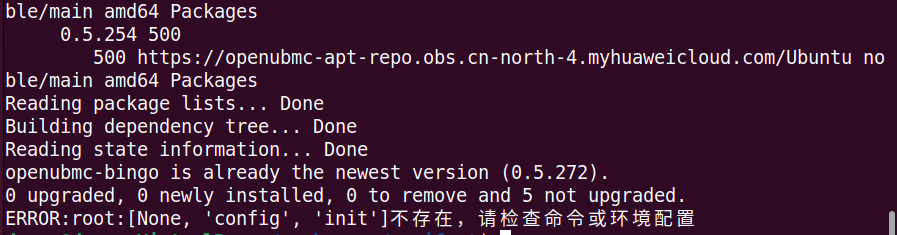
在执行python3 init.py -path ./bmc_sdk.zip,进行bmcsdk的环境初始化时报错,报错内容如下:
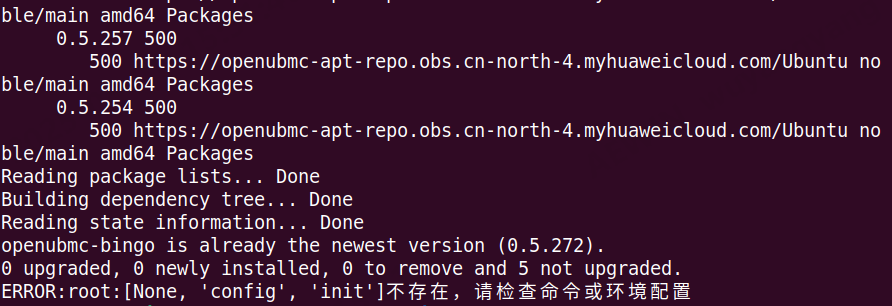
请帮忙确认如何对应
谢谢!
使用ubuntu24.04虚拟机
参考首页manifet教程,使用25.06 tags的代码。中间可能会有一些报错,需要手动处理。
cd manifest
python3 init.py -path <bmc_sdk.zip文件路径> -user <openUBMC社区用户名> -psw <openUBMC社区用户密码>
整体时间大概是半个小时搭建
bmc_sdk使用Index of /25.06/sdk/
比如可能会有软件包出错,或者pip下载时候,apt已经安装了,还有n 的配置源需要配置。
搭建步骤麻烦发出来,24.04安装可能需要离线安装。第一步是配置清华源。
我用的是virtualbox+Ubuntu,所以没有图片中的选项内容
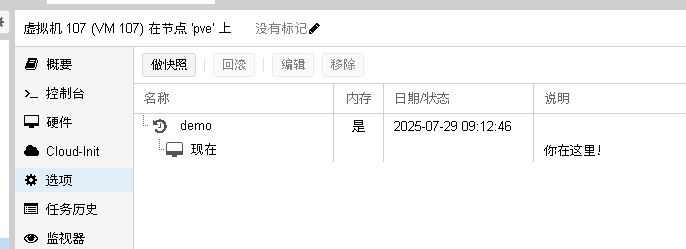
建议是配置清华源。其他部分不建议动。如果没有pve环境建议使用vmware ,目前vmware 应该是免费 了。具备快照环境可以快速回退干净的基础环境
我试试,周一回复
建议参照这个文档
麻烦了把完整操作步骤和log发到论坛上
log如下:
python3 init.py -path ./bmc_sdk.zip -user xxx -psw xxx
Hit:1 http://mirrors.huaweicloud.com/ubuntu noble InRelease
Hit:2 http://mirrors.huaweicloud.com/ubuntu noble-updates InRelease
Hit:3 http://mirrors.huaweicloud.com/ubuntu noble-backports InRelease
Hit:4 Index of /ubuntu/ | 清华大学开源软件镜像站 | Tsinghua Open Source Mirror noble InRelease
Hit:5 http://mirrors.huaweicloud.com/ubuntu noble-security InRelease
Hit:6 https://openubmc-apt-repo.obs.cn-north-4.myhuaweicloud.com/Ubuntu noble InRelease
Hit:7 Index of /ubuntu/ | 清华大学开源软件镜像站 | Tsinghua Open Source Mirror noble-updates InRelease
Hit:8 Index of /ubuntu/ | 清华大学开源软件镜像站 | Tsinghua Open Source Mirror noble-backports InRelease
Hit:9 Index of /ubuntu noble-security InRelease
Reading package lists… Done
Reading package lists… Done
Building dependency tree… Done
Reading state information… Done
python3 is already the newest version (3.12.3-0ubuntu2).
python3-pip is already the newest version (24.0+dfsg-1ubuntu1.2).
python3-dev is already the newest version (3.12.3-0ubuntu2).
git is already the newest version (1:2.43.0-1ubuntu7.3).
wget is already the newest version (1.21.4-1ubuntu4.1).
curl is already the newest version (8.5.0-2ubuntu10.6).
ca-certificates is already the newest version (20240203).
ipmitool is already the newest version (1.8.19-7ubuntu0.24.04.3).
dbus-x11 is already the newest version (1.14.10-4ubuntu4.1).
libdbus-1-dev is already the newest version (1.14.10-4ubuntu4.1).
dbus is already the newest version (1.14.10-4ubuntu4.1).
pkgconf is already the newest version (1.8.1-2build1).
libglib2.0-dev is already the newest version (2.80.0-6ubuntu3.4).
gcc-9 is already the newest version (9.5.0-6ubuntu2).
g+±9 is already the newest version (9.5.0-6ubuntu2).
unzip is already the newest version (6.0-28ubuntu4.1).
npm is already the newest version (9.2.0~ds1-2).
0 upgraded, 0 newly installed, 0 to remove and 1 not upgraded.
Reading package lists… Done
Building dependency tree… Done
Reading state information… Done
Package ‘python3-urllib3’ is not installed, so not removed
Package ‘python3-distro’ is not installed, so not removed
0 upgraded, 0 newly installed, 0 to remove and 1 not upgraded.
Reading package lists… Done
Building dependency tree… Done
Reading state information… Done
0 upgraded, 0 newly installed, 0 to remove and 1 not upgraded.
–2025-08-04 13:38:10-- https://mirrors.huaweicloud.com/ubuntu/pool/main/o/openssl/libssl1.1_1.1.1f-1ubuntu2_amd64.deb
Resolving mirrors.huaweicloud.com (mirrors.huaweicloud.com)… 120.46.63.139, 120.46.2.67, 124.70.61.162, …
Connecting to mirrors.huaweicloud.com (mirrors.huaweicloud.com)|120.46.63.139|:443… connected.
HTTP request sent, awaiting response… 200 OK
Length: 1318204 (1.3M) [application/octet-stream]
Saving to: ‘libssl1.1_1.1.1f-1ubuntu2_amd64.deb’
libssl1.1_1.1.1f-1u 100%[===================>] 1.26M 5.44MB/s in 0.2s
2025-08-04 13:38:14 (5.44 MB/s) - ‘libssl1.1_1.1.1f-1ubuntu2_amd64.deb’ saved [1318204/1318204]
(Reading database … 200599 files and directories currently installed.)
Preparing to unpack libssl1.1_1.1.1f-1ubuntu2_amd64.deb …
Unpacking libssl1.1:amd64 (1.1.1f-1ubuntu2) over (1.1.1f-1ubuntu2) …
Setting up libssl1.1:amd64 (1.1.1f-1ubuntu2) …
Processing triggers for libc-bin (2.39-0ubuntu8.5) …
Writing to /root/.config/pip/pip.conf
Writing to /root/.config/pip/pip.conf
Writing to /root/.config/pip/pip.conf
Writing to /root/.config/pip/pip.conf
openubmc-bingo:
Installed: 0.5.272
Candidate: 0.5.272
Version table:
*** 0.5.272 500
500 https://openubmc-apt-repo.obs.cn-north-4.myhuaweicloud.com/Ubuntu noble/main amd64 Packages
100 /var/lib/dpkg/status
0.5.270 500
500 https://openubmc-apt-repo.obs.cn-north-4.myhuaweicloud.com/Ubuntu noble/main amd64 Packages
0.5.269 500
500 https://openubmc-apt-repo.obs.cn-north-4.myhuaweicloud.com/Ubuntu noble/main amd64 Packages
0.5.265 500
500 https://openubmc-apt-repo.obs.cn-north-4.myhuaweicloud.com/Ubuntu noble/main amd64 Packages
0.5.262 500
500 https://openubmc-apt-repo.obs.cn-north-4.myhuaweicloud.com/Ubuntu noble/main amd64 Packages
0.5.261 500
500 https://openubmc-apt-repo.obs.cn-north-4.myhuaweicloud.com/Ubuntu noble/main amd64 Packages
0.5.257 500
500 https://openubmc-apt-repo.obs.cn-north-4.myhuaweicloud.com/Ubuntu noble/main amd64 Packages
0.5.254 500
500 https://openubmc-apt-repo.obs.cn-north-4.myhuaweicloud.com/Ubuntu noble/main amd64 Packages
Reading package lists… Done
Building dependency tree… Done
Reading state information… Done
openubmc-bingo is already the newest version (0.5.272).
0 upgraded, 0 newly installed, 0 to remove and 1 not upgraded.
ERROR:root:[None, ‘config’, ‘init’]不存在,请检查命令或环境配置
请问,是不是"/etc/apt/sources.list.d/ubuntu.sources"这个文件的URIs也需要更新成清华源
其实不用的,请问你拉的分支是正确的吗,使用tags 25.06分支,sdk 25.06。你可以试着构建一下。
sdk是25.06的,tags怎么确认是什么版本
需要git checkout 25.06
这份话题基本上也跑完了。参看这个看一看
还有一定要新的虚拟机环境
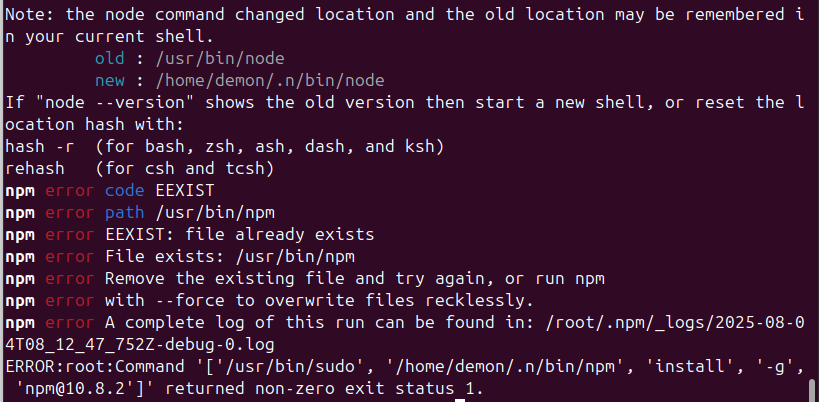
按理说 /home/demon/.n/bin 不应该出现在执行路径里,因为相关命令是在 root 下执行的。但实际情况是,root 执行时继承了用户 demon 的环境变量
当前系统环境如下( root shell 下执行):
$ npm --version
10.8.2
$ n --version
10.2.0
$ node --version
v20.18.0
虽然命令是在 root 权限下执行,但路径仍指向 /home/demon/.n/bin/npm,而不是 /usr/bin/npm,从而触发 npm 的全局安装冲突(EEXIST)。
先尝试手动解决下,把版本匹配上
执行这条命令前,要su - 切换到root,而不是sudo环境