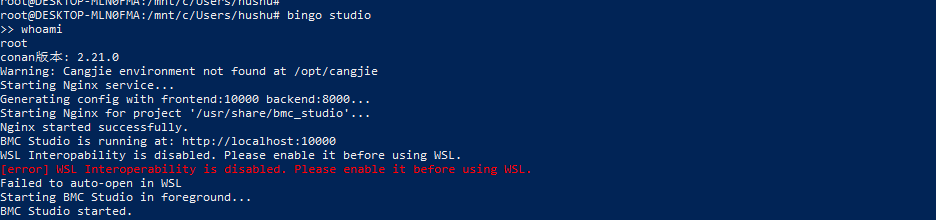
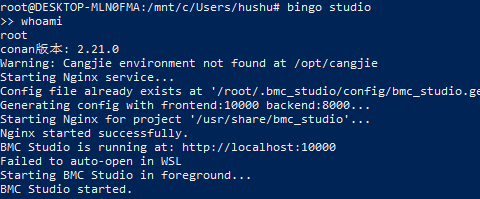
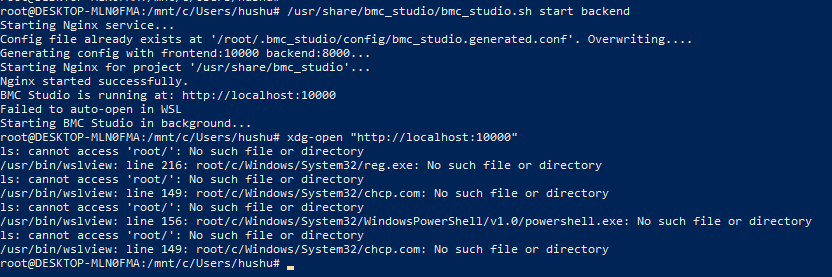
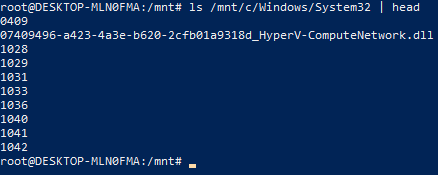
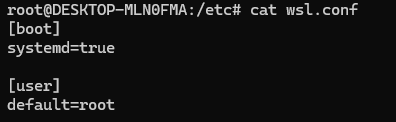
回显信息如下:
root@DESKTOP-MLN0FMA:~# strace -e openat xdg-open http://localhost:10000
echo $PATH
openat(AT_FDCWD, “/etc/ld.so.cache”, O_RDONLY|O_CLOEXEC) = 3
openat(AT_FDCWD, “/lib/x86_64-linux-gnu/libtinfo.so.6”, O_RDONLY|O_CLOEXEC) = 3
openat(AT_FDCWD, “/lib/x86_64-linux-gnu/libc.so.6”, O_RDONLY|O_CLOEXEC) = 3
openat(AT_FDCWD, “/dev/tty”, O_RDWR|O_NONBLOCK) = 3
openat(AT_FDCWD, “/usr/lib/locale/locale-archive”, O_RDONLY|O_CLOEXEC) = -1 ENOENT (No such file or directory)
openat(AT_FDCWD, “/usr/share/locale/locale.alias”, O_RDONLY|O_CLOEXEC) = 3
openat(AT_FDCWD, “/usr/lib/locale/C.UTF-8/LC_IDENTIFICATION”, O_RDONLY|O_CLOEXEC) = -1 ENOENT (No such file or directory)
openat(AT_FDCWD, “/usr/lib/locale/C.utf8/LC_IDENTIFICATION”, O_RDONLY|O_CLOEXEC) = 3
openat(AT_FDCWD, “/usr/lib/x86_64-linux-gnu/gconv/gconv-modules.cache”, O_RDONLY|O_CLOEXEC) = 3
openat(AT_FDCWD, “/usr/lib/locale/C.UTF-8/LC_MEASUREMENT”, O_RDONLY|O_CLOEXEC) = -1 ENOENT (No such file or directory)
openat(AT_FDCWD, “/usr/lib/locale/C.utf8/LC_MEASUREMENT”, O_RDONLY|O_CLOEXEC) = 3
openat(AT_FDCWD, “/usr/lib/locale/C.UTF-8/LC_TELEPHONE”, O_RDONLY|O_CLOEXEC) = -1 ENOENT (No such file or directory)
openat(AT_FDCWD, “/usr/lib/locale/C.utf8/LC_TELEPHONE”, O_RDONLY|O_CLOEXEC) = 3
openat(AT_FDCWD, “/usr/lib/locale/C.UTF-8/LC_ADDRESS”, O_RDONLY|O_CLOEXEC) = -1 ENOENT (No such file or directory)
openat(AT_FDCWD, “/usr/lib/locale/C.utf8/LC_ADDRESS”, O_RDONLY|O_CLOEXEC) = 3
openat(AT_FDCWD, “/usr/lib/locale/C.UTF-8/LC_NAME”, O_RDONLY|O_CLOEXEC) = -1 ENOENT (No such file or directory)
openat(AT_FDCWD, “/usr/lib/locale/C.utf8/LC_NAME”, O_RDONLY|O_CLOEXEC) = 3
openat(AT_FDCWD, “/usr/lib/locale/C.UTF-8/LC_PAPER”, O_RDONLY|O_CLOEXEC) = -1 ENOENT (No such file or directory)
openat(AT_FDCWD, “/usr/lib/locale/C.utf8/LC_PAPER”, O_RDONLY|O_CLOEXEC) = 3
openat(AT_FDCWD, “/usr/lib/locale/C.UTF-8/LC_MESSAGES”, O_RDONLY|O_CLOEXEC) = -1 ENOENT (No such file or directory)
openat(AT_FDCWD, “/usr/lib/locale/C.utf8/LC_MESSAGES”, O_RDONLY|O_CLOEXEC) = 3
openat(AT_FDCWD, “/usr/lib/locale/C.utf8/LC_MESSAGES/SYS_LC_MESSAGES”, O_RDONLY|O_CLOEXEC) = 3
openat(AT_FDCWD, “/usr/lib/locale/C.UTF-8/LC_MONETARY”, O_RDONLY|O_CLOEXEC) = -1 ENOENT (No such file or directory)
openat(AT_FDCWD, “/usr/lib/locale/C.utf8/LC_MONETARY”, O_RDONLY|O_CLOEXEC) = 3
openat(AT_FDCWD, “/usr/lib/locale/C.UTF-8/LC_COLLATE”, O_RDONLY|O_CLOEXEC) = -1 ENOENT (No such file or directory)
openat(AT_FDCWD, “/usr/lib/locale/C.utf8/LC_COLLATE”, O_RDONLY|O_CLOEXEC) = 3
openat(AT_FDCWD, “/usr/lib/locale/C.UTF-8/LC_TIME”, O_RDONLY|O_CLOEXEC) = -1 ENOENT (No such file or directory)
openat(AT_FDCWD, “/usr/lib/locale/C.utf8/LC_TIME”, O_RDONLY|O_CLOEXEC) = 3
openat(AT_FDCWD, “/usr/lib/locale/C.UTF-8/LC_NUMERIC”, O_RDONLY|O_CLOEXEC) = -1 ENOENT (No such file or directory)
openat(AT_FDCWD, “/usr/lib/locale/C.utf8/LC_NUMERIC”, O_RDONLY|O_CLOEXEC) = 3
openat(AT_FDCWD, “/usr/lib/locale/C.UTF-8/LC_CTYPE”, O_RDONLY|O_CLOEXEC) = -1 ENOENT (No such file or directory)
openat(AT_FDCWD, “/usr/lib/locale/C.utf8/LC_CTYPE”, O_RDONLY|O_CLOEXEC) = 3
openat(AT_FDCWD, “/usr/bin/xdg-open”, O_RDONLY) = 3
— SIGCHLD {si_signo=SIGCHLD, si_code=CLD_EXITED, si_pid=688, si_uid=0, si_status=1, si_utime=0, si_stime=0} —
— SIGCHLD {si_signo=SIGCHLD, si_code=CLD_EXITED, si_pid=690, si_uid=0, si_status=0, si_utime=0, si_stime=0} —
— SIGCHLD {si_signo=SIGCHLD, si_code=CLD_EXITED, si_pid=692, si_uid=0, si_status=0, si_utime=0, si_stime=0} —
— SIGCHLD {si_signo=SIGCHLD, si_code=CLD_EXITED, si_pid=694, si_uid=0, si_status=0, si_utime=0, si_stime=0} —
— SIGCHLD {si_signo=SIGCHLD, si_code=CLD_EXITED, si_pid=696, si_uid=0, si_status=0, si_utime=0, si_stime=0} —
— SIGCHLD {si_signo=SIGCHLD, si_code=CLD_EXITED, si_pid=698, si_uid=0, si_status=0, si_utime=0, si_stime=0} —
— SIGCHLD {si_signo=SIGCHLD, si_code=CLD_EXITED, si_pid=700, si_uid=0, si_status=0, si_utime=0, si_stime=0} —
— SIGCHLD {si_signo=SIGCHLD, si_code=CLD_EXITED, si_pid=702, si_uid=0, si_status=0, si_utime=0, si_stime=0} —
— SIGCHLD {si_signo=SIGCHLD, si_code=CLD_EXITED, si_pid=705, si_uid=0, si_status=0, si_utime=0, si_stime=0} —
— SIGCHLD {si_signo=SIGCHLD, si_code=CLD_EXITED, si_pid=744, si_uid=0, si_status=0, si_utime=0, si_stime=0} —
— SIGCHLD {si_signo=SIGCHLD, si_code=CLD_EXITED, si_pid=747, si_uid=0, si_status=0, si_utime=0, si_stime=0} —
openat(AT_FDCWD, “/root/.local/share/applications//”, O_RDONLY|O_NONBLOCK|O_CLOEXEC|O_DIRECTORY) = -1 ENOENT (No such file or directory)
— SIGCHLD {si_signo=SIGCHLD, si_code=CLD_EXITED, si_pid=750, si_uid=0, si_status=0, si_utime=0, si_stime=0} —
openat(AT_FDCWD, “/usr/local/share/applications//”, O_RDONLY|O_NONBLOCK|O_CLOEXEC|O_DIRECTORY) = -1 ENOENT (No such file or directory)
— SIGCHLD {si_signo=SIGCHLD, si_code=CLD_EXITED, si_pid=753, si_uid=0, si_status=0, si_utime=0, si_stime=0} —
— SIGCHLD {si_signo=SIGCHLD, si_code=CLD_EXITED, si_pid=758, si_uid=0, si_status=0, si_utime=0, si_stime=0} —
— SIGCHLD {si_signo=SIGCHLD, si_code=CLD_EXITED, si_pid=760, si_uid=0, si_status=0, si_utime=0, si_stime=0} —
— SIGCHLD {si_signo=SIGCHLD, si_code=CLD_EXITED, si_pid=763, si_uid=0, si_status=0, si_utime=0, si_stime=0} —
— SIGCHLD {si_signo=SIGCHLD, si_code=CLD_EXITED, si_pid=766, si_uid=0, si_status=0, si_utime=0, si_stime=0} —
— SIGCHLD {si_signo=SIGCHLD, si_code=CLD_EXITED, si_pid=771, si_uid=0, si_status=0, si_utime=0, si_stime=0} —
ls: cannot access ‘root/’: No such file or directory
/usr/bin/wslview: line 216: root/c/Windows/System32/reg.exe: No such file or directory
ls: cannot access ‘root/’: No such file or directory
/usr/bin/wslview: line 149: root/c/Windows/System32/chcp.com: No such file or directory
ls: cannot access ‘root/’: No such file or directory
/usr/bin/wslview: line 156: root/c/Windows/System32/WindowsPowerShell/v1.0/powershell.exe: No such file or directory
ls: cannot access ‘root/’: No such file or directory
/usr/bin/wslview: line 149: root/c/Windows/System32/chcp.com: No such file or directory
— SIGCHLD {si_signo=SIGCHLD, si_code=CLD_EXITED, si_pid=774, si_uid=0, si_status=127, si_utime=0, si_stime=0} —
+++ exited with 4 +++
/usr/local/sbin:/usr/local/bin:/usr/sbin:/usr/bin:/sbin:/bin:/usr/games:/usr/local/games:/usr/lib/wsl/lib:/mnt/c/Program Files (x86)/VMware/VMware Workstation/bin/:/mnt/c/Windows/system32:/mnt/c/Windows:/mnt/c/Windows/System32/Wbem:/mnt/c/Windows/System32/WindowsPowerShell/v1.0/:/mnt/c/Windows/System32/OpenSSH/:/mnt/c/Program Files/dotnet/:/mnt/d/C_ToolChain/WinAVR-20100110/bin:/mnt/d/C_ToolChain/WinAVR-20100110/utils/bin:/mnt/d/C_ToolChain/MinGW/bin:/mnt/d/C_ToolChain/MinGW/mingw32/bin:/mnt/d/C_ToolChain/WATCOM/BINNT64:/mnt/d/C_ToolChain/WATCOM/BINNT:/mnt/d/C_ToolChain/WATCOM/NASM:/mnt/c/Program Files (x86)/Microsoft SQL Server/100/Tools/Binn/:/mnt/c/Program Files (x86)/Microsoft SQL Server/100/DTS/Binn/:/mnt/c/Program Files (x86)/Ixia/Tcl/8.5.17.0/bin:/mnt/c/pango/PDS_2023.2-SP2/arch/lib/P1735/openssl:/mnt/c/Program Files/Microsoft VS Code/bin:/mnt/c/Program Files/Mellanox/WinMFT/:/mnt/c/Program Files (x86)/Ixia/Perl/site/bin:/mnt/c/Program Files (x86)/Ixia/Perl/bin:/mnt/c/Users/hushu/.local/bin:/mnt/c/Users/hushu/AppData/Local/Programs/Python/Launcher/:/mnt/c/Python/Python312/Scripts/:/mnt/c/Python/Python312/:/mnt/c/Cadence/SPB_16.6/openaccess/bin/win32/opt:/mnt/c/Cadence/SPB_16.6/tools/capture:/mnt/c/Cadence/SPB_16.6/tools/pspice:/mnt/c/Cadence/SPB_16.6/tools/specctra/bin:/mnt/c/Cadence/SPB_16.6/tools/fet/bin:/mnt/c/Cadence/SPB_16.6/tools/libutil/bin:/mnt/c/Cadence/SPB_16.6/tools/bin:/mnt/c/Cadence/SPB_16.6/tools/pcb/bin:/mnt/c/Users/hushu/AppData/Local/Microsoft/WindowsApps:/mnt/c/modeltech64_2020.4/win64:/mnt/c/iverilog/bin:/mnt/c/iverilog/gtkwave/bin:/snap/bin