点击此处查看详细分析解答
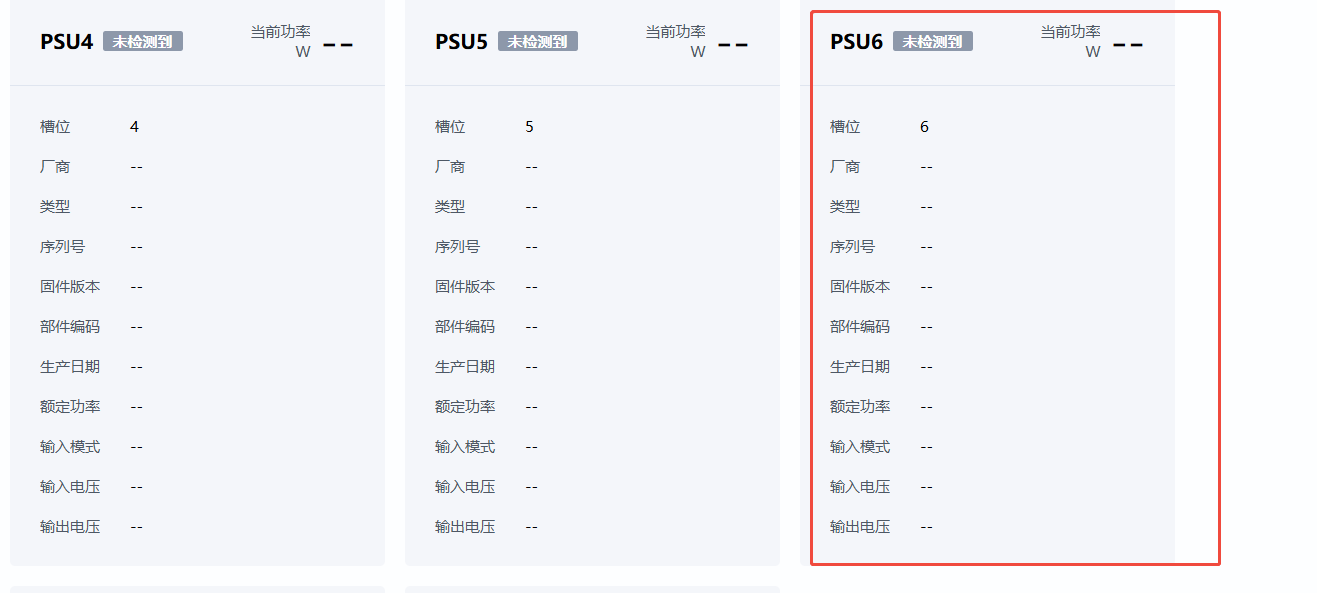
【电源&功率】页面显示 PSU6 未检测到的原因分析
根据您提供的完整信息,系统已通过扫描器(Scanner)检测到 PSU6 的在位状态(Presence=1),但 【电源&功率】页面仍显示“未检测到 PSU6”且关键参数全为“–”。这表明问题并非出在硬件物理连接或最底层的在位检测上,而是后续的 电源对象构建、电源信息获取、对象上树或 Web 页面渲染流程中存在异常。
 问题描述
问题描述
 扫描器
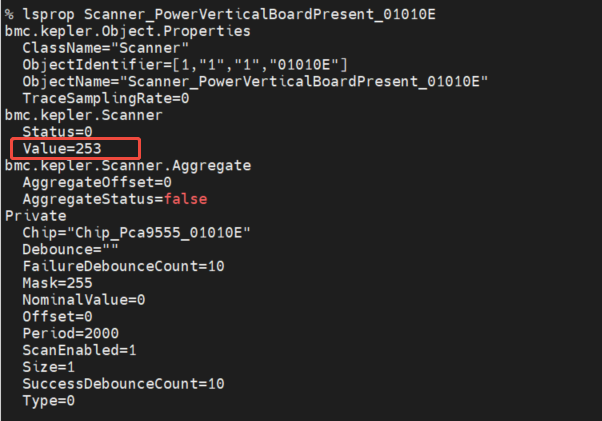
扫描器 Scanner_PowerVerticalBoardPresent_01010E 已正确读取 PSU6 所在垂直板的在位状态。-
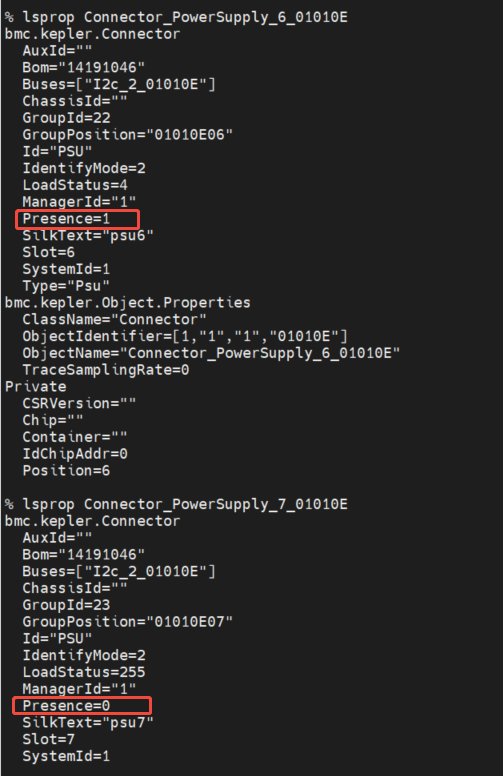
Connector_PowerSupply_6 对象的 Presence=1,说明在位逻辑判定成功。
 但在 Web 管理界面中,PSU6 显示为“未检测到”,所有信息为空。
 环境与配置信息
| 项目 |
内容 |
| 操作系统 |
Ubuntu 24.04 |
| 软件版本 |
OpenUBMC2512(推测) |
| 硬件配置 |
2×Kunpeng 920 5253Z, 32G 内存 |
| 目标 PSU |
PSU6,位于 Slot 6 |
| BOM 编码 |
14191046 |
| CSR 文件 |
14191046_PSU_0.sr(推测用于 PSU6) |
 根本原因分析
结合知识库内容及现场日志,可能原因如下:
 电源对象未正确创建或未成功“上树”
尽管 Connector_PowerSupply_6 检测到在位,但 OnePower 对象未因 Presence 变化被创建。
关键机制:在 OpenUBMC 中:
Connector 检测 Presence;- 当 Presence=1 时,触发电源管理模块(
power_mgmt)动态创建 OnePower 对象;
OnePower 对象才是真正向 Web 页面提供电源信息的数据源。
 依据:
依据:
 CSR 配置中 Presence 表达式错误(核心问题)
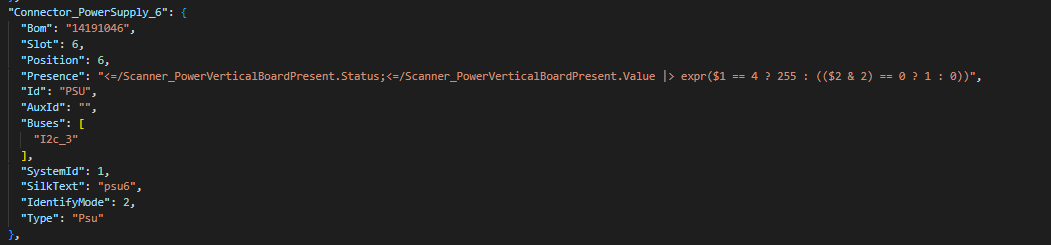
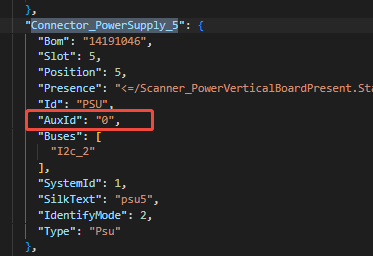
查看您提供的 SR 配置:
"Presence": "<?=Scanner_PowerVerticalBoardPresent.Status;<?=Scanner_PowerVerticalBoardPresent.Value | expr($1 == 4 ? 255 : (($2 & 2) == 0 ? 1 : 0))"
该表达式存在 严重语法错误和逻辑不一致:
- 包含两个
<?=,且嵌套方式错误;
$1 和 $2 未明确对应哪个 Scanner 输出(Status 还是 Value);- 实际日志中
Value=253(即 0xFD),若使用 ($2 & 2),则 253 & 2 = 0 → (0 == 0) ? 1 : 0 → 1,逻辑看似正确,但表达式语法不被 CSR 解析器识别。
正确的 CSR Presence 表达式应为:
"Presence": "<?=Scanner_PowerVerticalBoardPresent.Value | expr(($1 & 2) == 0 ? 1 : 0)"
或更简洁:
"Presence": "<?=Scanner_PowerVerticalBoardPresent.Value | match(253)"
(若板级定义 253 表示所有 PSU 均在位)
 当前 CSR 表达式 语法错误导致 Presence 实际解析结果不可预测或为默认值 0。
 PsuSlot 配置缺失或未匹配到 Slot 6
PsuSlot 是电源槽位的配置对象,用于定义:
- 槽位编号(SlotNumber)
- I2C 地址(SlotI2cAddr)
- 关联的 Chip 和 FRU 信息
依据知识库:
PsuSlot_1 的配置依赖于 14191046_PSU_0.sr 文件;- 若未为
Slot=6 配置对应的 PsuSlot_6,则即使 Presence=1,也无法构建 OnePower 对象。
当 BOM 相同(如 14191046),应确保 CSR 文件支持 多槽位动态实例化,否则 Slot 6 将无配置可用。
 I2C 通信未启用或地址错误
即使 Presence 正确,若系统无法通过 I2C 读取 PSU6 的 FRU 或 PMBus 信息,则 OnePower 无法获取厂商、固件等信息,表现为“–”。
日志中:
Buses=["I2c_3"](SR)- 但
Connector_PowerSupply_6_01010E 实际为 Buses=["I2c_2_01010E"]
SR 与实际 bus 不一致,可能导致协议初始化失败。
 BMC Web 界面未收到事件通知或刷新延迟
Web 页面依赖于 bmc.dev.PowerSupply.Status 接口和变更广播(Change Broadcast)来更新 UI。
若 OnePower 对象创建成功但未触发 InterfaceAdd 事件,或 Web 缓存未刷新,也会出现“信息未更新”。
解决方案建议
1. 修正 CSR 配置文件中的 Presence 表达式
修改 14191046_PSU_0.sr 中 Connector_PowerSupply_6 的 Presence:
"Presence": "<?=Scanner_PowerVerticalBoardPresent.Value | expr(($1 & 2) == 0 ? 1 : 0)"
或使用固定值匹配(推荐调试阶段):
"Presence": "<?=Scanner_PowerVerticalBoardPresent.Value | match(253)"
验证命令:
busctl --user tree bmc.kepler.power_mgmt
检查是否存在 OnePower_6 对象。
2. 确保 PsuSlot 支持 Slot 6
在 CSR 中为 Slot 6 配置 PsuSlot:
"PsuSlot_6": {
  "SlotNumber": 6,
  "Presence": "Connector_PowerSupply_6.Presence",
  "SlotI2cAddr": 184,
  "PsuChip": "#/Eeprom_PsuChip6",
  "FruI2cAddr": 176
}
并确保 OnePower 能通过 register_psu_slot 注册该槽位。
3. 校正 I2C Bus 配置
统一 I2C 配置:
"Buses": ["I2c_2_01010E"] // 与实际一致
4. 重启电源管理服务或刷新对象
手动触发电源重加载:
systemctl restart power_mgmt.service
或使用 busctl 手动加载对象。
5. 验证 OnePower 对象是否创建
运行命令检查:
busctl --user list bmc.kepler.power_mgmt | grep OnePower
若看到 OnePower_6,则继续检查其属性:
busctl --user get-property bmc.kepler.power_mgmt.OnePower_6 /bmc/kepler/OnePower bmc.kepler.OnePower FirmwareVersion
6. 检查 Web 界面数据源
确认 BMC Web 接口 /redfish/v1/Chassis/1/Power 是否返回 PSU6 数据:
curl -k -u root:password https://<BMC_IP>/redfish/v1/Chassis/1/Power
若 Redfish 有数据但 Web 无显示,则为 前端渲染问题。
 总结
总结
| 问题 |
原因 |
建议措施 |
| PSU6 显示未检测 |
CSR Presence 表达式语法错误 |
修正为合法表达式 |
信息全为 -- |
OnePower 未创建或 I2C 通信失败 |
检查 PsuSlot 和 I2C 配置 |
| 仅 PSU6 异常 |
Slot 6 配置特殊,未泛化 |
确保 CSR 支持 Slot 6 |
| Web 未刷新 |
事件未广播或缓存问题 |
重启 power_mgmt 或刷新 Redfish |
 调试命令汇总
# 查看 Connector 状态
lsprop Connector_PowerSupply_6_01010E

# 查看 Scanner 值
lsprop Scanner_PowerVerticalBoardPresent_01010E

# 查看所有 OnePower 对象
busctl --user tree bmc.kepler.power_mgmt

# 获取 PSU6 固件版本(若存在)
busctl --user get-property bmc.kepler.power_mgmt.OnePower_6 /bmc/kepler/OnePower bmc.kepler.OnePower FirmwareVersion

# 重启电源管理服务
systemctl restart power_mgmt.service
 最终建议:
最终建议:
优先修正 CSR 文件中错误的 Presence 表达式,并确保 PsuSlot_6 和 OnePower 正确生成,90% 以上的问题将得以解决。