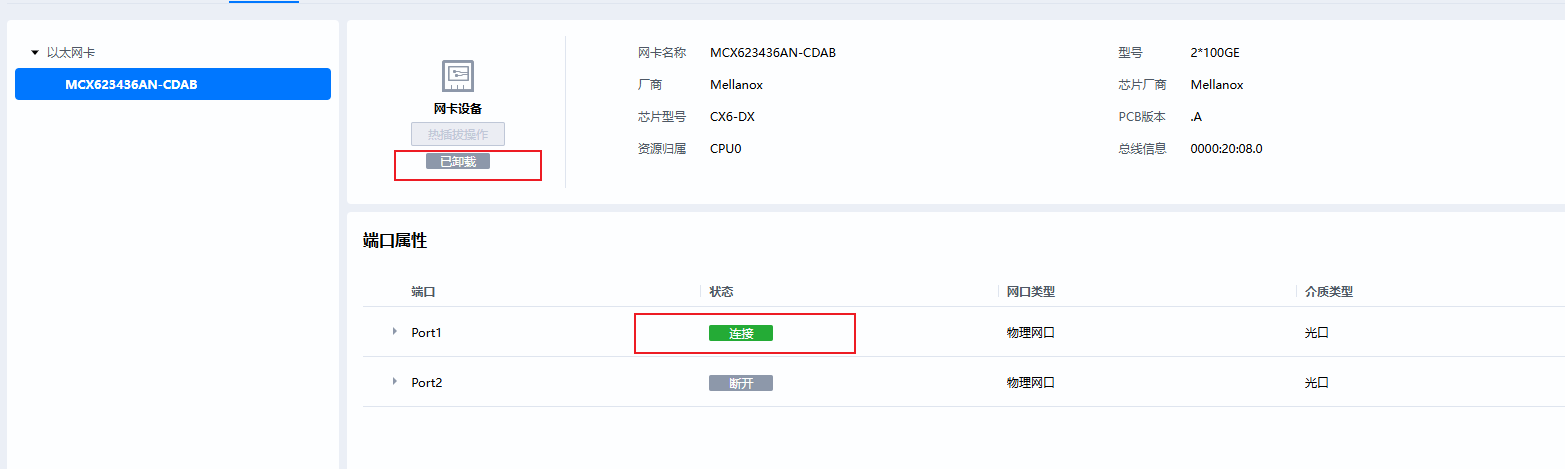
目前项目在适配MCX623436AN-CDAB网卡,网卡正常插入并连接一根网线,但是网卡页面显示处于已卸载状态
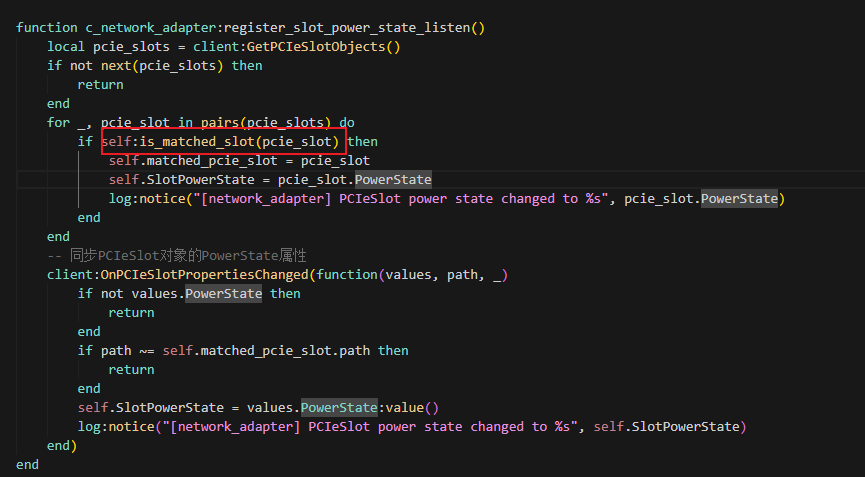
目前定位到匹配资源树信息失败,槽位电源状态未正常更新
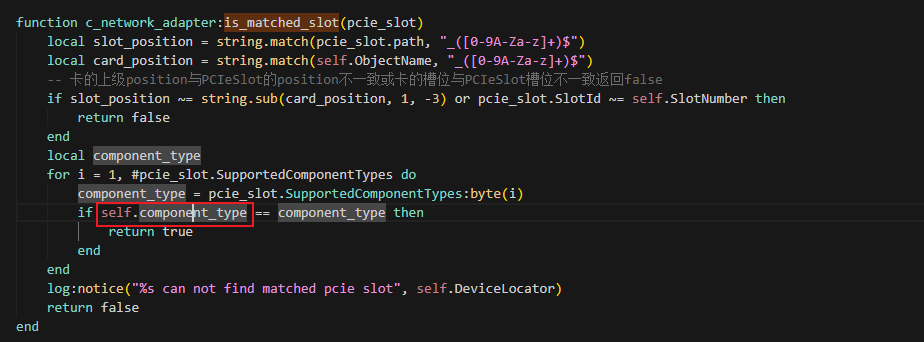
主要是component_type没有正常更新,导致匹配失败
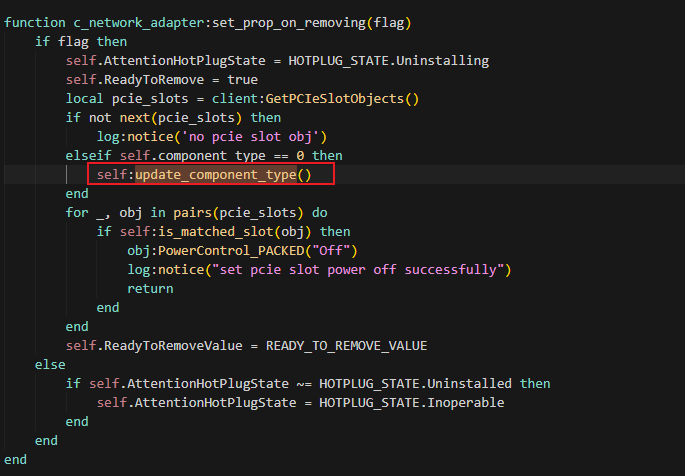
查看发现只有卸载设备时才会更新component_type
是否有什么好的解决办法
目前项目在适配MCX623436AN-CDAB网卡,网卡正常插入并连接一根网线,但是网卡页面显示处于已卸载状态
答案内容由AI生成,仅供参考:
 总结与建议
总结与建议| 步骤 | 建议 |
|---|---|
| 1. 优先修复初始化逻辑 | 在网卡初始化时主动调用 update_component_type() |
| 2. 增加匹配容错机制 | 在 is_matched_slot() 中支持无 component_type 的降级匹配 |
| 3. 增加 Slot 状态监听 | 插入时主动尝试刷新状态和重新匹配 |
| 4. 验证 FRU 数据可读性 | 确保 MCX623436AN-CDAB 的 FRU 可正常读取 |
| 5. 日志增强 | 在 update_component_type() 中添加日志输出,便于定位 |
最终目标:确保网卡在 物理插入后能被正确识别、匹配 Slot、同步电源状态,避免 Web 界面误报“已卸载”。
根据您提供的信息,项目中正在适配 MCX623436AN-CDAB 网卡时出现了 Web 界面显示“已卸载” 的问题,尽管物理上网卡已正确插入并连接网线。经定位发现核心原因为 资源树匹配失败,根本原因在于 component_type 未正常更新,进而导致 is_matched_slot 判断失败。
以下是对该问题的综合分析和解决建议。
 问题总结
问题总结| 项目 | 内容 |
|---|---|
| 网卡型号 | MCX623436AN-CDAB |
| 当前现象 | Web 界面显示“已卸载”,但物理连接正常,Port1 显示“连接” |
| 根本原因 | component_type 未在初始化或上电时正确更新,仅在“卸载”动作中触发更新 |
| 影响范围 | 资源树匹配失败 → Slot 电源状态不同步 → 热插拔状态异常 |
 核心原因分析
component_type 更新时机不合理从您提供的代码截图可见:
function c_network_adapter:set_prop_on_removing(flag)
    ...
    elseif self.component_type == 0 then
        self:update_component_type()
    end
    ...
end
仅当
component_type == 0且在“移除设备”流程中 才触发update_component_type()。
这意味着:
component_type 更新;is_matched_slot() 中进行类型匹配时,self.component_type 为 0 或无效值;SlotPowerState 不更新 → 显示“已卸载”。is_matched_slot() 匹配逻辑依赖 component_type该函数中的关键判断逻辑如下:
for _, obj in pairs(pcie_slots) do
    if self:is_matched_slot(obj) then
        ...
    end
end
而 is_matched_slot() 实现中包含:
if self.component_type == component_type then
    return true
end
若
self.component_type未初始化,则永远无法匹配成功。
这直接导致 self.matched_pcie_slot 无法建立,后续 PowerState 监听失效,状态无法同步。
解决方案建议 方案一:在网卡初始化阶段主动更新 component_type在网卡对象创建或初始化阶段(如 initialize 或 post_init 阶段)主动调用一次 update_component_type(),避免依赖“卸载”事件来触发。
function c_network_adapter:initialize()
    ...
    -- 主动更新 component_type
    if self.component_type == 0 or not self.component_type then
        self:update_component_type()
    end

    -- 注册电源状态监听
    self:register_slot_power_state_listen()
    ...
end
component_type 已正确设置; 方案二:优化 is_matched_slot() 匹配逻辑,允许降级匹配若 component_type 暂无法及时获取,可考虑在匹配逻辑中做容错处理,例如:
if self.component_type == 0 then
    -- 如果 component_type 未知,仅通过 slot position 和 SlotId 匹配
    return slot_position == string.sub(card_position, 1, -3) and pcie_slot.SlotId == self.SlotNumber
else
    -- 否则严格匹配 component_type
    for i = 1, #pcie_slot.SupportedComponentTypes do
        if self.component_type == pcie_slot.SupportedComponentTypes:byte(i) then
            return true
        end
    end
end
这样即使
component_type暂未更新,也能完成基本匹配,后续再异步更新。
方案三:监听 PCIe Slot 状态变化并主动刷新可添加对 PCIe Slot Present 状态的监听,在设备插入后主动尝试刷新 component_type 和重新匹配。
client:OnPCIESlotPropertiesChanged(function(values, path, _)
    if values.Present and not self.matched_pcie_slot then
        self:update_component_type()
        self:try_match_slot()  -- 尝试重新匹配
    end
end)
 补充建议
补充建议update_component_type() 的实现逻辑请检查该函数是否真正从硬件(如 FRU、CPLD、PCIe 配置空间)获取了正确的 component_type,并确保其数据源可靠。
若该函数本身依赖网卡已加载,可能形成“依赖循环”:需匹配才能加载,但加载后才更新类型。
参考知识库中类似案例(如“智能网卡加载问题总结”文档):
 知识点补充:MCX623436AN-CDAB 相关信息
根据上下文,该网卡具备以下特性:
| 属性 | 值 |
|---|---|
| 厂商 | Mellanox Technologies |
| 芯片型号 | CX6-DX (ConnectX-6 Dx) |
| 总线位置 | 0000:20:08.0 |
| 热插拔支持 | HotPluggable 属性为 false(不支持热插拔) |
| NCSI 支持 | 支持(通过 MCTP over PCIe) |
| FRU 信息 | 存在加载失败记录,需确认 EEPROM 是否正常 |
注意:该卡在部分系统中存在 FRU 信息加载失败 的历史问题,可能影响
component_type获取。
总结与建议| 步骤 | 建议 |
|---|---|
| 1. 优先修复初始化逻辑 | 在网卡初始化时主动调用 update_component_type() |
| 2. 增加匹配容错机制 | 在 is_matched_slot() 中支持无 component_type 的降级匹配 |
| 3. 增加 Slot 状态监听 | 插入时主动尝试刷新状态和重新匹配 |
| 4. 验证 FRU 数据可读性 | 确保 MCX623436AN-CDAB 的 FRU 可正常读取 |
| 5. 日志增强 | 在 update_component_type() 中添加日志输出,便于定位 |
最终目标:确保网卡在 物理插入后能被正确识别、匹配 Slot、同步电源状态,避免 Web 界面误报“已卸载”。
如有更多日志(如 framework.log 中关于 kepler.class.ClassDuplicateDefined 或 no pcie slot obj 的报错),可进一步深入分析。
没理解你说的问题,网卡如果正常上电,那带外功能预期就是正常的
正常上电,显示已卸载是正常的吗
应该继续看一下更新component type后为什么还是没有匹配到PCIeSlot对象
我在start里加了update_component_type()后,网卡的component_type更新成功,问题得以解决,所以问题根因应该是初始化的时候没有更新网卡的component_type
这个根因可能是因为没有配置PCIeSlot对象,毕竟我们确实没有找到PCIeSlot对象
回复错帖子了 功能之前是正常的,但是我们rework了OCP Riser以及线缆接法,同时也更改了OCP Riser的CPLD版本,之后卸载不成功了
前置OCP网卡MCX623436AN-CDAB热插拔失败,一直处于卸载中
嗯嗯 我是从那个帖子过来的。
我看这个帖子里说一开始显示也有问题:web上一直显示已卸载,原因是找不到PCIeSlot对象。
所以想会不会和 可插拔网卡默认显示已卸载状态,实际网卡正常连接 是同一个原因,都是PCIeSlot未配置导致。
这个问题已经解决了,属于代码问题,NetworkAdapter组件起来的时候没有同步网卡component_type,导致和PCIeSlot对象匹配失败(is_matched_slot函数),这个问题解决后才可以进行热插拔操作,随后又遇到了这个问题
 那是我理解错了,也就是你那边虽然在VPD里没找到pcieslot的配置,但是代码里实际是找到的pcieslot对象的么?