背景
在WEB的存储管理显示界面,现在RAID卡BBU电池的温度,便于客户监视电池温度。
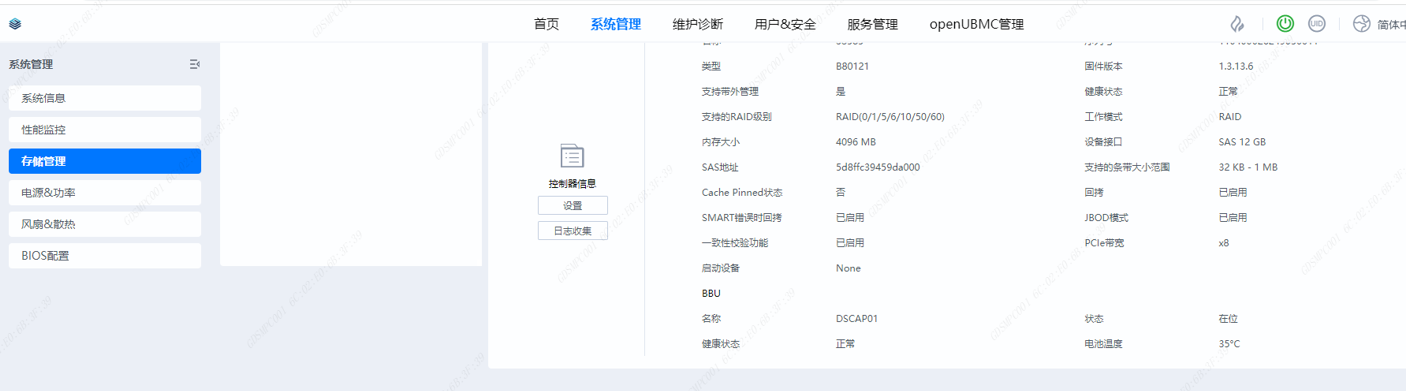
关联ISSUE
无
整体方案
1、通过南向接口获取BBU温度
“interfaces”: {
            "bmc.kepler.Systems.Storage.Battery": \[

                "TemperatureCelsius"

            \]

}
2、通过北向接口展示BBU温度
“Uri”: “/UI/Rest/System/Storage/:raidcontrollerid”
“Interfaces”: {
“Type”: “GET”,
“RspBody”: {
“BBU”: {
“Name”: “${ProcessingFlow[5]/Destination/Name}”,
“Health”: “${Statements/BBUHealth()}” ,
“State”: "${Statements/BBUState()} ",
“TemperatureCelsius”: “${ProcessingFlow[5]/Destination/TemperatureCelsiu s}”
},
}
}
3、webui组件新增BBU温度的字段模型,用于WEB显示
export class BBUMo del {
private name: [string, str ing];
private state: [string, st ring] ;
private healthState: [string, s tring ];
private temperature: [string, strin g];
con struc tor(
nam e: st ring,
sta te: s tring,
healthSt ate: string,
temperat u r e: st ring,
) {
this.name = [‘COMMO N_NAM E’, name];
this.state = [‘ STATU S’, state];
this.healthState = [‘NET_HEALTH_STAT US’, healthState];
this.temperature = [‘BBU_TEMPERATU RE ’, t e mp erature];
}
}
评审点
新增webrest接口"Uri": "/UI/Rest/System/Storage/:raidcontrollerid"的返回属性BBU 的 子属性TemperatureCelsius
详细描述
1、新增webrest接口"Uri": "/UI/Rest/System/Storage/:raidcontrollerid"的返回属性BBU 的子属性TemperatureCelsius
当前 /UI/Rest/System/Storage/:raidcontrollerid GET 接口的数据流如下:
硬件 → MDB接口 → ProcessingFlow → Statements转换 → RspBody → 前端展示
Battery.json 的 MDB 接口定义中已经存在 TemperatureCelsius 属性
在 BBU 对象中新增 TemperatureCelsius 字段,映射到 bmc.kepler.Systems.Storage.Battery:
“BBU”: {
“Name”: “${ProcessingFlow[5]/Destination/Name}”,
“Health”: “${Statements/BBUHealth()}”,
“State”: “${Statements/BBUState()}”,
“TemperatureCelsius”: “${ProcessingFlow[5]/Destination/TemperatureCelsius}”
}
- bbu.model.ts(前端 BBU 数据模型)
新增 temperature 字段:
export class BBUModel {
  private name: [string, string];
  private state: [string, string];
  private healthState: [string, string];
  private temperature: [string, number | null];  // 新增

  constructor(
    name: string,
    state: string,
    healthState: string,
    temperature: number | null,  // 新增参数
  ) {
    this.name = ['COMMON_NAME', name];
    this.state = ['STATUS', state];
    this.healthState = ['NET_HEALTH_STATUS', healthState];
    this.temperature = ['STORE_TEMPERATURE', temperature];  // 新增
  }
}
3. raid.service.ts(前端数据加工服务)
修改 setbbuModel 函数(第 49-73 行),从后端返回的 BBU 对象中提取 TemperatureCelsius:
function setbbuModel(bodyData: any): BBUModel | null {
  if (bodyData.BBU === null) {
    return null;
  }
  let bbuModel = new BBUModel('Absent', 'STORE_IN_POSITION', 'STORE_NORMAL', null);
  // ... 现有逻辑 ...
  const temperature = bodyData.BBU.TemperatureCelsius ?? null;  // 新增
  bbuModel = new BBUModel(bodyData.BBU.Name || empty, position, bbuHealth, temperature);  // 修改
  return bbuModel;
}
4. Raid.vue(前端 BBU 展示组件)
现有的 BBU 渲染逻辑(第 82-90 行)通过遍历 raid.bbu 数组自动展示所有 BBUModel 属性。由于 BBUModel 新增的 temperature 字段已经是 [label, value] 格式,Vue 模板中的 v-for 循环会自动渲染,无需修改模板。
现有逻辑:
<template v-for="item in raid.bbu" :key="item">
  <div v-if="item[0]" class="row">
    <p class="row-left">{{ $t(item[0]) }}</p>
    <p class="row-right">{{ getI18n(item[1]) }}</p>
  </div>
</template>
5. 国际化文件
需要在国际化文件中新增 STORE_TEMPERATURE 的翻译:zh/en/fr/ja/ru
是否准备好AI预审
是