问题描述
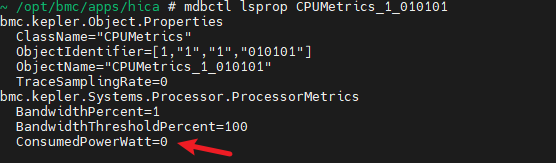
openubmc2512版本,鲲鹏920/920s模组,CPU功耗和内存功耗显示都是0,请问是否支持从imu获取到CPU和内存功耗,有没有相关的调试命令?
答案内容由AI生成,仅供参考:
 结论
结论| 项目 | 结论 |
|---|---|
| 是否支持获取CPU/内存功耗 | 支持 |
| 当前功耗为0是否正常 |  不正常,应为数据未正确采集或配置问题 不正常,应为数据未正确采集或配置问题 |
| 是否可通过IMU获取 | 是,标准路径为通过IMU + IPMI/SMBus 获取 |
| 是否有调试命令 | 有,可用 mobctl lsprop、ipmitool mc info 等 |
根据您提供的信息,关于鲲鹏920/920s模组在openUBMC 25.12版本中是否支持获取CPU和内存功耗的问题,现综合分析如下:
支持能力确认鲲鹏920/920s模组是支持获取CPU和内存功耗的。系统具备相应的监控架构和数据接口。
bmc.kepler.Systems.Processor.ProcessorMetrics 中的 ConsumedPowerWatt 字段bmc.kepler.Systems.Memory.MemoryMetrics 中的 ConsumedPowerWatt 字段Get Cpu Module Power 可用于测量多主机节点的CPU模块功耗这些功能由 Bmc Kepler 平台提供支持,该平台作为基础管理控制器(BMC)的核心,负责硬件监控和系统管理。
 功耗显示为0的可能原因
尽管系统支持功耗监控,但出现功耗值为0的情况,可能由以下原因导致:
数据采集延迟或未激活
ConsumedPowerWatt 被描述为“读取时广播更新”的属性,若未主动触发读取,可能保持初始值0。
IMU通信异常
CPU/内存功耗数据通常通过 IMU(智能管理单元)经 IPMI 或 SMBus 协议获取。若链路异常或固件不响应,将无法获取有效数据。
配置缺失或错误
某些传感器或功耗监控功能需要在 CSR 配置文件中显式启用,如 PowerStrategy 类中的 PowerCappingSupported=true 等参数未正确配置。
固件版本兼容性问题
尽管 openUBMC 25.09 已支持 NPU/GPU 等部件功耗监控(见版本发布文档),但仍可能存在特定模组的适配延迟。
 调试建议与命令
您可以执行以下命令进行排查:
ipmitool -I lanplus -H <BMC_IP> -U Administrator -P <Password> mc info
验证输出中是否包含:
Additional Device Support :
    Sensor Device
    SDR Repository Device
    SEL Device
    FRU Inventory Device
mobctl lsprop PowerStrategy
确认关键属性是否启用:
PowerCappingSupported = truePowerLimitEnabled = truePowerCappingDevices 包含 "CPU"尝试调用功耗获取接口:
mobctl invoke BmcKepler Get Cpu Module Power
mobctl lsprop CPUmetrics_1_010101
mobctl lsprop MemoryMetrics_1_010101  # 假设存在此对象
访问以下 Redfish 路径查看是否有功耗数据返回:
/redfish/v1/Systems/1/Processors/CPU1/ProcessorMetrics/redfish/v1/Systems/1/Memory/DIMM1/MemoryMetrics 相关文档与功能佐证
Additional Device Support 明确列出对 Sensor Device 和 FRU Inventory Device 的支持,说明具备传感器数据采集基础。Power/Performance Control 概念和 Get Cpu Module Power 方法,证明平台设计上支持动态功耗管理。 结论| 项目 | 结论 |
|---|---|
| 是否支持获取CPU/内存功耗 | 支持 |
| 当前功耗为0是否正常 | 不正常,应为数据未正确采集或配置问题 |
| 是否可通过IMU获取 | 是,标准路径为通过IMU + IPMI/SMBus 获取 |
| 是否有调试命令 | 有,可用 mobctl lsprop、ipmitool mc info 等 |
 建议操作步骤
PowerStrategy 配置中启用了功耗封顶功能ipmitool mc info 检查IMU通信状态mobctl invoke Get Cpu Module Power 主动触发采集
提示:某些系统在 OS 未启动时可能无法获取精确的CPU功耗值,请确保系统处于运行状态再进行测试。
如问题持续存在,建议结合日志分析命令:
journalctl -u imu-sensor-service
dmesg | grep -i power
相关链接:
你好,我没有看到该文档有提到有关CPU功耗或内存功耗的地方,请问还有其他参考资料吗
好的,请确认当下是否为上电状态,
若为下电状态,请上电。
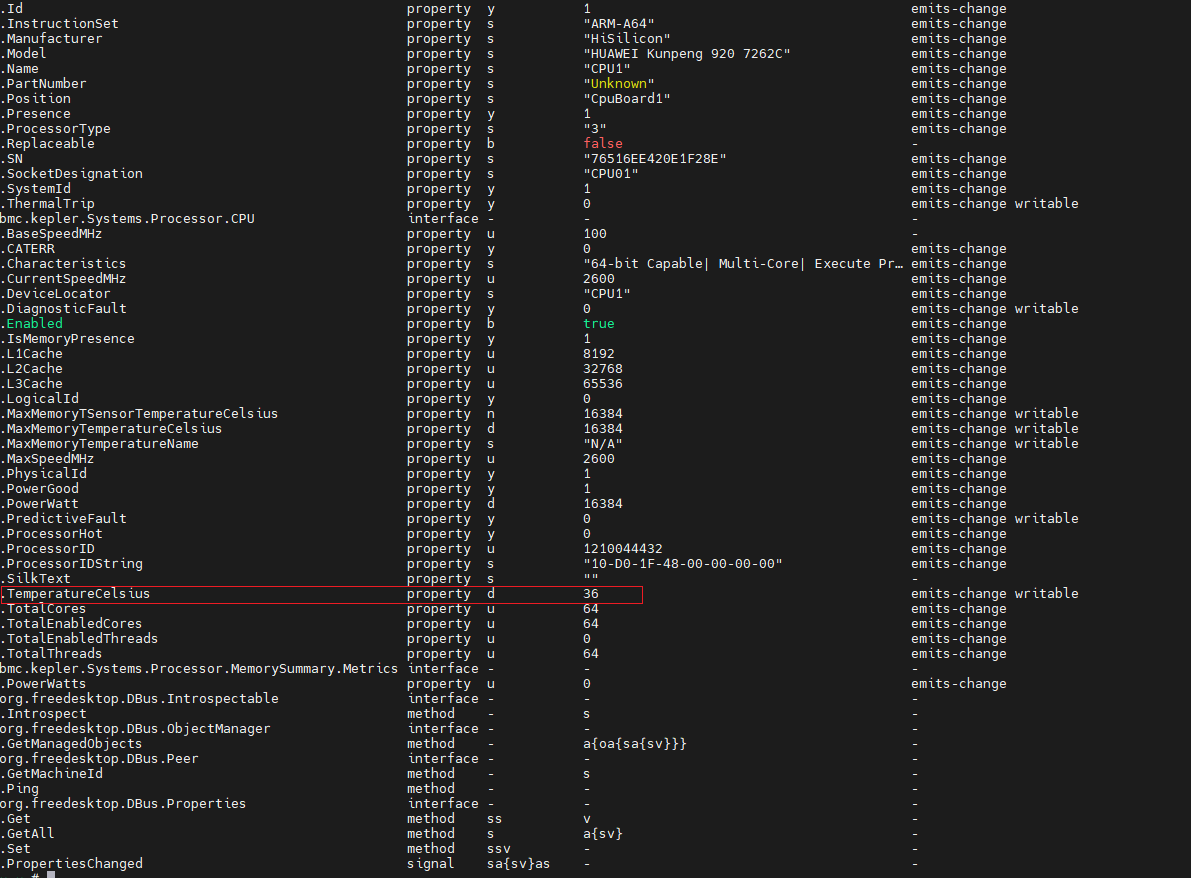
若为上电状态,请查看当下其他通过imu查询的信息是否有正常获取到,如CPU对象在 bmc.kepler.Systems.Processor.CPU 接口下的 MaxMemoryTemperatureCelsius、TemperatureCelsius等是否有获取到
在ssh连接中输入如下代码
mdbctl
attach compute
dloglevel debug
静置环境一分钟后,一键收集日志。麻烦将日志发送至邮箱 zhangzhiyang22@huawei.com
日志已发送,麻烦帮忙看看,谢谢。
通过一键收集,观察到以下日志打印
2026-02-14 09:26:21.185183 compute DEBUG: cpu_object.lua(258): update cpu2 temperature, cc=0, temp=41.000000
2026-02-14 09:26:23.203104 compute DEBUG: cpu_object.lua(295): update cpu2 power, cc=195, error
初步判定为从imu获取相关信息超时
遇到了同样的问题,请问如何解决?
看一下cpu是否有上电
CPU为上电状态,OS可以正常进入,CPU温度可以拿到
2026-04-08 17:06:23.166351 compute DEBUG: cpu_object.lua(258): update cpu1 temperature, cc=0, temp=47.000000
2026-04-08 17:06:23.632156 compute DEBUG: cpu_object.lua(258): update cpu2 temperature, cc=0, temp=52.000000
2026-04-08 17:06:23.672924 compute DEBUG: cpu_object.lua(258): update cpu2 temperature, cc=0, temp=52.000000
2026-04-08 17:06:26.293595 compute DEBUG: pmu_object.lua(60): start the slower loop to query CPU and memory temperatures and power
2026-04-08 17:06:26.739558 compute DEBUG: imu_cmd.lua(300): get memory temperature failed, error: 195
2026-04-08 17:06:26.740289 compute DEBUG: cpu_object.lua(321): update cpu1 memory temperature, cc=195, error
2026-04-08 17:06:28.736391 compute DEBUG: imu_cmd.lua(300): get memory temperature failed, error: 195
2026-04-08 17:06:28.738054 compute DEBUG: cpu_object.lua(321): update cpu1 memory temperature, cc=195, error
2026-04-08 17:06:30.742453 compute DEBUG: cpu_object.lua(295): update cpu1 power, cc=195, error
2026-04-08 17:06:32.743700 compute DEBUG: imu_cmd.lua(300): get memory temperature failed, error: 195
2026-04-08 17:06:32.745366 compute DEBUG: cpu_object.lua(321): update cpu2 memory temperature, cc=195, error
2026-04-08 17:06:34.756244 compute DEBUG: imu_cmd.lua(300): get memory temperature failed, error: 195
2026-04-08 17:06:34.757739 compute DEBUG: cpu_object.lua(321): update cpu2 memory temperature, cc=195, error
2026-04-08 17:06:36.764690 compute DEBUG: cpu_object.lua(295): update cpu2 power, cc=195, error
更新一下bios版本
你好,我们也是遇见差不多的问题,日志和上述日志一样。我们的设备是从iBMC V2升级到openUBMC的,Bios版本是S920X10/S920S10的最新的7.47版本。如果更新Bios,需要更新到什么版本了?
找一下BIOS侧的同学,bmc不清楚他们的支持情况