问题描述
鲲鹏服务器和网迅25Ge网卡,10Ge网卡联调过程中,带内通过ibma获取网卡信息失败。web和资源树上都没有内容更新。
答案内容由AI生成,仅供参考:
| 项目 | 状态 |
|---|---|
| 根本原因 | iBMA 通信模式不匹配 + BDF 地址映射错误 + 版本兼容性问题 |
| 关键修复点 | 设置 iBMA_network_type=veth |
| 数据链路 | iBMA → host_agent → network_adapter → Redfish/WebUI |
| 已验证工具 | lspci, ethtool, ibmacli, dmesg |
结论:将 iBMA 的网络模式设置为
veth并重启服务是解决问题的关键第一步。后续应验证 BDF 映射、检查版本兼容性,并确认整个数据上报链路通畅。
在 openUBMC 环境中,系统无法通过带内管理代理 iBMA(Intelligent Baseboard Management Agent)正确获取网卡信息。尽管 iBMA 服务已成功安装并启动,但 Web UI 上未显示 CPU、内存及网络适配器等关键系统信息。同时,在 BMC 的管理界面中也无法查看到 iBMA 上报的硬件数据,导致带内资源监控功能失效。
该问题直接影响服务器的带内健康状态监测、网络配置管理和硬件资产管理能力。
./install.sh -s);network_adapter 组件可通过带内通道从 iBMA 获取网卡数据;[XXXXX.XXXXXX] [XX] (NULL net device): edma: edma_host_send_msg, 759, no response in 10s, clean msg
net_card_info 文件中无有效网卡/光模块数据。| 尝试方法 | 结果 |
|---|---|
重启 iBMA 服务(systemctl restart ibma) |
错误日志依然频繁出现,信息仍未上报 |
| 检查 iBMA 安装日志,确认服务启动成功 | 安装流程无报错,但通信失败持续发生 |
验证 ethtool 命令是否可获取网口信息(如 ethtool eth0) |
可正常获取,说明 OS 层网卡驱动正常 |
使用 lspci 检查 PCIe BDF 信息是否匹配配置 |
部分设备信息未正确映射 |
检查 iBMA.ini 配置文件中的 iBMA_network_type 参数 |
发现当前值非 veth,不符合推荐模式 |
根据上下文信息和系统行为,可归纳为以下几点核心原因:
iBMA 与 BMC 通信通道异常
eDMA 通道向 BMC 发送 IPMI 消息进行注册和数据上报;iBMA_network_type 不符合要求
iBMA_network_type 不是 veth,需切换至 veth 模式并重启 iBMA;veth 是推荐的虚拟以太网设备模式,用于保障带内通信稳定性;PCIe BDF 地址映射不匹配
PcieAddrInfo 配置对象与实际硬件不符,则 iBMA 获取的信息无法正确匹配;lspci 命令验证槽位与 BDF 对应关系。数据上报链路未完整打通
host_agent 的订阅机制或 network_adapter 的监听器)异常,则信息无法上树。版本兼容性问题
 1. 修改 iBMA 网络模式为 veth 并重启服务
# 修改配置文件
ibmacli conf modify --name iBMA.ini --arg iBMA_System.iBMA_network_type --value veth
# 重启 iBMA 服务
systemctl restart ibma
依据来源:搜索结果
[id=10]中明确指出:“如果 iBMA_network_type 不是 veth,则需要切换到 veth 上然后重启 bma 生效”。
2. 验证并修复 PCIe BDF 映射# 列出所有 PCIe 设备及其 BDF
lspci -tv
# 核对配置文件中 PcieAddrInfo 的 BDF 是否一致
cat /opt/ibma/config/PcieAddrInfo.conf
[id=9] PCIe配置 文档中关于 dmidecode --type 9 或 lspci 的使用。 3. 检查 iBMA 服务状态与通信日志# 查看 iBMA 服务状态
service BMA status
# 实时监控内核日志中的 eDMA 错误
dmesg -H -w | grep edma
edma_host_send_msg 超时,说明底层通信仍存在问题; 4. 确保 host_agent 正确接收并转发数据检查 host_agent 是否正常运行,并能接收来自 iBMA 的 Redfish 请求事件:
# 查询 host_agent 服务状态
systemctl status host_agent

# 查看相关接口是否被调用(ForwardRequest, UpdateSpecificResource 等)
journalctl -u host_agent --no-pager -n 100
参考文档
[id=2]提到:host_agent提供ForwardRequest接口用于接收 BMA 请求,且network_adapter依赖此链路上报信息。
5. 升级 iBMA 至更稳定版本(可选)尝试升级 iBMA 至 2.19.0 或 2.20.0 版本,因文档中指出:
“有些版本(例如 2.16, 2.17, 2.19)能够正常显示 HBA 光模块的信息。”
这表明更高版本对带内信息上报和解析进行了优化。
net_card_info 文件是否生成并包含内容:cat /var/lib/bmc/network_adapter/net_card_info
GET /redfish/v1/Systems/1/NetworkAdapters/NIC_1
network_adapter:描述了网卡信息从 iBMA 到 BMC 的完整传递路径IPMI管理定位问题:提供了 iBMA_network_type 配置修复方法veth 模式以确保通信可靠性| 项目 | 状态 |
|---|---|
| 根本原因 | iBMA 通信模式不匹配 + BDF 地址映射错误 + 版本兼容性问题 |
| 关键修复点 | 设置 iBMA_network_type=veth |
| 数据链路 | iBMA → host_agent → network_adapter → Redfish/WebUI |
| 已验证工具 | lspci, ethtool, ibmacli, dmesg |
结论:将 iBMA 的网络模式设置为
veth并重启服务是解决问题的关键第一步。后续应验证 BDF 映射、检查版本兼容性,并确认整个数据上报链路通畅。
在环境OS内,收集iBMA 日志,发送到邮箱 zhouzijia2@huawei.com ,日志收集操作如下:
cd “$(rpm -ql iBMA2.0 | grep ibma$)” 进入iBMA安装目录;
tar -zcf ibma_log.tar.gz log/ config/使用tar命令把iBMA的log目录和config目录文件打包
收集ibma_log.tar.gz 压缩包发送到我的邮箱: zhouzijia2@huawei.com
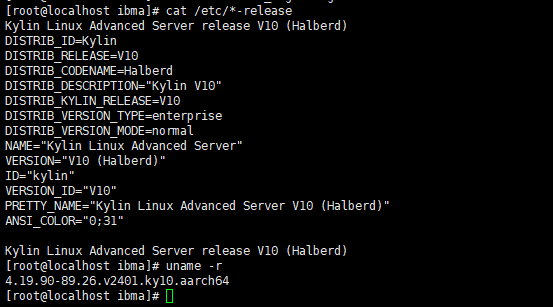
并提供一下OS版本,内核版本等环境信息
好的,谢谢。相关ibma日志已经发您邮箱了。不好意思,想问下您这里OS版本和内核版本具体是指什么
执行cat /etc/*-release 和 uname -r 命令,查看命令回显
好的收到,我们结合日志分析之后答复
不好意思,请问现在有什么进展吗?
该问题能否稳定复现?若能再复现,请复现后同时收集 BMC 日志(web一键收集)及 iBMA 日志(参考前面提供的方式)发送至邮箱 wanghaozhou2@huawei.com
前面从 iBMA 日志看无异常,需要进一步结合 BMC 日志确认是否 BMC 侧获取 iBMA 上报的信息失败
可以稳定复现。相关日志发您邮箱了。
请问有试过仅重启 iBMA 后该问题也能复现吗?
重启 iBMA 命令:systemctl restart iBMA
没有尝试过systemctl restart iBMA,不过有在服务器os下重启过ibma服务,重启后web上还是没有信息更新。
刚才试了下在telnet下执行systemctl restart iBMA,提示没有iBMA服务,但是os那边ibmacli service status是可以查看到ibma服务状态的。

根据日志信息暂未发现异常,怀疑是host_agent获取的BMA资源信息与实际BMA上报的信息不一致,请按以下提供的方式执行并确认观察点
1、进入OS后修改文件 WhiteURLList.ini ,增加内容:“^/redfish/v1/_SmsID/.*$”
2、重启 BMA:systemctl restart iBMA
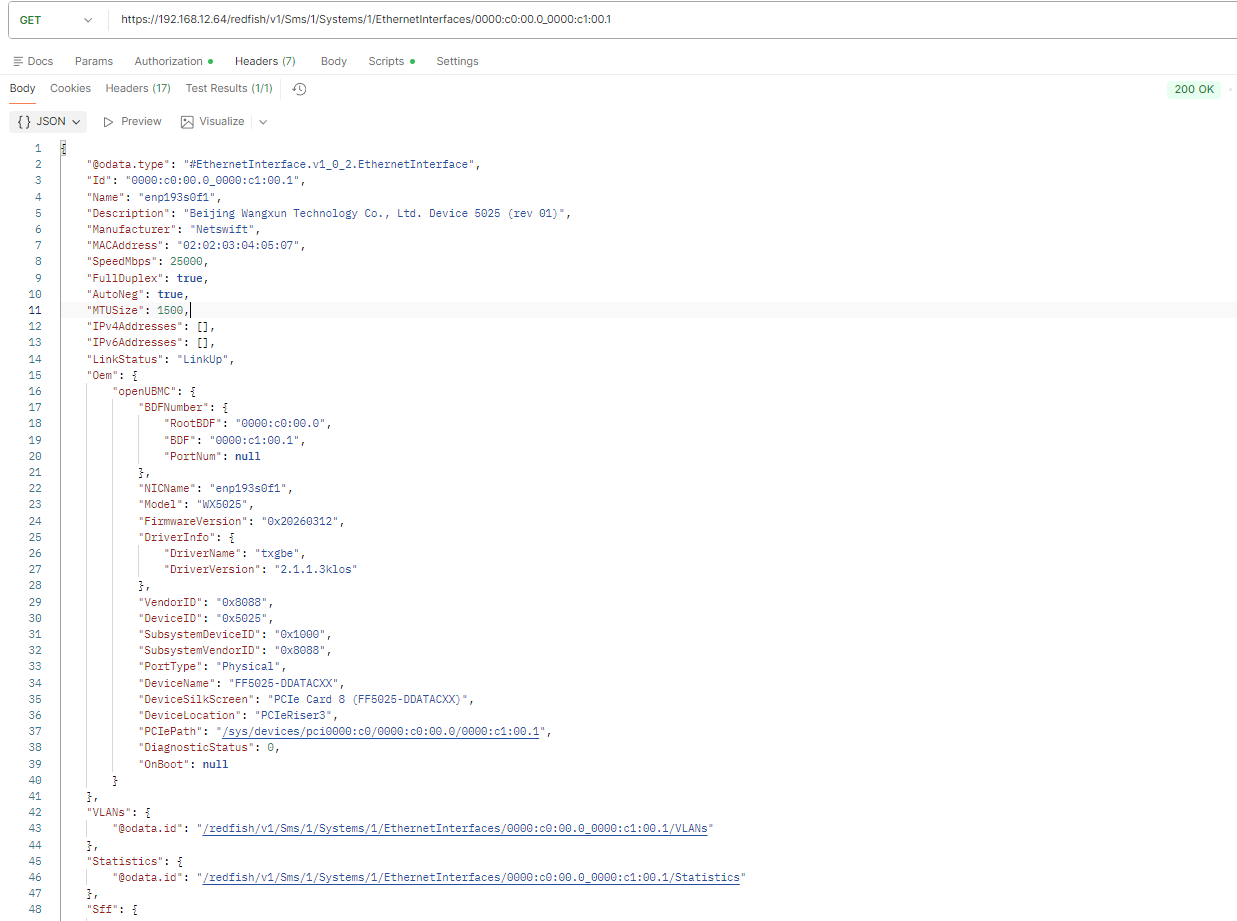
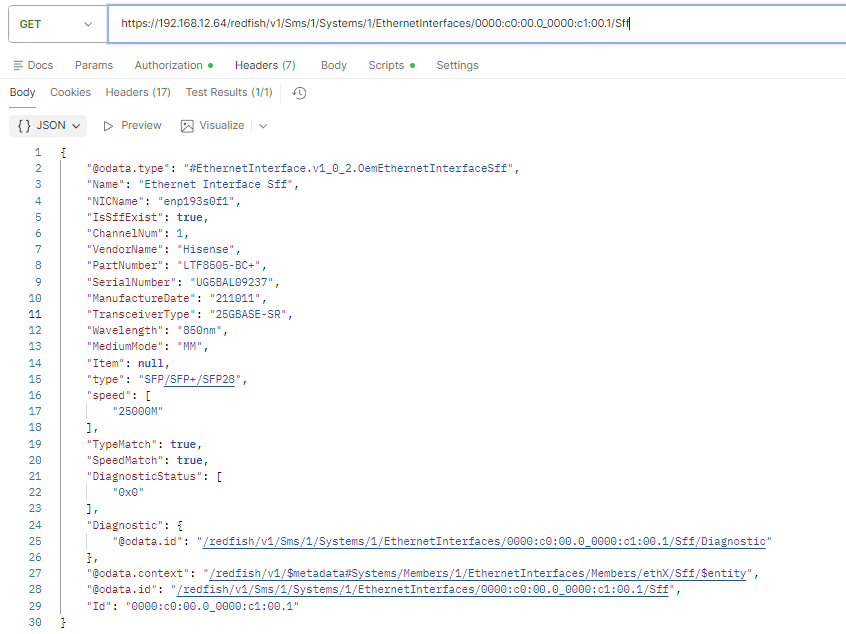
3、BMA 起来后,可以通过 BMC 侧直接访问 BMA 资源,使用 postman 等工具直接 Get 访问具体的网卡的 Uri 资源
4、将上一步查询到的结果与 host_agent 资源协作接口中的相应资源内容做对比,确认是否一致
第二步重启BMA时提示没有找到iBMA.service。
第四步里“与host_agent资源协作接口做对比”具体是和哪一个做比较?
~ ~ # busctl --user tree bmc.kepler.host_agent
└─/bmc
└─/bmc/kepler
├─/bmc/kepler/IpmiCmds
│ ├─/bmc/kepler/IpmiCmds/06
│ │ ├─/bmc/kepler/IpmiCmds/06/58
│ │ │ ├─/bmc/kepler/IpmiCmds/06/58/BmaRegisterWithBmc
│ │ │ ├─/bmc/kepler/IpmiCmds/06/58/HeartBeatCount
│ │ │ └─/bmc/kepler/IpmiCmds/06/58/RegisterSmsId
│ │ └─/bmc/kepler/IpmiCmds/06/59
│ │ └─/bmc/kepler/IpmiCmds/06/59/GetSmsHTTPType
│ └─/bmc/kepler/IpmiCmds/30
│ ├─/bmc/kepler/IpmiCmds/30/93
│ │ ├─/bmc/kepler/IpmiCmds/30/93/GetBobChannelType
│ │ ├─/bmc/kepler/IpmiCmds/30/93/GetSmsName
│ │ ├─/bmc/kepler/IpmiCmds/30/93/SetBobChannelType
│ │ └─/bmc/kepler/IpmiCmds/30/93/SetSmsName
│ └─/bmc/kepler/IpmiCmds/30/94
│ └─/bmc/kepler/IpmiCmds/30/94/SetNetNatConfig
├─/bmc/kepler/Systems
│ └─/bmc/kepler/Systems/1
│ ├─/bmc/kepler/Systems/1/ComputerSystem
│ └─/bmc/kepler/Systems/1/Sms
│ └─/bmc/kepler/Systems/1/Sms/1
│ ├─/bmc/kepler/Systems/1/Sms/1/AgentPorts
│ │ ├─/bmc/kepler/Systems/1/Sms/1/AgentPorts/HttpsPort0
│ │ ├─/bmc/kepler/Systems/1/Sms/1/AgentPorts/TrapPort0
│ │ ├─/bmc/kepler/Systems/1/Sms/1/AgentPorts/TrapPort1
│ │ ├─/bmc/kepler/Systems/1/Sms/1/AgentPorts/TrapPort2
│ │ └─/bmc/kepler/Systems/1/Sms/1/AgentPorts/TrapPort3
│ └─/bmc/kepler/Systems/1/Sms/1/ComputerSystem
│ ├─/bmc/kepler/Systems/1/Sms/1/ComputerSystem/EventService
│ │ └─/bmc/kepler/Systems/1/Sms/1/ComputerSystem/EventService/Subscriptions
│ ├─/bmc/kepler/Systems/1/Sms/1/ComputerSystem/Managers
│ │ └─/bmc/kepler/Systems/1/Sms/1/ComputerSystem/Managers/iBMA
│ │ ├─/bmc/kepler/Systems/1/Sms/1/ComputerSystem/Managers/iBMA/Base
│ │ ├─/bmc/kepler/Systems/1/Sms/1/ComputerSystem/Managers/iBMA/DateTime
│ │ ├─/bmc/kepler/Systems/1/Sms/1/ComputerSystem/Managers/iBMA/Logs
│ │ ├─/bmc/kepler/Systems/1/Sms/1/ComputerSystem/Managers/iBMA/Monitors
│ │ │ ├─/bmc/kepler/Systems/1/Sms/1/ComputerSystem/Managers/iBMA/Monitors/DiskAlarm
│ │ │ ├─/bmc/kepler/Systems/1/Sms/1/ComputerSystem/Managers/iBMA/Monitors/DiskError
│ │ │ ├─/bmc/kepler/Systems/1/Sms/1/ComputerSystem/Managers/iBMA/Monitors/DiskEvent
│ │ │ ├─/bmc/kepler/Systems/1/Sms/1/ComputerSystem/Managers/iBMA/Monitors/Drives
│ │ │ ├─/bmc/kepler/Systems/1/Sms/1/ComputerSystem/Managers/iBMA/Monitors/DrivesSilkScreen
│ │ │ ├─/bmc/kepler/Systems/1/Sms/1/ComputerSystem/Managers/iBMA/Monitors/ErrorStatistics
│ │ │ ├─/bmc/kepler/Systems/1/Sms/1/ComputerSystem/Managers/iBMA/Monitors/EthtoolLog
│ │ │ ├─/bmc/kepler/Systems/1/Sms/1/ComputerSystem/Managers/iBMA/Monitors/GPU
│ │ │ ├─/bmc/kepler/Systems/1/Sms/1/ComputerSystem/Managers/iBMA/Monitors/HBAAndCNA
│ │ │ ├─/bmc/kepler/Systems/1/Sms/1/ComputerSystem/Managers/iBMA/Monitors/Infiniband
│ │ │ ├─/bmc/kepler/Systems/1/Sms/1/ComputerSystem/Managers/iBMA/Monitors/LocalEvent
│ │ │ ├─/bmc/kepler/Systems/1/Sms/1/ComputerSystem/Managers/iBMA/Monitors/NPU
│ │ │ ├─/bmc/kepler/Systems/1/Sms/1/ComputerSystem/Managers/iBMA/Monitors/Nic
│ │ │ ├─/bmc/kepler/Systems/1/Sms/1/ComputerSystem/Managers/iBMA/Monitors/NvmeUpgradeSmartTime
│ │ │ ├─/bmc/kepler/Systems/1/Sms/1/ComputerSystem/Managers/iBMA/Monitors/OS
│ │ │ ├─/bmc/kepler/Systems/1/Sms/1/ComputerSystem/Managers/iBMA/Monitors/Overview
│ │ │ ├─/bmc/kepler/Systems/1/Sms/1/ComputerSystem/Managers/iBMA/Monitors/PCHRefreshTime
│ │ │ ├─/bmc/kepler/Systems/1/Sms/1/ComputerSystem/Managers/iBMA/Monitors/PchMaxTemperature
│ │ │ ├─/bmc/kepler/Systems/1/Sms/1/ComputerSystem/Managers/iBMA/Monitors/SenseCode
│ │ │ ├─/bmc/kepler/Systems/1/Sms/1/ComputerSystem/Managers/iBMA/Monitors/SlowDisk
│ │ │ ├─/bmc/kepler/Systems/1/Sms/1/ComputerSystem/Managers/iBMA/Monitors/StorageControllers
│ │ │ ├─/bmc/kepler/Systems/1/Sms/1/ComputerSystem/Managers/iBMA/Monitors/Summary
│ │ │ ├─/bmc/kepler/Systems/1/Sms/1/ComputerSystem/Managers/iBMA/Monitors/iBMA
│ │ │ └─/bmc/kepler/Systems/1/Sms/1/ComputerSystem/Managers/iBMA/Monitors/iBMAToken
│ │ ├─/bmc/kepler/Systems/1/Sms/1/ComputerSystem/Managers/iBMA/OAM
│ │ └─/bmc/kepler/Systems/1/Sms/1/ComputerSystem/Managers/iBMA/WatchDog
│ ├─/bmc/kepler/Systems/1/Sms/1/ComputerSystem/Systems
│ │ └─/bmc/kepler/Systems/1/Sms/1/ComputerSystem/Systems/1
│ │ ├─/bmc/kepler/Systems/1/Sms/1/ComputerSystem/Systems/1/EthernetInterfaces
│ │ │ ├─/bmc/kepler/Systems/1/Sms/1/ComputerSystem/Systems/1/EthernetInterfaces/0000_3A01_3A04_2E0_5F0000_3A06_3A00_2E0
│ │ │ │ ├─/bmc/kepler/Systems/1/Sms/1/ComputerSystem/Systems/1/EthernetInterfaces/0000_3A01_3A04_2E0_5F0000_3A06_3A00_2E0/OAM
│ │ │ │ │ └─/bmc/kepler/Systems/1/Sms/1/ComputerSystem/Systems/1/EthernetInterfaces/0000_3A01_3A04_2E0_5F0000_3A06_3A00_2E0/OAM/Statistics
│ │ │ │ ├─/bmc/kepler/Systems/1/Sms/1/ComputerSystem/Systems/1/EthernetInterfaces/0000_3A01_3A04_2E0_5F0000_3A06_3A00_2E0/Statistics
│ │ │ │ └─/bmc/kepler/Systems/1/Sms/1/ComputerSystem/Systems/1/EthernetInterfaces/0000_3A01_3A04_2E0_5F0000_3A06_3A00_2E0/VLANs
│ │ │ ├─/bmc/kepler/Systems/1/Sms/1/ComputerSystem/Systems/1/EthernetInterfaces/0000_3A16_3A00_2E0_5F0000_3A17_3A00_2E0
│ │ │ │ ├─/bmc/kepler/Systems/1/Sms/1/ComputerSystem/Systems/1/EthernetInterfaces/0000_3A16_3A00_2E0_5F0000_3A17_3A00_2E0/OAM
│ │ │ │ │ └─/bmc/kepler/Systems/1/Sms/1/ComputerSystem/Systems/1/EthernetInterfaces/0000_3A16_3A00_2E0_5F0000_3A17_3A00_2E0/OAM/Statistics
│ │ │ │ ├─/bmc/kepler/Systems/1/Sms/1/ComputerSystem/Systems/1/EthernetInterfaces/0000_3A16_3A00_2E0_5F0000_3A17_3A00_2E0/Sff
│ │ │ │ │ └─/bmc/kepler/Systems/1/Sms/1/ComputerSystem/Systems/1/EthernetInterfaces/0000_3A16_3A00_2E0_5F0000_3A17_3A00_2E0/Sff/Diagnostic
│ │ │ │ ├─/bmc/kepler/Systems/1/Sms/1/ComputerSystem/Systems/1/EthernetInterfaces/0000_3A16_3A00_2E0_5F0000_3A17_3A00_2E0/Statistics
│ │ │ │ └─/bmc/kepler/Systems/1/Sms/1/ComputerSystem/Systems/1/EthernetInterfaces/0000_3A16_3A00_2E0_5F0000_3A17_3A00_2E0/VLANs
│ │ │ ├─/bmc/kepler/Systems/1/Sms/1/ComputerSystem/Systems/1/EthernetInterfaces/0000_3A16_3A00_2E0_5F0000_3A17_3A00_2E1
│ │ │ │ ├─/bmc/kepler/Systems/1/Sms/1/ComputerSystem/Systems/1/EthernetInterfaces/0000_3A16_3A00_2E0_5F0000_3A17_3A00_2E1/OAM
│ │ │ │ │ └─/bmc/kepler/Systems/1/Sms/1/ComputerSystem/Systems/1/EthernetInterfaces/0000_3A16_3A00_2E0_5F0000_3A17_3A00_2E1/OAM/Statistics
│ │ │ │ ├─/bmc/kepler/Systems/1/Sms/1/ComputerSystem/Systems/1/EthernetInterfaces/0000_3A16_3A00_2E0_5F0000_3A17_3A00_2E1/Sff
│ │ │ │ │ └─/bmc/kepler/Systems/1/Sms/1/ComputerSystem/Systems/1/EthernetInterfaces/0000_3A16_3A00_2E0_5F0000_3A17_3A00_2E1/Sff/Diagnostic
│ │ │ │ ├─/bmc/kepler/Systems/1/Sms/1/ComputerSystem/Systems/1/EthernetInterfaces/0000_3A16_3A00_2E0_5F0000_3A17_3A00_2E1/Statistics
│ │ │ │ └─/bmc/kepler/Systems/1/Sms/1/ComputerSystem/Systems/1/EthernetInterfaces/0000_3A16_3A00_2E0_5F0000_3A17_3A00_2E1/VLANs
│ │ │ ├─/bmc/kepler/Systems/1/Sms/1/ComputerSystem/Systems/1/EthernetInterfaces/0000_3Ac0_3A00_2E0_5F0000_3Ac1_3A00_2E0
│ │ │ │ ├─/bmc/kepler/Systems/1/Sms/1/ComputerSystem/Systems/1/EthernetInterfaces/0000_3Ac0_3A00_2E0_5F0000_3Ac1_3A00_2E0/OAM
│ │ │ │ │ └─/bmc/kepler/Systems/1/Sms/1/ComputerSystem/Systems/1/EthernetInterfaces/0000_3Ac0_3A00_2E0_5F0000_3Ac1_3A00_2E0/OAM/Statistics
│ │ │ │ ├─/bmc/kepler/Systems/1/Sms/1/ComputerSystem/Systems/1/EthernetInterfaces/0000_3Ac0_3A00_2E0_5F0000_3Ac1_3A00_2E0/Sff
│ │ │ │ │ └─/bmc/kepler/Systems/1/Sms/1/ComputerSystem/Systems/1/EthernetInterfaces/0000_3Ac0_3A00_2E0_5F0000_3Ac1_3A00_2E0/Sff/Diagnostic
│ │ │ │ ├─/bmc/kepler/Systems/1/Sms/1/ComputerSystem/Systems/1/EthernetInterfaces/0000_3Ac0_3A00_2E0_5F0000_3Ac1_3A00_2E0/Statistics
│ │ │ │ └─/bmc/kepler/Systems/1/Sms/1/ComputerSystem/Systems/1/EthernetInterfaces/0000_3Ac0_3A00_2E0_5F0000_3Ac1_3A00_2E0/VLANs
│ │ │ ├─/bmc/kepler/Systems/1/Sms/1/ComputerSystem/Systems/1/EthernetInterfaces/0000_3Ac0_3A00_2E0_5F0000_3Ac1_3A00_2E1
│ │ │ │ ├─/bmc/kepler/Systems/1/Sms/1/ComputerSystem/Systems/1/EthernetInterfaces/0000_3Ac0_3A00_2E0_5F0000_3Ac1_3A00_2E1/OAM
│ │ │ │ │ └─/bmc/kepler/Systems/1/Sms/1/ComputerSystem/Systems/1/EthernetInterfaces/0000_3Ac0_3A00_2E0_5F0000_3Ac1_3A00_2E1/OAM/Statistics
│ │ │ │ ├─/bmc/kepler/Systems/1/Sms/1/ComputerSystem/Systems/1/EthernetInterfaces/0000_3Ac0_3A00_2E0_5F0000_3Ac1_3A00_2E1/Sff
│ │ │ │ │ └─/bmc/kepler/Systems/1/Sms/1/ComputerSystem/Systems/1/EthernetInterfaces/0000_3Ac0_3A00_2E0_5F0000_3Ac1_3A00_2E1/Sff/Diagnostic
│ │ │ │ ├─/bmc/kepler/Systems/1/Sms/1/ComputerSystem/Systems/1/EthernetInterfaces/0000_3Ac0_3A00_2E0_5F0000_3Ac1_3A00_2E1/Statistics
│ │ │ │ └─/bmc/kepler/Systems/1/Sms/1/ComputerSystem/Systems/1/EthernetInterfaces/0000_3Ac0_3A00_2E0_5F0000_3Ac1_3A00_2E1/VLANs
│ │ │ ├─/bmc/kepler/Systems/1/Sms/1/ComputerSystem/Systems/1/EthernetInterfaces/Bridge
│ │ │ │ └─/bmc/kepler/Systems/1/Sms/1/ComputerSystem/Systems/1/EthernetInterfaces/Bridge/bridge00
│ │ │ │ ├─/bmc/kepler/Systems/1/Sms/1/ComputerSystem/Systems/1/EthernetInterfaces/Bridge/bridge00/Statistics
│ │ │ │ └─/bmc/kepler/Systems/1/Sms/1/ComputerSystem/Systems/1/EthernetInterfaces/Bridge/bridge00/VLANs
│ │ │ └─/bmc/kepler/Systems/1/Sms/1/ComputerSystem/Systems/1/EthernetInterfaces/Team
│ │ ├─/bmc/kepler/Systems/1/Sms/1/ComputerSystem/Systems/1/GPUs
│ │ │ └─/bmc/kepler/Systems/1/Sms/1/ComputerSystem/Systems/1/GPUs/0000_3A01_3A00_2E0_5F0000_3A02_3A00_2E0
│ │ │ └─/bmc/kepler/Systems/1/Sms/1/ComputerSystem/Systems/1/GPUs/0000_3A01_3A00_2E0_5F0000_3A02_3A00_2E0/Summary
│ │ ├─/bmc/kepler/Systems/1/Sms/1/ComputerSystem/Systems/1/InfiniBands
│ │ ├─/bmc/kepler/Systems/1/Sms/1/ComputerSystem/Systems/1/LogServices
│ │ │ └─/bmc/kepler/Systems/1/Sms/1/ComputerSystem/Systems/1/LogServices/iBMA
│ │ ├─/bmc/kepler/Systems/1/Sms/1/ComputerSystem/Systems/1/NPUs
│ │ ├─/bmc/kepler/Systems/1/Sms/1/ComputerSystem/Systems/1/Power
│ │ │ └─/bmc/kepler/Systems/1/Sms/1/ComputerSystem/Systems/1/Power/1
│ │ ├─/bmc/kepler/Systems/1/Sms/1/ComputerSystem/Systems/1/Storage
│ │ │ └─/bmc/kepler/Systems/1/Sms/1/ComputerSystem/Systems/1/Storage/1
│ │ │ ├─/bmc/kepler/Systems/1/Sms/1/ComputerSystem/Systems/1/Storage/1/Drives
│ │ │ │ └─/bmc/kepler/Systems/1/Sms/1/ComputerSystem/Systems/1/Storage/1/Drives/PCH_5F0000_3A32_3A04_2E0_5Fdisk1
│ │ │ │ └─/bmc/kepler/Systems/1/Sms/1/ComputerSystem/Systems/1/Storage/1/Drives/PCH_5F0000_3A32_3A04_2E0_5Fdisk1/RebuildState
│ │ │ ├─/bmc/kepler/Systems/1/Sms/1/ComputerSystem/Systems/1/Storage/1/FC
│ │ │ ├─/bmc/kepler/Systems/1/Sms/1/ComputerSystem/Systems/1/Storage/1/FCoE
│ │ │ ├─/bmc/kepler/Systems/1/Sms/1/ComputerSystem/Systems/1/Storage/1/PCIE_5FSSD
│ │ │ ├─/bmc/kepler/Systems/1/Sms/1/ComputerSystem/Systems/1/Storage/1/StorageControllers
│ │ │ ├─/bmc/kepler/Systems/1/Sms/1/ComputerSystem/Systems/1/Storage/1/Volumes
│ │ │ │ └─/bmc/kepler/Systems/1/Sms/1/ComputerSystem/Systems/1/Storage/1/Volumes/PCH_5F0000_3A32_3A04_2E0_5Fdisk1
│ │ │ └─/bmc/kepler/Systems/1/Sms/1/ComputerSystem/Systems/1/Storage/1/iSCSI
│ │ └─/bmc/kepler/Systems/1/Sms/1/ComputerSystem/Systems/1/Summary
│ ├─/bmc/kepler/Systems/1/Sms/1/ComputerSystem/TaskService
│ │ └─/bmc/kepler/Systems/1/Sms/1/ComputerSystem/TaskService/Tasks
│ └─/bmc/kepler/Systems/1/Sms/1/ComputerSystem/UpdateService
│ ├─/bmc/kepler/Systems/1/Sms/1/ComputerSystem/UpdateService/FirmwareInventory
│ │ ├─/bmc/kepler/Systems/1/Sms/1/ComputerSystem/UpdateService/FirmwareInventory/Nic_5F0000_3A01_3A04_2E0_5F0000_3A06_3A00_2E0
│ │ ├─/bmc/kepler/Systems/1/Sms/1/ComputerSystem/UpdateService/FirmwareInventory/Nic_5F0000_3A16_3A00_2E0_5F0000_3A17_3A00_2E0
│ │ └─/bmc/kepler/Systems/1/Sms/1/ComputerSystem/UpdateService/FirmwareInventory/Nic_5F0000_3Ac0_3A00_2E0_5F0000_3Ac1_3A00_2E0
│ ├─/bmc/kepler/Systems/1/Sms/1/ComputerSystem/UpdateService/Progress
│ └─/bmc/kepler/Systems/1/Sms/1/ComputerSystem/UpdateService/SoftwareInventory
│ ├─/bmc/kepler/Systems/1/Sms/1/ComputerSystem/UpdateService/SoftwareInventory/Nic_5F0000_3A01_3A04_2E0_5F0000_3A06_3A00_2E0
│ ├─/bmc/kepler/Systems/1/Sms/1/ComputerSystem/UpdateService/SoftwareInventory/Nic_5F0000_3A16_3A00_2E0_5F0000_3A17_3A00_2E0
│ ├─/bmc/kepler/Systems/1/Sms/1/ComputerSystem/UpdateService/SoftwareInventory/Nic_5F0000_3Ac0_3A00_2E0_5F0000_3Ac1_3A00_2E0
│ ├─/bmc/kepler/Systems/1/Sms/1/ComputerSystem/UpdateService/SoftwareInventory/iBMA
│ └─/bmc/kepler/Systems/1/Sms/1/ComputerSystem/UpdateService/SoftwareInventory/iBMA_5FDriver
└─/bmc/kepler/host_agent
└─/bmc/kepler/host_agent/MicroComponent
└─/bmc/kepler/host_agent/MicroComponent/Debug
第二步注意是在 OS 侧下执行的哦
第四步如您附上的内容,path其实是 BMA 相应资源直接转义而来的,网卡相应资源是在 /bmc/kepler/Systems/1/Sms/1/ComputerSystem/Systems/1/EthernetInterfaces 下
举个栗子:/bmc/kepler/Systems/1/Sms/1/ComputerSystem/Systems/1/EthernetInterfaces/0000_3A01_3A04_2E0_5F0000_3A06_3A00_2E0 对应的 BMA 资源其实为 /redfish/v1/Sms/1/Systems/1/EthernetInterfaces/0000:01:04.0_0000:06:00.0
理论上 host_agent 资源协作接口下的内容应与 BMA 相应资源的内容完全对应
好的,谢谢。
刚才尝试了下,两边获取的资源内容是一致的。
~ ~ # busctl --user introspect bmc.kepler.host_agent /bmc/kepler/Systems/1/Sms/1/ComputerSystem/Systems/1/EthernetInterfaces/0000_3Ac0_3A00_2E0_5F0000_3Ac1_3A00_2E1
NAME TYPE SIGNATURE RESULT/VALUE FLAGS
bmc.kepler.sms interface - - -
._40odata_2Econtext property v s "/redfish/v1/$metadata#Systems/Member… -
._40odata_2Eid property v s "/bmc/kepler/Systems/1/Sms/1/Computer… -
._40odata_2Etype property v s "#EthernetInterface.v1_0_2.EthernetIn… -
bmc.kepler.sms.redfish interface - - -
.AutoNeg property v b true -
.Description property v s "Beijing Wangxun Technology Co., Ltd.… -
.FullDuplex property v b true -
.IPv4Addresses property v ai 0 -
.IPv6Addresses property v ai 0 -
.Id property v s “0000:c0:00.0_0000:c1:00.1” -
.LinkStatus property v s “LinkUp” -
.MACAddress property v s “02:02:03:04:05:07” -
.MTUSize property v x 1500 -
.Manufacturer property v s “Netswift” -
.Name property v s “enp193s0f1” -
.SpeedMbps property v x 25000 -
._40odata_2Econtext property v s "/redfish/v1/$metadata#Systems/Member… -
._40odata_2Eid property v s "/bmc/kepler/Systems/1/Sms/1/Computer… -
._40odata_2Etype property v s "#EthernetInterface.v1_0_2.EthernetIn… -
bmc.kepler.sms.redfish.OAM interface - - -
._40odata_2Eid property v s "/bmc/kepler/Systems/1/Sms/1/Computer… -
bmc.kepler.sms.redfish.Oem.Huawei interface - - -
.DeviceID property v s “0x5025” -
.DeviceLocation property v s “PCIeRiser3” -
.DeviceName property v s “FF5025-DDATACXX” -
.DeviceSilkScreen property v s “PCIe Card 8 (FF5025-DDATACXX)” -
.DiagnosticStatus property v x 0 -
.FirmwareVersion property v s “0x20260312” -
.Model property v s “WX5025” -
.NICName property v s “enp193s0f1” -
.OnBoot property v s “null” -
.PCIePath property v s "/sys/devices/pci0000:c0/0000:c0:00.0… -
.PortType property v s “Physical” -
.SubsystemDeviceID property v s “0x1000” -
.SubsystemVendorID property v s “0x8088” -
.VendorID property v s “0x8088” -
bmc.kepler.sms.redfish.Oem.Huawei.BDFNumber interface - - -
.BDF property v s “0000:c1:00.1” -
.PortNum property v s “null” -
.RootBDF property v s “0000:c0:00.0” -
bmc.kepler.sms.redfish.Oem.Huawei.DriverInfo interface - - -
.DriverName property v s “txgbe” -
.DriverVersion property v s “2.1.1.3klos” -
bmc.kepler.sms.redfish.Sff interface - - -
._40odata_2Eid property v s "/bmc/kepler/Systems/1/Sms/1/Computer… -
bmc.kepler.sms.redfish.Statistics interface - - -
._40odata_2Eid property v s "/bmc/kepler/Systems/1/Sms/1/Computer… -
bmc.kepler.sms.redfish.VLANs interface - - -
._40odata_2Eid property v s "/bmc/kepler/Systems/1/Sms/1/Computer… -
org.freedesktop.DBus.Introspectable interface - - -
.Introspect method - s -
org.freedesktop.DBus.ObjectManager interface - - -
.GetManagedObjects method - a{oa{sa{sv}}} -
org.freedesktop.DBus.Peer interface - - -
.GetMachineId method - s -
.Ping method - - -
org.freedesktop.DBus.Properties interface - - -
.Get method ss v -
.GetAll method s a{sv} -
.Set method ssv - -
.PropertiesChanged signal sa{sv}as - -
~ ~ # busctl --user introspect bmc.kepler.host_agent /bmc/kepler/Systems/1/Sms/1/ComputerSystem/Systems/1/EthernetInterfaces/0000_3Ac0_3A00_2E0_5F0000_3Ac1_3A00_2E1/Sff
NAME TYPE SIGNATURE RESULT/VALUE FLAGS
bmc.kepler.sms interface - - -
._40odata_2Econtext property v s "/redfish/v1/$metadata#Systems/Member… -
._40odata_2Eid property v s "/bmc/kepler/Systems/1/Sms/1/Computer… -
._40odata_2Etype property v s "#EthernetInterface.v1_0_2.OemEtherne… -
bmc.kepler.sms.redfish interface - - -
.ChannelNum property v x 1 -
.DiagnosticStatus property v as 1 “0x0” -
.Id property v s “0000:c0:00.0_0000:c1:00.1” -
.IsSffExist property v b true -
.Item property v s “null” -
.ManufactureDate property v s “211011” -
.MediumMode property v s “MM” -
.NICName property v s “enp193s0f1” -
.Name property v s “Ethernet Interface Sff” -
.PartNumber property v s “LTF8505-BC+” -
.SerialNumber property v s “UG5BAL09237” -
.SpeedMatch property v b true -
.TransceiverType property v s “25GBASE-SR” -
.TypeMatch property v b true -
.VendorName property v s “Hisense” -
.Wavelength property v s “850nm” -
._40odata_2Econtext property v s "/redfish/v1/$metadata#Systems/Member… -
._40odata_2Eid property v s "/bmc/kepler/Systems/1/Sms/1/Computer… -
._40odata_2Etype property v s "#EthernetInterface.v1_0_2.OemEtherne… -
.speed property v as 1 “25000M” -
.type property v s “SFP/SFP+/SFP28” -
bmc.kepler.sms.redfish.Diagnostic interface - - -
._40odata_2Eid property v s "/bmc/kepler/Systems/1/Sms/1/Computer… -
org.freedesktop.DBus.Introspectable interface - - -
.Introspect method - s -
org.freedesktop.DBus.ObjectManager interface - - -
.GetManagedObjects method - a{oa{sa{sv}}} -
org.freedesktop.DBus.Peer interface - - -
.GetMachineId method - s -
.Ping method - - -
org.freedesktop.DBus.Properties interface - - -
.Get method ss v -
.GetAll method s a{sv} -
.Set method ssv - -
.PropertiesChanged signal sa{sv}as - -
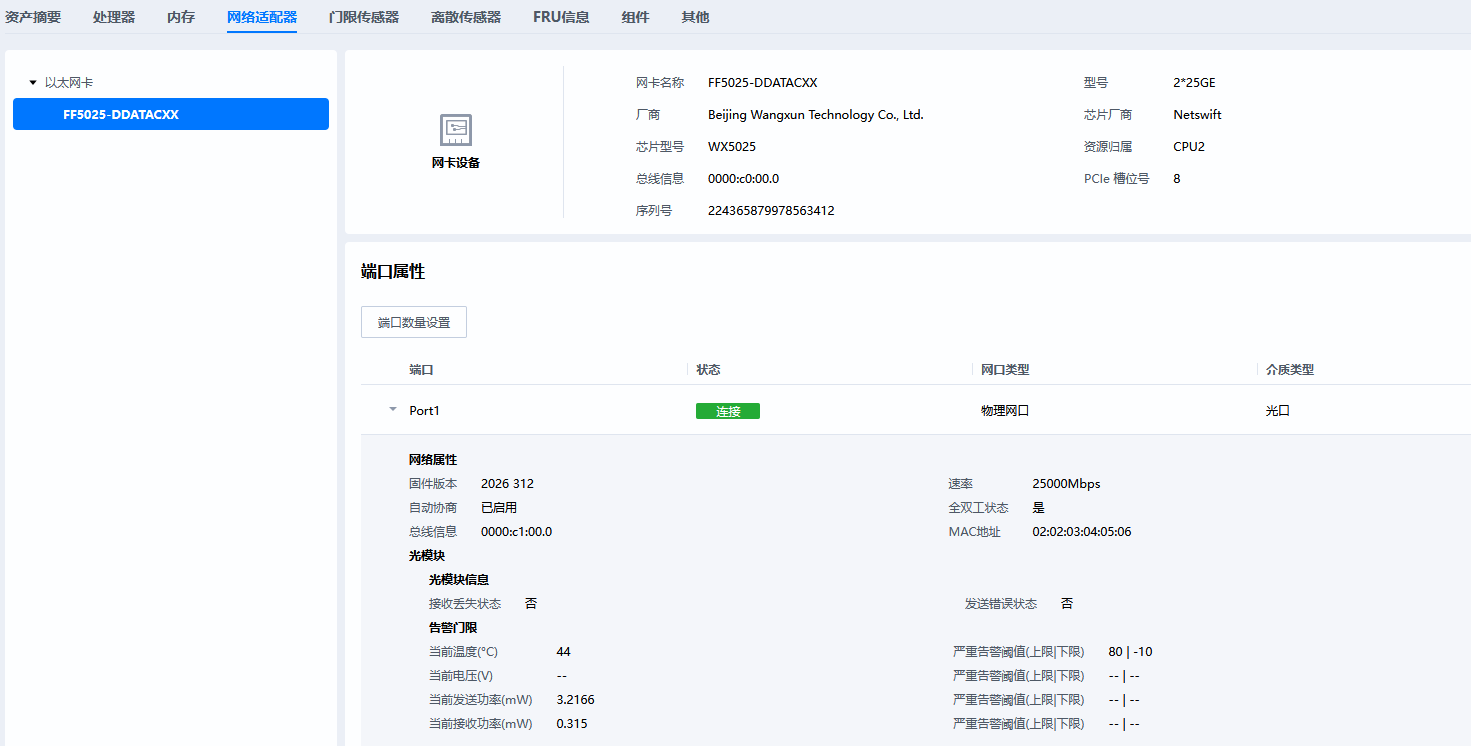
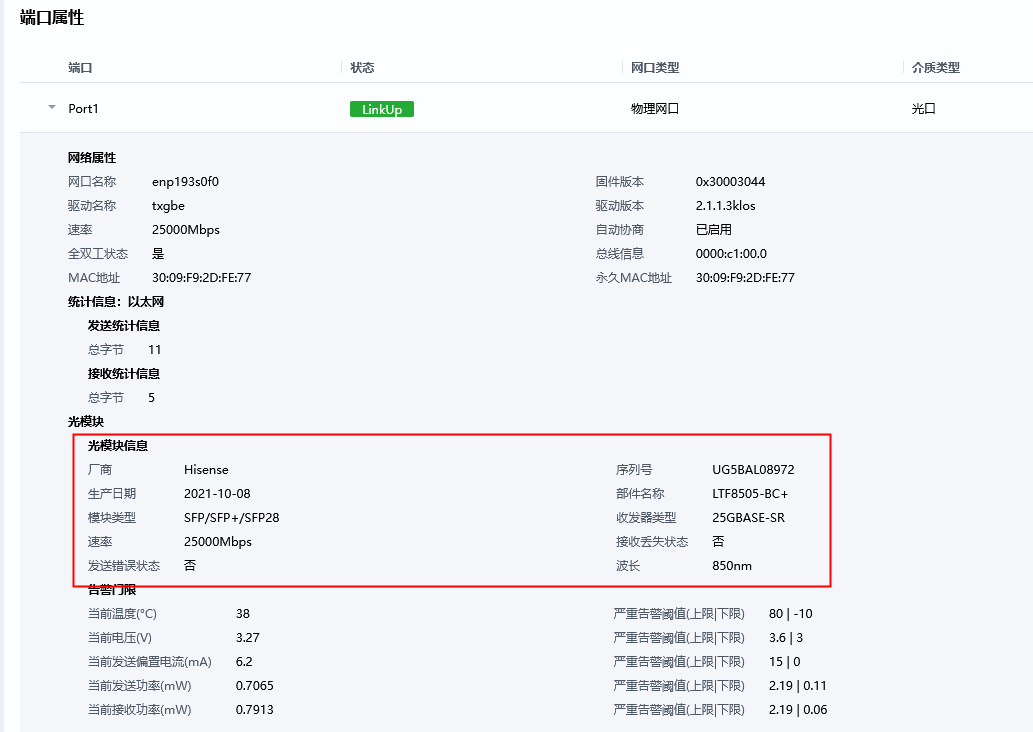
但是这些光模块信息(比如厂商信息,部件号,序列号,类型等等都没有显示在web上)
不好意思,我们现在又显示不上去了。
之前manifest使用2603版本(02a32134976a26ca6bd99c32dadd22be5082d654),ibma获取的网卡信息可以成功显示到web上。后面因为测试用例报告中有部分用例需要关闭bma,所以最近一段时间服务器bma都是关闭状态的(os下执行ibmacli service stop),然后昨天打开(os下ibmacli service restart和systemctl restart iBMA)之后发现恢复到之前异常状态了:host_agent资源树有内容,和redfish获取的信息是一致的,但是web上没有显示。
怀疑过是不是服务器固件在运行时被修改或被破坏,然后重新生成了一版hpm,重新升级,结果web上还是没有显示。
是不是host_agent信息到web之间信息传递不稳定?
下面是当前hpm包使用组件的版本信息
~ ~ # cat /etc/package_info
webui/1.90.215@openubmc/stable#56b08b1994610406dd52cbc20cd931c5%1774840981.526
web_backend/1.110.1@openubmc/stable#9fbc6f6d3294b9e8759113add19b0e70%1774424292.269
vpp/300.0.0@openubmc/stable#47f0c2f0a9d941ab72608dce3788da92%1774424281.989
vpd/1.90.65@openubmc/stable#8ac3504f72507a2db8bc431d0a7e8572%1774874718.04
vnc_proxy/0.0.2@openubmc/stable#a36ad85b24ac1626d667ee155e476740%1765983860.352
usb_entry/1.110.0@openubmc/stable#9b75d408599e7b0eafd7aed38e84e5ef%1774424235.822
ums/1.110.1@openubmc/stable#462f9b13ad1a65a1e262841ef2238844%1774424206.149
thermal_mgmt/1.80.21@openubmc/stable#7ab45c425073fdcf461ef0fe00eb24d9%1774682593.737
storage/1.90.82@openubmc/stable#59a47ff99b0ce052f6577830faa81042%1774663593.147
ssdp/1.80.5@openubmc/stable#b4176c26f5aae7e20eb9b4a6c4f614e8%1771064390.086
sqlite3/3.42.0-3.oe2403sp1-h2.b002@openubmc/stable#cc10134d71595485e3753462b9154ee2%1766737513.765
spdm/1.0.15@openubmc/stable#2771fe00cedf88c21a0a5c68e80ce74b%1764413630.967
soctrl/1.110.8@openubmc/stable#a1581f418e32fc2df67284f603974797%1774972078.522
snmp/1.100.5@openubmc/stable#0cb5f09b004d1ec24b51dd158c6476d9%1774972083.635
skynet/1.8.0.b001_014@openubmc/stable#07b7fee4acd86184a3273caa79e346bc%1774972065.248
signature_verify_cbb_library/25.1.0.b003_001@openubmc/stable#67351e3ec250b016b2db8074e27f66bf%1766737452.574
sensor/1.70.117@openubmc/stable#137ddd09a861769cd4130220110b94b8%1774660361.274
security_aop/26.0.4@openubmc/stable#19977d2a7e80414b7c69cab2a0f9da7c%1774972075.581
secbox/25.1.3+b001_00004@openubmc/stable#b281c6f2a943350cf585f6e769b25bc5%1774424067.731
runtime_accessor/1.110.12@openubmc/stable#3a816e4ef0e49a6c0fdbfb8eb2263d24%1774424045.155
rootfs_user/1.90.1@openubmc/stable#300ec5b774cd2fbea6803de86d14bc6d%1774409103.535
rmcpd/1.110.8@openubmc/stable#712fcb704824192ab509add1dbc7a32f%1774424016.278
remote_console/1.110.17@openubmc/stable#5e5146cd14f0704951f09275d079a579%1774972048.91
redfish/1.110.8@openubmc/stable#f7919d8c65f90611d0a582c2c4a9e5c3%1774423935.075
re2/2022-06-01.004@openubmc/stable#b33603719fe54f64e74d1b193857bd3f%1765425153.318
rackmount/1.100.154@openubmc/stable#28ad6abeb4e2b21b7c25a7f51c701e92%1774695732.183
protobuf/3.14.0.006@openubmc/stable#33d71724e88864067353be0a8cefd123%1772710275.54
profile_schema/1.80.2@openubmc/stable#2746f0d2502b68d8b6ef5d67e04cd7ff%1773566615.567
product_mgmt/1.110.9@openubmc/stable#68c02db30e8130f64efd358e5ea7378f%1774423908.021
power_mgmt/1.70.179@openubmc/stable#cde55d68e85e37730004e100289b15ca%1774602668.514
persistence/1.110.11@openubmc/stable#0c94cf99c69a82b8a539322cafeb699d%1774423882.752
pcie_device/1.90.24@openubmc/stable#26244146634d308f7d5021c6e7559d0c%1774011017.73
opentelemetry-proto/1.1.0.001@openubmc/stable#409d7a08c0d959225713ccde19aee334%1765425018.668
opentelemetry/1.13.0.020@openubmc/stable#4b66a5bc1e05cedb453f2bd221e02c89%1772790884.474
openssl/3.5.1@openubmc/stable#0b2bec259da3e69a9f9c7a720fd607e2%1762437145.721
openssh/9.6p1-3.oe2403sp1-htrunk10_009@openubmc/stable#99bd2373435832a7f52dcf1d353376bf%1774423876.139
openldap/2.6.10+htrunk2_002@openubmc/stable#b9142fd99b7a510a62a6cb2963a1a6e8%1774423867.834
oms/1.110.14@openubmc/stable#78c8e0a35a4dc2494fd923c0ad7d49d4%1774972009.919
observability/1.110.2@openubmc/stable#c79da1643129300bad476f74386406a7%1772852586.086
ntp/4.2.8+htrunk3_003@openubmc/stable#eb466b4d6905e93928c4c25780ca2648%1774423833.983
nsm/1.110.14@openubmc/stable#f7d79e734e6c7c6c9ad8f8713a69afe5%1774423616.704
nginx/1.29.2-htrunk4@openubmc/stable#b7dbce86949886809435d001a68abc86%1774423610.022
network_adapter/1.90.56@openubmc/stable#17039a855146ce6e59f133a78b73d8d6%1774680862.834
net-snmp/5.9.3-4.oe2403sp1-htrunk9.b001@openubmc/stable#4c2d2c59d1cc3cb453ac3efce5b98702%1774423601.532
muparser/2.3.5@openubmc/stable#84e2234079c3369253067443ccc83ac0%1766737049.117
mdb_interface/1.100.37@openubmc/stable#4e92cfcc7980d64eade7a1167f162f8b%1773925899.943
mctpd/1.110.3@openubmc/stable#024ca5cc1bdb6de66fff6f3312f63252%1774423509.962
manufacture/1.80.2@openubmc/stable#bfd7de0907e6eea8c8653545fb7087c4%1770465273.481
maca/1.110.5@openubmc/stable#2789e9457c87033cb4438262e36c8a2f%1774423487.18
luajit/2.1.0.b022@openubmc/stable#51c2d31c0263daaba6c3e0522753bcc8%1774971971.345
lsw/1.70.15@openubmc/stable#b9479af42c327f013650501676524ada%1765771093.844
lsnmp/1.30.11@openubmc/stable#838ea6b30b9234b0c79f5a5636aa622f%1774423448.076
lldpd/1.0.19+h2@openubmc/stable#4596950e47ee71ba993895c02fdcc641%1774423441.014
libyaml/0.2.5.b002@openubmc/stable#05c0a401a0d7fa230b834d5ce3ea7f80%1758353786.644
libssh2/1.11.0-4.oe2403sp1@openubmc/stable#8f0c9b01503f314cdaa8872c82d595c0%1766736930.934
libspdm/3.8.1@openubmc/stable#3ec92eccdb9b6f02b305a16b9085ee5b%1762437701.977
libsomp/2.0.8@openubmc/stable#93ad43f4b8212ab7d4624cf3bfd0b736%1774971947.524
libsoc_adapter/1.110.31@openubmc/stable#74685728e8dee59b06f1b2a5e2fdf05c%1774972043.614
libroute_mapper/1.110.3@openubmc/stable#13201e0f7a17d33566385f26d40716f2%1774423148.433
libproto-mc4c/1.90.6@openubmc/stable#bbedb8303513e499d9551a66259685f3%1771063681.407
libmgmt_protocol/1.90.14@openubmc/stable#e11a163b420c28aef842f890faa8c84f%1774971975.209
libmdbc/1.80.3@openubmc/stable#afaa04794644f888a37d103455c186cb%1766736731.854
libmcpp/1.2.59@openubmc/stable#1ab0d832b1ff86f10b2a4d36d4054901%1773570368.065
libmcc/1.100.2@openubmc/stable#18839c8ceff16a42c822484eef0bfda4%1774422982.327
libmc4lua/1.110.26@openubmc/stable#cf140427de8dd05f206e8693a10b146a%1774972032.491
liblogger/1.90.9@openubmc/stable#a3cfe641e5846f18cbebb5d232cf1c79%1774971945.577
libenergy/1.0.20@openubmc/stable#5a6661db8fc5d362b848100d5d8a66ef%1774422809.772
lcurl/1.20.15@openubmc/stable#3e1cd3b38efb73df16e7a1308dd5b06f%1774422784.198
kmc/25.0.50@openubmc/stable#462220668d129b2a43eef3ce4f411485%1774422774.617
key_mgmt/1.110.2@openubmc/stable#4b2e296bc15ce79a167bc4504c83a254%1774422752.771
json/b003_00004@openubmc/stable#d4cfc42df5879e88ef2df22b86a6d6cd%1774972003.165
ipmi_core/1.100.43@openubmc/stable#3e380ad4ab18e303825d935c8ada779d%1774422638.113
iam/1.10.3@openubmc/stable#17794008efa96735a8fe8025a1f8ad68%1773826579.728
hwproxy/1.110.16@openubmc/stable#4bbf75fae8e9a2f2c6aa4ee32ac26b98%1774422604.848
hwdiscovery/1.110.7@openubmc/stable#59f08051a71b6e15167f724ecdc8d1aa%1774422578.445
huawei_secure_c/1.0.2@openubmc/stable#ad5c55d13a8eb0a86cf895705d393b7f%1774971854.01
host_agent/1.100.11@openubmc/stable#92857b181ca5c90e1d7b75200fe8c87c%1774422545.738
hisec_tls/25.1.3.b001@openubmc/stable#6e05207385ecc3c3fccf3c766a66902a%1774422542.716
hica/1.70.14@openubmc/stable#2895a8f32706a7011a0d5b4081737338%1760007847.181
help/1.71.63@openubmc/stable#60c648f57dafbf431f143e9bea84b935%1773912964.975
grpc/1.33.1.007@openubmc/stable#95e56348ed1854f7b8f6656cf523baf2%1772789529.378
general_hardware/1.100.53@openubmc/stable#020a19794ccdec174e07b9695350ead1%1774838898.571
frudata/1.70.61@openubmc/stable#6f75b53854f5cfb78e91ab219cab7a53%1773904508.596
fructrl/1.70.83@openubmc/stable#e31c7ec0d6806455eb9796c99d831c07%1774275555.151
fluent-bit/3.2.0.b005@openubmc/stable#84106d691dccb83fbbe36fbc8cef00b5%1766754094.728
firmware_mgmt/1.110.61@openubmc/stable#856cb9be99fc8d7e99c2fe5886fecff3%1774971838.848
file_transfer/1.70.26@openubmc/stable#af76dcd2c43105ead3b079550f96508e%1774422461.758
event_policy/1.110.1@openubmc/stable#f868d2d5eec4c84ce017c7250ea5194f%1774422433.055
event/1.80.50@openubmc/stable#caf515674b17efb9456f43b5b887d66c%1774971833.867
editline_library_-_libedit/3.1-20250104-h2.5@openubmc/stable#801baa1c311f48f3247025b2fa319f44%1766736343.497
devmon/1.2.22@openubmc/stable#d83202041a5e1a3fe7724f5fbe229a9e%1773566391.118
ddns/1.110.1@openubmc/stable#0e2b84b3a524c15d1b2f5ea45d1b5bcf%1774422364.429
dcmid/1.0.3@openubmc/stable#aab4efb23a9b99bf145f19ab037c079e%1765952897.966
cyrus_sasl/2.1.28-h1.computing.ibmc.r1_001@openubmc/stable#579b161b98909a5efa6eb8cdc2b302f7%1766736302.815
curl/8.4.0-14.oe2403sp1-htrunk10@openubmc/stable#3f02d260cdd9b781ef876bc77208501c%1774422348.174
computing_component_raid/v100r001c00spc512b020_4@openubmc/stable#6f70443f7919ee45d594fc42ef9e1d22%1766736288.265
compute/1.100.30@openubmc/stable#c51d2a7abb374d49736afbf22ccc32c3%1774971901.464
component_drivers/1.2.89@openubmc/stable#50a83416a58470a98fcfa991358cdb8f%1774086727.717
cli/1.100.12@openubmc/stable#72fb89815ce5513ba0db389c453d51ce%1774422187.988
chassis/1.80.40@openubmc/stable#84250114ccaa1f6d7cc6868be09e8b3f%1774426872.998
certificate/1.30.20@openubmc/stable#5b18f77b67ad112a4467fde66982330e%1774422160.896
capability_proxy/1.110.15@openubmc/stable#b66e923fc9201ac1fa16f9488be90620%1774422136.775
c_ares/1.34.6.001@openubmc/stable#7e1dd89e497d432664a87c4373df797b%1765458933.308
busybox/1.34.1@openubmc/stable#8ceabbe0c14c8f3e456ec13c2a141258%1773818038.34
boost/1.87.0.b003@openubmc/stable#59369971980a2bd69fe38add2d9dea60%1774971874.334
bmc_upgrade/1.80.3@openubmc/stable#3fa4cf0945da8e1c841deb8073a086fd%1774422100.911
bmc_time/1.70.75@openubmc/stable#4c48ff811fa248eba73420f37310b7ec%1774422072.577
bmc_soc/1.110.20@openubmc/stable#1c17720b0df62b29dd1cb5b1526d56c8%1774422015.144
bmc_network/1.110.45@openubmc/stable#c1c32750e918f256be5c6fcac7245e9f%1774971878.353
bmc_health/1.70.14@openubmc/stable#c662ae8aade467745d4fc7b87c99d83c%1774421929.799
bmc_cpld_driver/1.0.1@openubmc/stable#bef7d7c2eb4c5ada09a3d750a91db5be%1774421918.707
bios/1.100.21@openubmc/stable#9c56674f39d2910d86874da7c9ba2411%1773904365.267
account/1.110.65@openubmc/stable#1eca206e7c294214a84c68225e8d95fd%1774597566.155
abseil/20250127.0.004@openubmc/stable#18da5a1817aa8a1cf615b6c92e923b88%1765442229.712