【功耗封顶】功耗封顶失败执行策略是否会记录日志

// 此模板仅供参考,如果不适用可以修改

问题描述

openUBMC执行功耗封顶失败策略是否会记录日志,是记录哪一个日志?
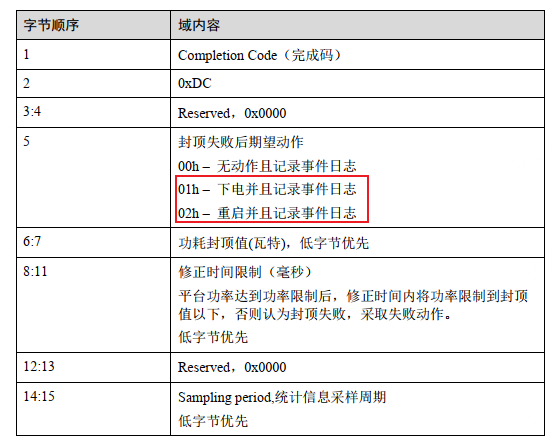
我在维护日志、操作日志、运行日志均未发现相关日志

例如我设置功耗封顶失败策略为下电,服务器确实下电了,但是没看到相关日志

环境信息

openUBMC 2512 LTS SP1

重现步骤

NA

期望结果

确认执行功耗封顶失败策略以后,是否会记录相关日志

实际结果

未发现有记录相关日志

尝试过的解决方案

[列出您已经尝试过的解决方案及结果]

分析结论

[详细总结您对此问题的分析结论]
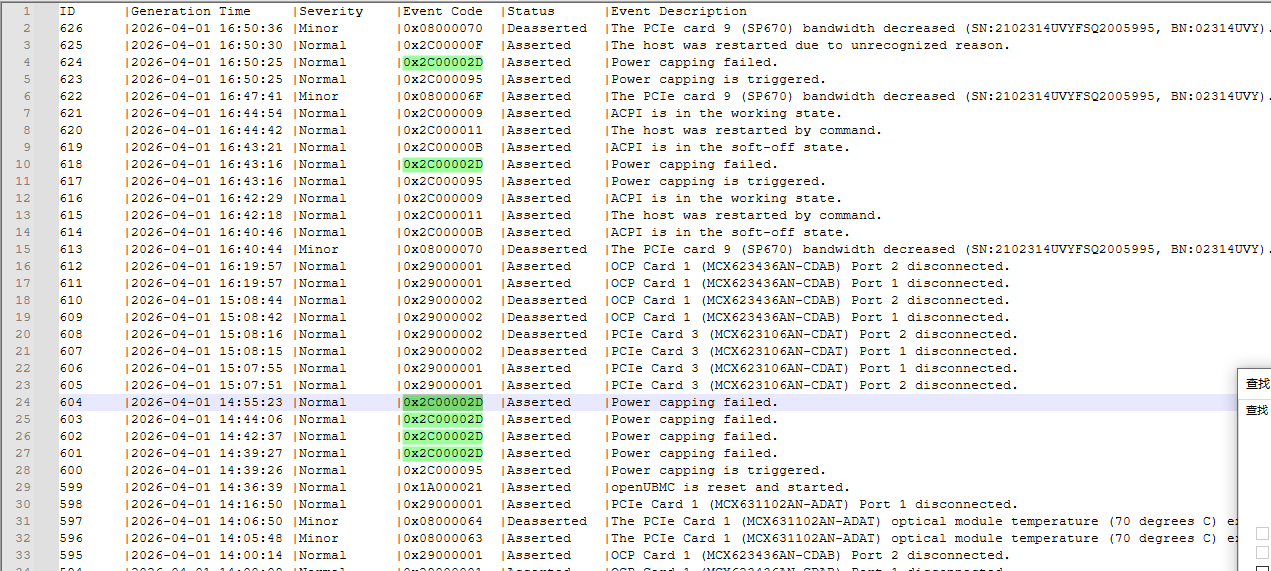
确认记录的是sel日志

答案内容由AI生成,仅供参考:
结论

是的,功耗封顶失败事件本应记录日志,但是否记录取决于 PowerLimitExceptionPowerLimitExceptionLogEvent 的配置组合。

当前环境中可能由于 日志记录开关未启用固件行为变更未同步日志机制,导致虽执行了动作,却未生成可见日志。

点击此处查看详细分析解答

功耗封顶失败策略日志记录问题分析

根据您提供的问题描述,关于“openUBMC执行功耗封顶失败策略是否会记录日志”这一问题,结合当前系统版本(openUBMC 2512 LTS SP1)的相关技术文档和知识库信息,以下是详细分析与结论。


:magnifying_glass_tilted_left: 问题核心

您在配置功耗封顶失败动作(如“下电”、“重启”等)后,发现系统确实执行了对应动作(例如服务器已下电),但在维护日志、操作日志、运行日志中均未发现相关记录。您希望确认:

  1. 功耗封顶失败是否会产生日志?
  2. 若有日志,应记录在哪个文件或位置?

:white_check_mark: 核心结论

是的,功耗封顶失败事件本应记录日志,但是否记录取决于 PowerLimitExceptionPowerLimitExceptionLogEvent 的配置组合。

当前环境中可能由于 日志记录开关未启用固件行为变更未同步日志机制,导致虽执行了动作,却未生成可见日志。


:puzzle_piece: 关键机制解析

1. 控制参数:PowerLimitExceptionPowerLimitExceptionLogEvent

参数 类型 描述
PowerLimitException String (读写) 定义当功耗封顶失败时的响应动作,取值包括:
NoAction
LogEventOnly
HardPowerOff
Reset
PowerLimitExceptionLogEvent Boolean (读写) 是否在发生功耗封顶失败时,记录事件日志

:warning: 特别注意:

  • 即使 PowerLimitException 设置为 HardPowerOffReset如果 PowerLimitExceptionLogEvent = false,则不会记录任何日志
  • 日志的生成由 PowerLimitExceptionLogEvent 明确控制。

2. 日志内容由哪些组件负责?

  • Power Strategy Component:负责检测功耗是否超出限制,并判断是否触发 PowerLimitActivatedPowerLimitFailed
  • Log Service (log_service.lua):负责将事件写入系统日志。
  • 最终输出到 app.log 文件:大多数运行时日志(包括功率异常事件)会被写入 /var/log/app.log

:books: 来源依据

:white_check_mark: 来自 Document Chunk 1 的变更说明:

“为了保证功耗封顶失败动作的实现与 Redfish/ipmi-DCMI 标准定义一致……新增 LogEventOnly 选项用于记录事件日志。”
“NoAction 选项实现由记录事件日志变更为不做任何操作新增的 LogEventOnly 选项实现为仅记录事件日志。”

这表明:

  • NoAction 不再自动记录日志(25.09 之后版本变更)。
  • 必须显式使用 LogEventOnly 或通过 PowerLimitExceptionLogEvent = true 才能确保日志输出。

:white_check_mark: 来自 Knowledge Graph 的实体定义验证:

{
  "entity": "PowerLimitExceptionLogEvent",
  "type": "data",
  "description": "PowerLimitExceptionLogEvent is a read-write Boolean controlling whether an event log is recorded when power limit exceptions occur."
}

明确指出:这是一个可配置的开关,决定是否在发生功耗封顶异常时记录事件日志


:white_check_mark: 引用接口文档:bmc.kepler.Systems.PowerStrategy

| PowerLimitExceptionLogEvent | Boolean | 读写 | 变更广播 | 是否支持功耗封顶失败动作记录事件日志 |
| PowerLimitException         | String  | 读写 | 变更广播 | 功耗封顶失败动作 |

说明:需要同时配置这两个属性才能确保 “执行动作 + 记录日志”


:clipboard: 实际配置场景推演

PowerLimitException PowerLimitExceptionLogEvent 是否执行动作 是否记录日志 结果说明
HardPowerOff false :white_check_mark: :cross_mark: 服务器断电,无日志(符合当前现象)
HardPowerOff true :white_check_mark: :white_check_mark: 断电并记录日志
LogEventOnly true :cross_mark: :white_check_mark: 仅记录日志
NoAction true :cross_mark: :white_check_mark: 不做任何事,仅日志
NoAction false :cross_mark: :cross_mark: 完全无响应

:backhand_index_pointing_right: 您的情况极可能是 PowerLimitExceptionLogEvent = false 导致日志未生成。


:card_index_dividers: 日志应出现在哪里?

所有功耗异常事件,若被记录,将出现在以下文件中:

:white_check_mark: 主要日志文件:app.log

  • 路径:/var/log/app.log
  • 内容包含:
    • power_strategy INFO/ERROR: 如 Power limit exception triggered
    • PowerLimitFailed = true
    • 动作执行记录:如 Executing HardPowerOff due to power capping failure

可通过命令检索:

grep -i "power.*limit" /var/log/app.log
grep "PowerLimitFailed" /var/log/app.log

:white_check_mark: 其他可能路径(调试时):

  • 当前事件日志:/var/log/current_event.txt
  • 事件数据库查询(Redfish):
    GET /redfish/v1/Systems/1/LogServices/EventLog/Entries
    

:white_check_mark: 验证与解决建议

步骤 1:确认当前策略配置

# 查看当前设置
busctl get-property bmc.kepler.Systems.PowerStrategy PowerLimitException
busctl get-property bmc.kepler.Systems.PowerStrategy PowerLimitExceptionLogEvent

预期输出示例:

PowerLimitException: "HardPowerOff"
PowerLimitExceptionLogEvent: false   ← 如果是 false,则不会记录日志

步骤 2:开启日志记录功能

# 启用日志记录
busctl set-property bmc.kepler.Systems.PowerStrategy PowerLimitExceptionLogEvent b true

# 可选:设置为 LogEventOnly + 硬关机组合(确保日志+动作)
busctl set-property bmc.kepler.Systems.PowerStrategy PowerLimitException s "HardPowerOff"

推荐组合:PowerLimitException = "HardPowerOff", PowerLimitExceptionLogEvent = true


步骤 3:触发并验证日志

手动模拟或制造功耗超限(如高性能负载运行),观察:

tail -f /var/log/app.log | grep -i power

应能看到类似日志:

2026-03-15 10:12:34 power_strategy ERROR: PowerLimitFailed set to true, executing HardPowerOff
2026-03-15 10:12:34 Log Service: Event recorded - Power capping failure action triggered

:pushpin: 分析结论总结

项目 内容
是否会记录日志? :white_check_mark: 会,但前提是 PowerLimitExceptionLogEvent = true
未见日志的原因? :cross_mark: PowerLimitExceptionLogEvent 很可能为 false,导致仅有动作无日志
日志应记录在哪? :white_check_mark: /var/log/app.log,由 Log Service 模块写入
历史兼容性注意点? :warning: openUBMC 25.09+ 版本中 NoAction 已不再默认记录日志,必须使用 LogEventOnly 或开启 LogEvent 标志
当前版本建议 使用 openUBMC 25.12 LTS SP1,并确保 SDK ≥ 25.12 版本以避免接口不一致

:white_check_mark: 建议动作

  1. :white_check_mark: 检查并启用 PowerLimitExceptionLogEvent = true
  2. :white_check_mark: 测试功耗封顶失败流程,验证日志是否生成
  3. :white_check_mark: 使用 Redfish 或 WebUI 检查事件日志条目
  4. :white_check_mark: 升级至最新 openUBMC 版本,确保行为一致性
  5. :white_check_mark: 参考文档:https://www.openubmc.cn/docs

如有进一步问题,可提供 app.log 中相关片段以便深入诊断。