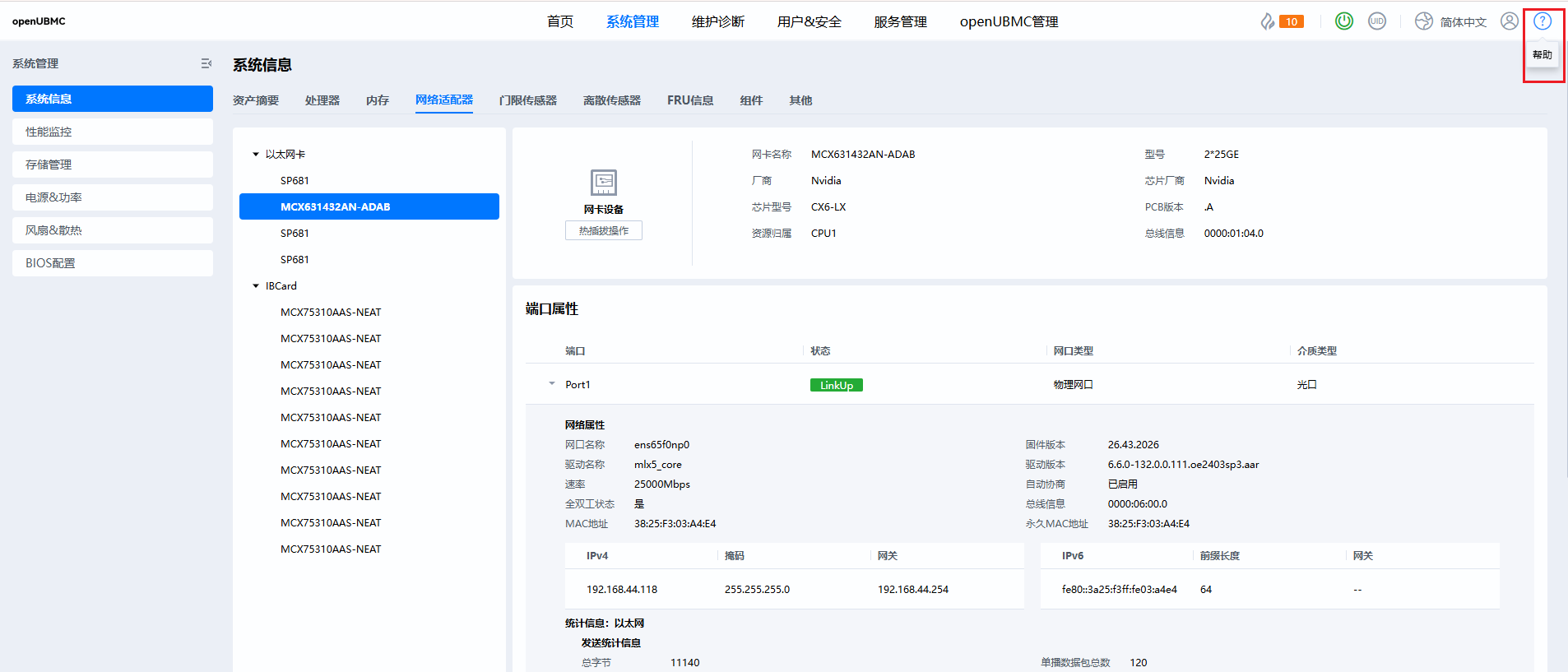
BMC不显示以太网卡的连接视图,无交换机信息

// 此模板仅供参考,如果不适用可以修改

问题描述

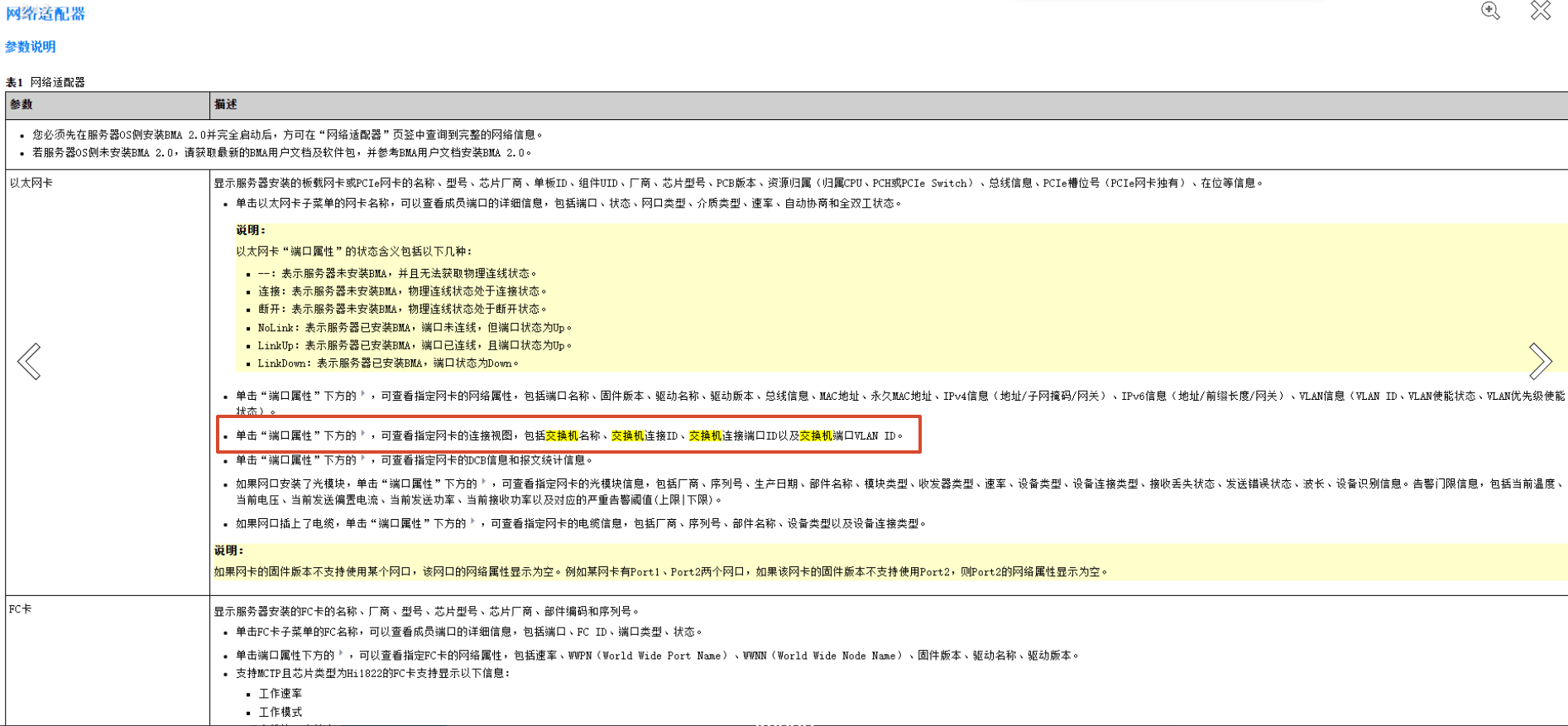
BMC上不显示以太网卡的连接视图,无交换机信息,包括交换机名称、交换机连接ID、交换机连接端口ID以及交换机端口VLAN ID。

环境信息

  • 操作系统:[如 Ubuntu 24.04]

  • 软件版本:[如 OpenUBMC2512]

  • 硬件配置:[如 CPU、内存等]

重现步骤

  1. 登录BMC web

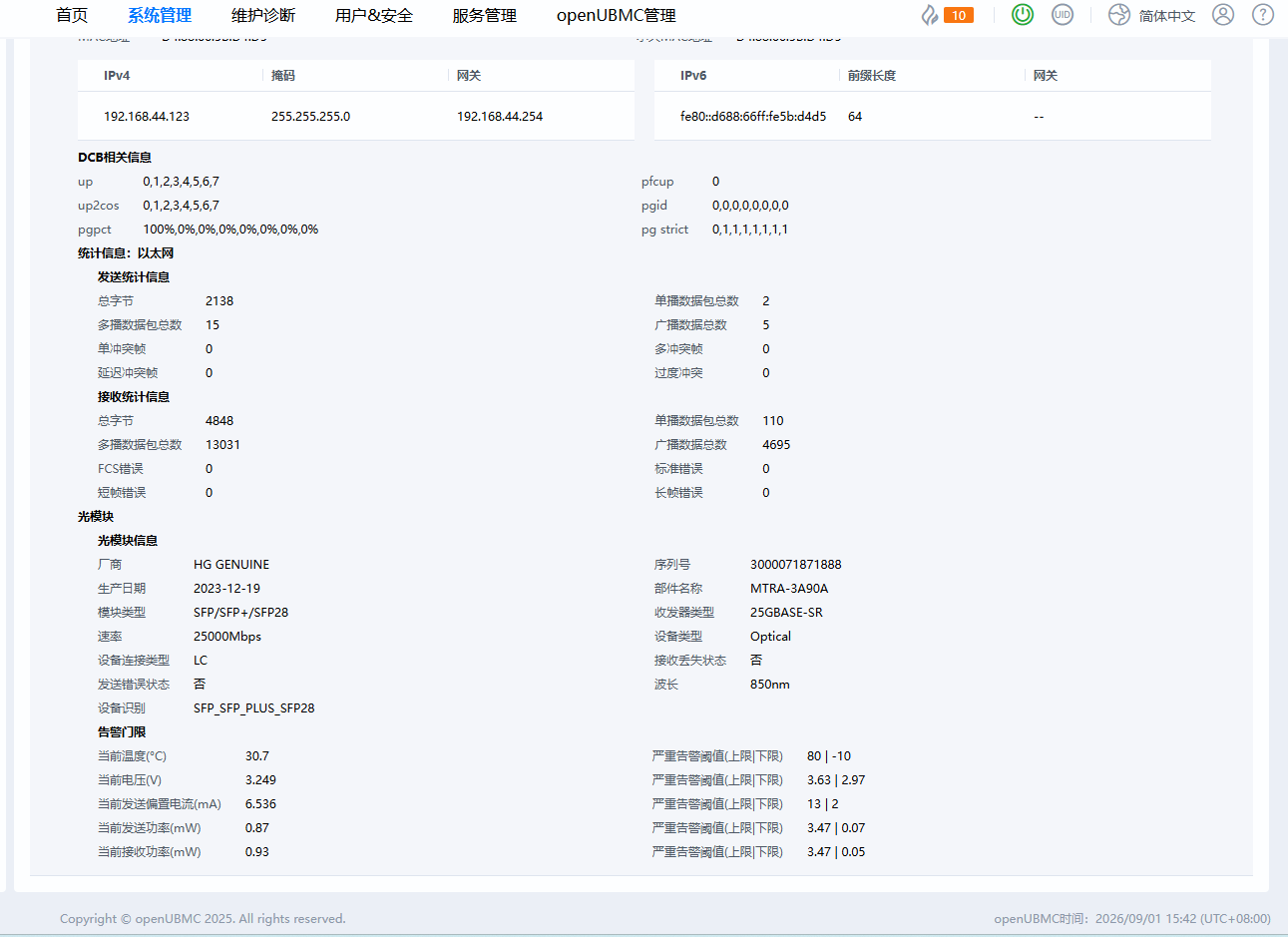
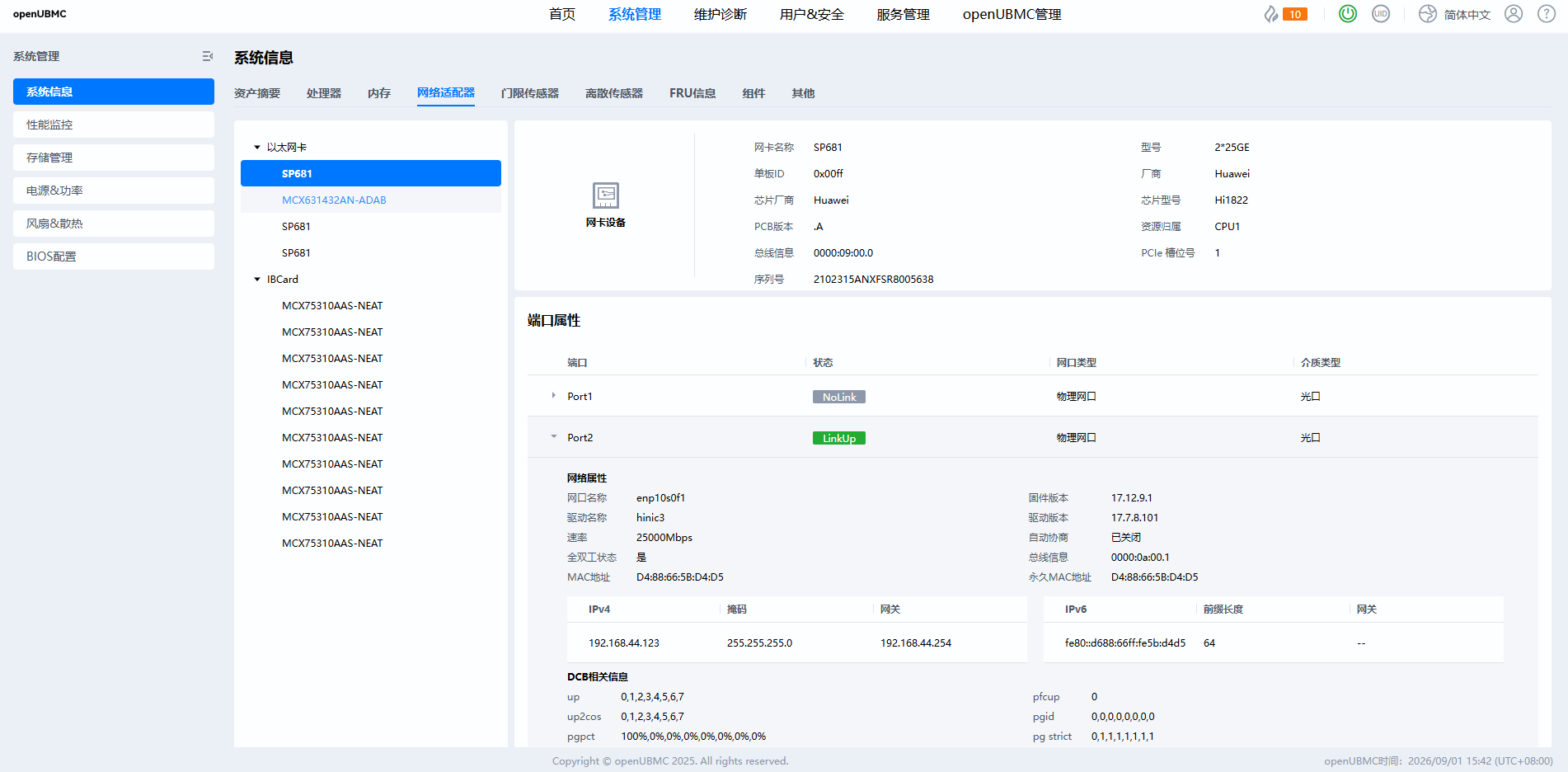
  2. 系统管理-系统信息-网络适配器-选中网络设备,选中以太网卡设备,点击端口属性下方隐藏标志

  3. 查看指定网卡的连接视图

期望结果

端口隐藏信息中有连接视图,显示交换机信息

实际结果

端口隐藏信息中无连接视图,不显示交换机信息
代码

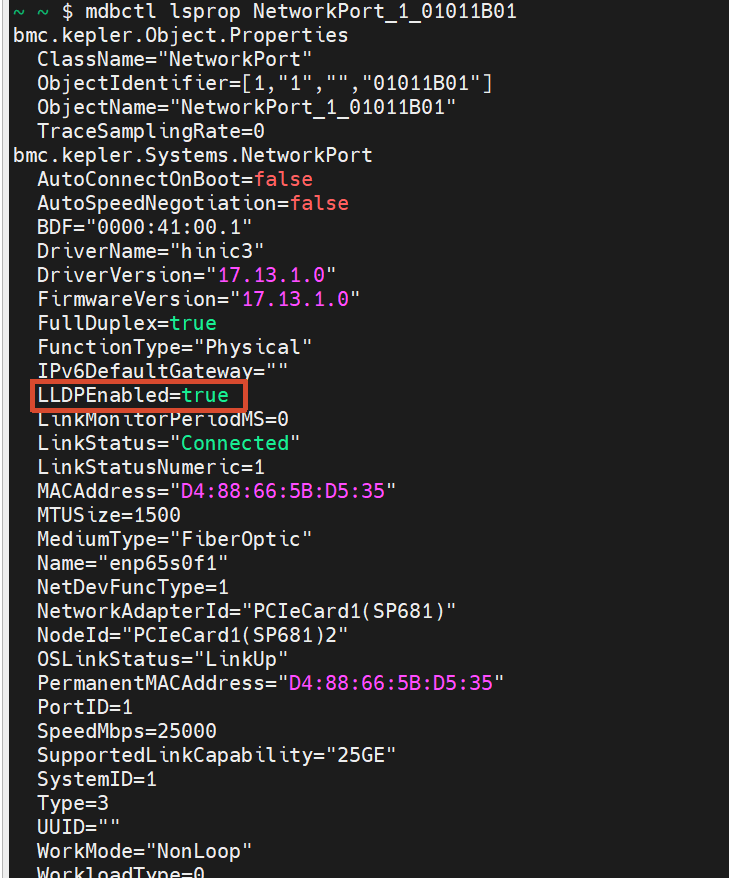
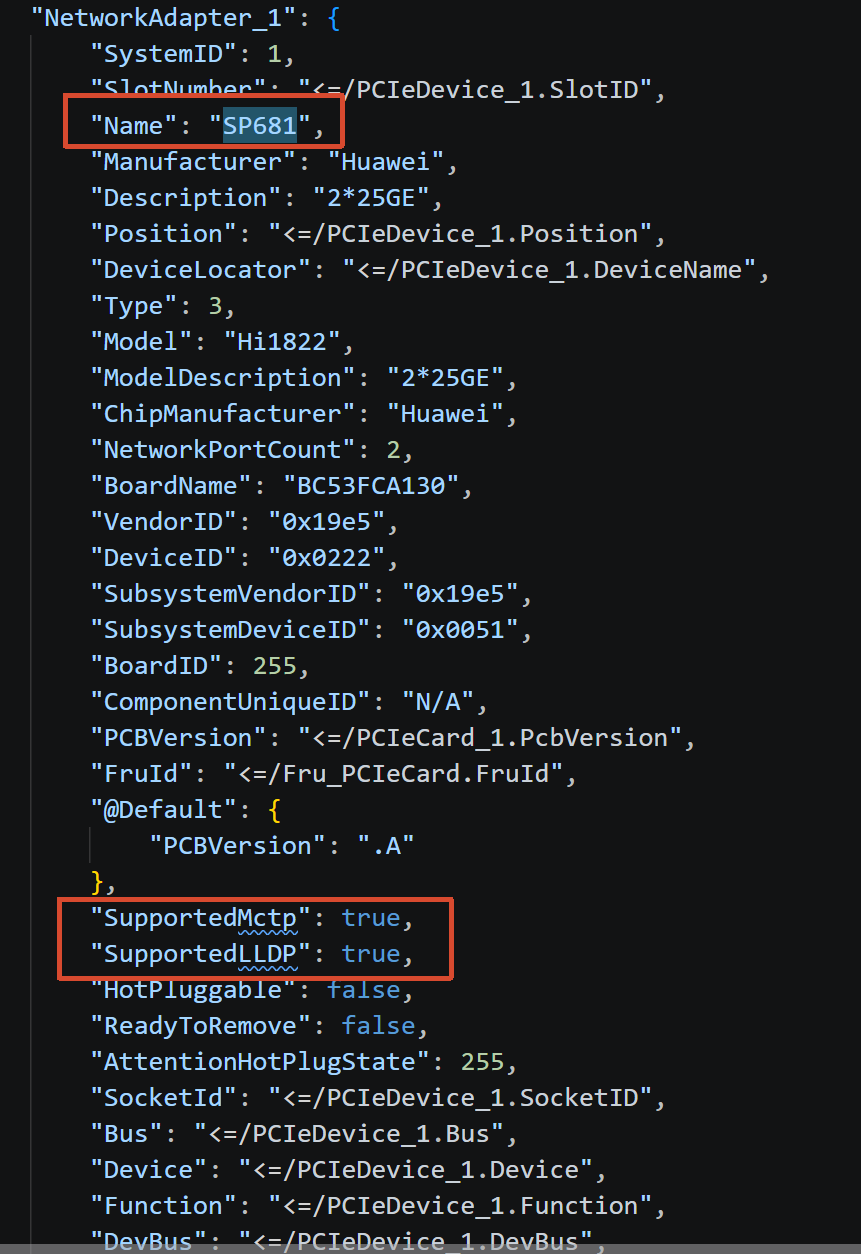
1.网卡SP681支持MCTP和LLDP,且对应字段已经设置为true
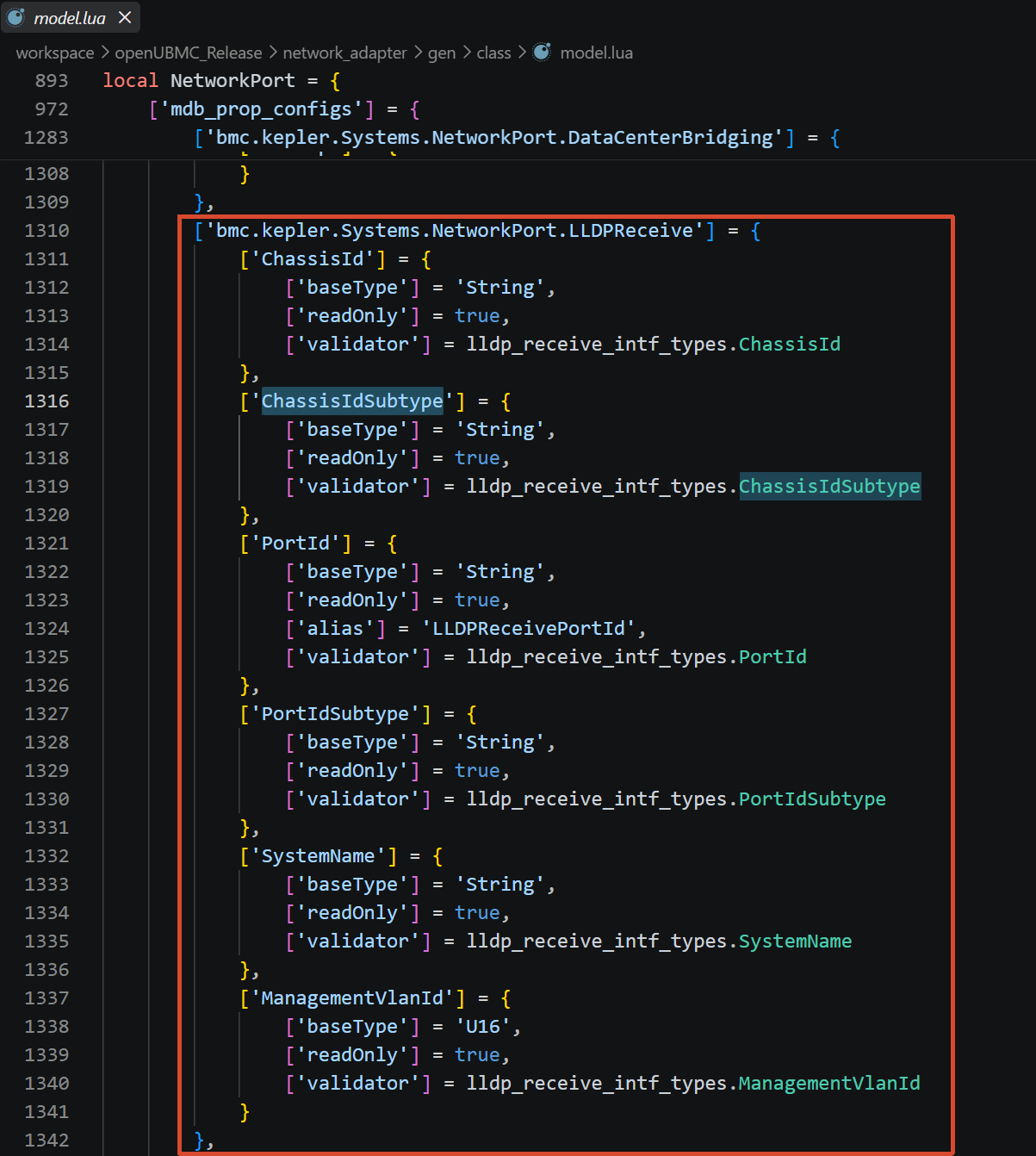
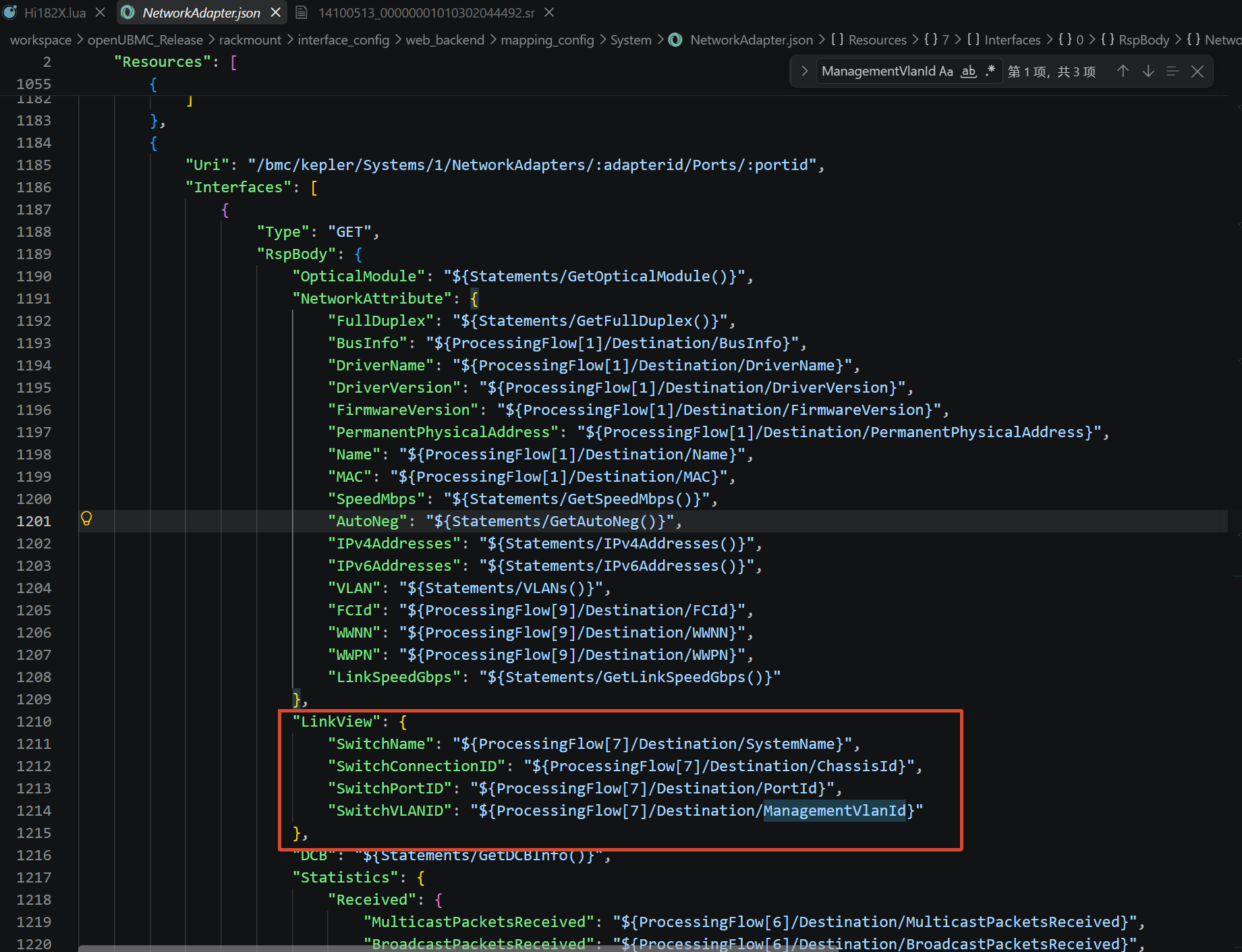
2.交换机相关字段的配置

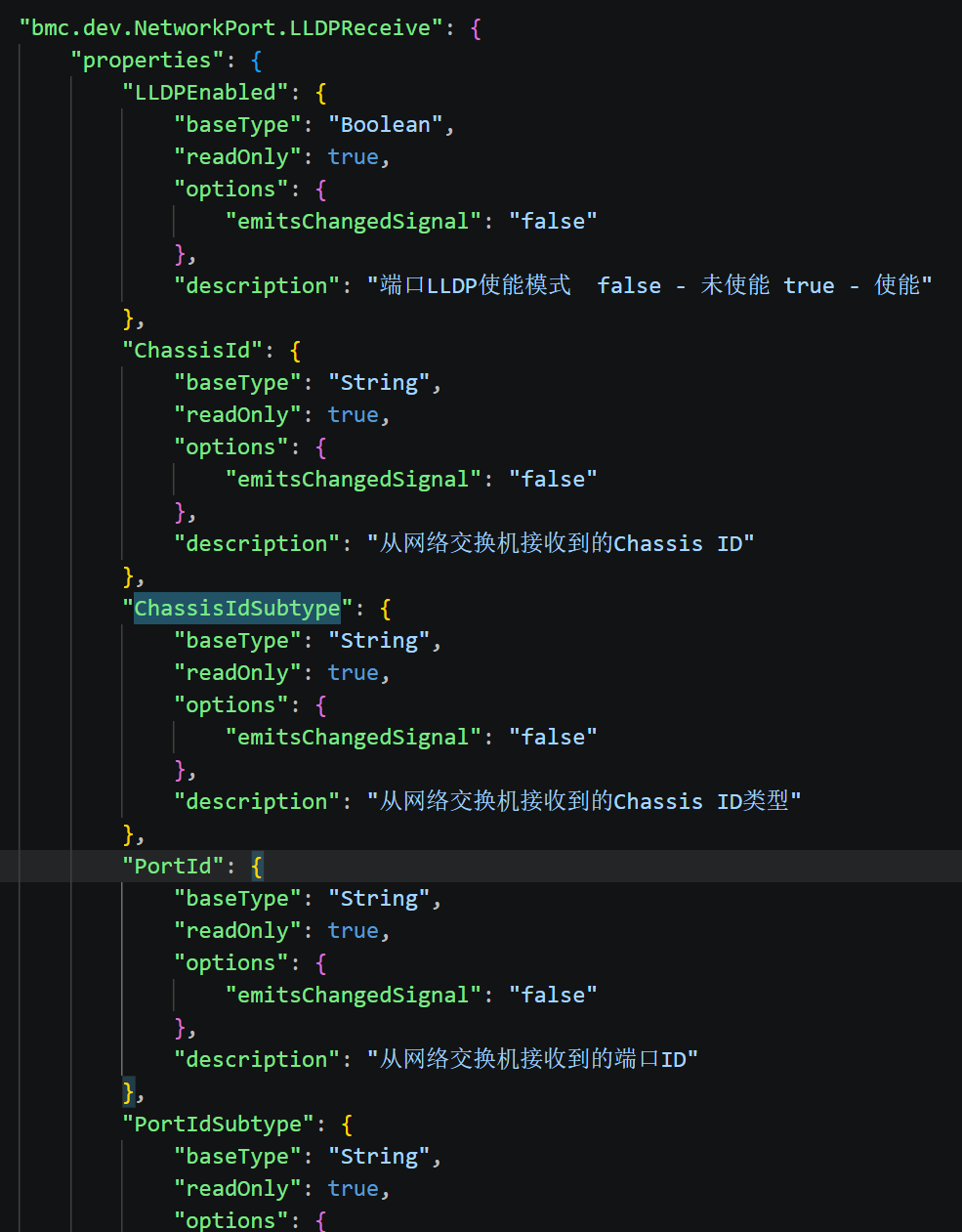
mdb_interface/json/intf/mdb/bmc/dev/NetworkPort/LLDPReceive.json
network_adapter/gen/class/model.lua
network_adapter/src/lualib/device/class/network_port.lua

local lldp_receive_mds_name_map<const> = {
    ChassisId = 'chassis_id',
    ChassisIdSubtype = 'chassis_id_subtype',
    PortId = 'port_id',
    PortIdSubtype = 'port_id_subtype',
    SystemName = 'system_name',
    ManagementVlanId = 'vlan_id'
}

local default_lldp_receive_data<const> = {
    ChassisId = '',
    ChassisIdSubtype = '',
    PortId = '',
    PortIdSubtype = '',
    SystemName = '',
    ManagementVlanId = 0xFFFF
}

local function set_lldp_for_hi182x(port, enable)
    local ok, ret
    if enable then
        -- 先尝试新命令字
        ok, ret = pcall(function()
            return port.ncsi_config_obj
                :SetOnLLDPTxEnable({ channel_id = port:get_port_id(), package_id = port.package_id })
                :value()
        end)
        if not ok or not ret then
            -- 新命令字失败,则尝试旧命令字
            ok, ret = pcall(function()
                return port.ncsi_config_obj
                    :SetOnLLDPTxEnableOld({
                        channel_id = port:get_port_id(),
                        package_id = port.package_id,
                    })
                    :value()
            end)
        end
        return ok, ret
    end
    -- 先尝试新命令字
    ok, ret = pcall(function()
        return port.ncsi_config_obj
            :SetOffLLDPTxEnable({ channel_id = port:get_port_id(), package_id = port.package_id })
            :value()
    end)
    if not ok or not ret then
        -- 新命令字失败,则尝试旧命令字
        ok, ret = pcall(function()
            return port.ncsi_config_obj
                :SetOffLLDPTxEnableOld({ channel_id = port:get_port_id(), package_id = port.package_id })
                :value()
        end)
    end
    return ok, ret
end


function c_network_port:set_LLDP_capability_by_ncsi(enable, parent)
    local ok, ret
    if parent and device_comm_fun.is_hi182x_model(parent.Model) then
        ok, ret = set_lldp_for_hi182x(self, enable)
    elseif parent and LLDP_SUPPORTED_MELLANOX_MODELS[parent.Model] then
        ok, ret = set_lldp_for_mellanox(self, enable, parent)
    elseif parent and LLDP_SUPPORTED_WANGXUN_MODELS[parent.Model] then
        ok, ret = set_lldp_for_wangxun(self, enable)
    end

    if not ok or not ret then
        log:error('set LLDP capability failed for port %s', self.NodeId)
    end
    return ok, ret
end

function c_network_port:set_LLDP_capability_by_mcu(enable)
    local ctx = context.get_context_or_default()
    local dpu_cards = client:GetDPUCardObjects()
    local position = self:get_position()
    local cur_dpu, ok, ret
    for _, dpu_card in pairs(dpu_cards) do
        if dpu_card.extra_params.Position == position then
            cur_dpu = dpu_card
            break
        end
    end
    if not cur_dpu then
        log:error('not find dpu card on position[%s]', position)
        return false, false
    end
    ok, ret = pcall(function()
        return cur_dpu:SetLLDPStatus(ctx, self:get_port_id(), enable and 1 or 0)
    end)
    if not ok then
        log:error('unable to set LLDP capability for port %s, error: %s', self:get_port_id(), ret)
        return false, false
    end
    return true, true
end

-- redfish调用此函数设置LLDP使能
function c_network_port:redfish_set_lldp_capability(enable)
    log:notice('set LLDP capability for port %s, enable: %s', self.NodeId, enable)
    local parent = self:get_parent()
    local ctx = context.get_context()
    -- 网卡不支持lldp使能
    if not parent.SupportedLLDP then
        log:error('not support set LLDP capability for port %s', self.NodeId)
        self:log_lldp_operation(enable, ctx, false)
        error(custom_messages.ConfigPortLLDPErr())
    end

    local ok, ret
    if self.WorkloadType == LOADED_NIC_OS then
        ok, ret = self:set_LLDP_capability_by_mcu(enable)
    elseif self.oem_smbus_config_obj and next(self.oem_smbus_config_obj) ~= nil then
        ok, ret = self.oem_smbus_config_obj:SetPortLLDPEnable(self, enable)
    else
        ok, ret = self:set_LLDP_capability_by_ncsi(enable, parent)
    end

    if not ok or not ret then
        log:error('set LLDP capability failed for port %s', self.NodeId)
        self:log_lldp_operation(enable, ctx, false)
        error(custom_messages.ConfigPortLLDPErr())
    end

    self:log_lldp_operation(enable, ctx, true)
    log:notice('%s port %s LLDP successfully', enable and 'enable' or 'disable', self.NodeId)
end

function c_network_port:update_LLDP_enabled_by_mcu()
    local ctx = context.get_context_or_default()
    local dpu_cards = client:GetDPUCardObjects()
    local position = self:get_position()
    local cur_dpu
    for _, dpu_card in pairs(dpu_cards) do
        if dpu_card.extra_params.Position == position then
            cur_dpu = dpu_card
            break
        end
    end
    if not cur_dpu then
        log:error('not find dpu card on position[%s]', position)
        return
    end
    local ok, status = pcall(function()
        return cur_dpu:GetLLDPStatus(ctx, self:get_port_id())
    end)
    if not ok then
        log:error('unable to get LLDP capability for port %s, error: %s', self:get_port_id(), status)
        return
    end
    self.LLDPEnabled = status == 1 and true or false
end

function c_network_port:enable_lldp_over_mctp()
    self:next_tick(function()
        -- 最多尝试5次,每次间隔1分钟
        local max_retries = 5
        local retry_count = 0
        local retry_interval_ticks = 6000 -- 1分钟
        local ok, ret

        while retry_count < max_retries do
            retry_count = retry_count + 1
            ok, ret = pcall(function()
                return self.ncsi_config_obj
                    :SetOnLLDPOverMCTPEnable({
                        channel_id = self:get_port_id(),
                        package_id = self.package_id,
                    })
                    :value()
            end)

            if ok and ret then
                log:notice('%s enable lldp over mctp successfully, retry_count: %d', self.NodeId, retry_count)
                return
            end

            if retry_count < max_retries then
                log:warn(
                    'enable lldp over mctp failed for port %s, retry %d/%d, will retry after 2 minutes',
                    self.NodeId,
                    retry_count,
                    max_retries
                )
                skynet.sleep(retry_interval_ticks)
            end
        end

        log:error('enable lldp over mctp failed for port %s after %d retries', self.NodeId, max_retries)
    end)
end

function c_network_port:update_lldp_tx_enabled_by_ncsi()
    local s
    local parent = self:get_parent()
    if parent and device_comm_fun.is_hi182x_model(parent.Model) then
        s = self.ncsi_config_obj:GetLLDPTxEnable({ channel_id = self:get_port_id(), package_id = self.package_id })
    elseif parent and (LLDP_SUPPORTED_MELLANOX_MODELS[parent.Model] or LLDP_SUPPORTED_WANGXUN_MODELS[parent.Model]) then
        s = self.ncsi_config_obj:GetLLDPCapability({ channel_id = self:get_port_id(), package_id = self.package_id })
    end
    self:connect_signal(s.on_data_change, function(data)
        self.LLDPEnabled = data
        log:notice('%s update lldp tx enabled to %s by ncsi', self.NodeId, data)
    end)
    table.insert(self.schedulers, s)
    s:start()
    log:notice('%s update lldp tx enabled by ncsi start', self.NodeId)
end

function c_network_port:update_ncsi_properties()
    self:next_tick(self.update_ncsi_port_stats, self)
    self:next_tick(self.update_ncsi_link_status, self)
    self:next_tick(self.update_BDF_by_ncsi, self)
    self:next_tick(self.update_MAC_by_ncsi, self)
    self:next_tick(self.update_DCBX_by_ncsi, self)
    self:next_tick(self.update_default_MAC_by_ncsi, self)
    if self.WorkloadType == LOADED_NIC_OS then
        self:next_tick(self.update_LLDP_enabled_by_mcu, self)
    else
        self:next_tick(self.update_lldp_tx_enabled_by_ncsi, self)
    end
    local op = self:get_optical_module()
    if op then
        op:update_ncsi_properties(self.ncsi_config_obj, self.package_id)
    end
end

function c_network_port:register_property_changed_callback()
    local link_status = self.LinkStatusNumeric == 1 and 'Connected' or
        self.LinkStatusNumeric == 0 and 'Disconnected' or INVALID_DATA_STRING
    self:set_link_status(link_status)
    self:connect_signal(self.on_property_changed, function(name, value)
        if property_changed_switch[name] then
            self:next_tick(property_changed_switch[name], self, value)
        end
    end)

    if self['bmc.kepler.Systems.NetworkPort'] then
        self:connect_signal(self['bmc.kepler.Systems.NetworkPort'].property_before_change, function(name, value)
            if name == 'LLDPEnabled' then
                self:redfish_set_lldp_capability(value)
            end
        end)
    end
end

function c_network_port:ctor()
    self.schedulers = {}
    self.lldp_config_obj = {}
    self.ncsi_config_obj = {}
    self.smbus_schedulers = {}
    self.oem_smbus_config_obj = {}
    self.package_id = 0
    self.na_object_name = ''
    self.np_object_name = ''
    self.lldp_clear_task = false
    self.tasks = c_tasks.new()
    self.vlans = false
    self.get_ncsi_link_status_succeess = false
    self.npu_ipv4_info = {}
    self.npu_ipv4_obj = false
    -- 此表用于临时保存非bma获取的属性,用于bma断开后恢复,当前仅LinkStatus使用
    self.t_port_prop_without_bma = {}
    self.ncsi_get_linkstatus_retry_count = 0
    self.is_npu_heartbeat_loss = false
    self.is_dmp_status_ready = false
    self.mac_change = signal.new()
    self.record_flag = 0
    self.hccs_flag = 2
    self.link_up_cnt = 0
    self.link_down_cnt = 0
    self.link_up_timestamp = {}
    self.link_down_timestamp = {}
    self.per_module_log_cnt = 0
    self.npu_port_log_buffer = {}
    self.npu_port_cdr_info_abnormal = false
    self.children = {}
    self.parent = {}
    self.device_path = ''
    self.hccs_info = {
        npu_id = 0,
        health_status = 0,
        lane_mode = {},
        link_lane_list = {},
        link_speed = {},
        tx_packets = {},
        tx_bytes = {},
        rx_packets = {},
        rx_bytes = {},
        retry_count = {},
        error_count = {},
        first_error_lane = 255,
        snr_max = {{0, 0, 0, 0}, {0, 0, 0, 0}, {0, 0, 0, 0}, {0, 0, 0, 0},
            {0, 0, 0, 0}, {0, 0, 0, 0}, {0, 0, 0, 0}},
        snr_min = {{0, 0, 0, 0}, {0, 0, 0, 0}, {0, 0, 0, 0}, {0, 0, 0, 0},
            {0, 0, 0, 0}, {0, 0, 0, 0}, {0, 0, 0, 0}},
        half_height_max = {{0, 0, 0, 0}, {0, 0, 0, 0}, {0, 0, 0, 0}, {0, 0, 0, 0},
            {0, 0, 0, 0}, {0, 0, 0, 0}, {0, 0, 0, 0}},
        half_height_min = {{0, 0, 0, 0}, {0, 0, 0, 0}, {0, 0, 0, 0}, {0, 0, 0, 0},
            {0, 0, 0, 0}, {0, 0, 0, 0}, {0, 0, 0, 0}}
    }
    self.get_properties_res = {}
    self.bdf_task_is_running = false
end

rackmount/interface_config/web_backend/mapping_config/System/NetworkAdapter.json

连接视图
3.LLDP接收信息接口属性说明

属性名 类型 可读写 描述 等级定义
ChassisId String 只读 从网络交换机接收到的Chassis ID;交换机(机箱)的唯一标识(交换机连接ID) L1: 基本静态信息
ChassisIdSubtype String 只读 从网络交换机接收到的Chassis ID类型:1、Agentld;2、ChassisComp;3、IfAlias;4、IfName;5、LocalAssign;6、MacAddr;7、NetworkAddr;8、NotTransmitted;9、PortComp L1: 基本类型信息
PortId String 只读 从网络交换机接收到的端口ID;交换机端口的唯一标识 L1: 基本静态信息
PortIdSubtype String 只读 从网络交换机接收到的端口ID类型:1、Agentld;2、ChassisComp;3、IfAlias;4、IfName;5、LocalAssign;6、MacAddr;7、NetworkAddr;8、NotTransmitted;9、PortComp L1: 基本类型信息
SystemName String 只读 网络交换机名称 L1: 基本静态信息
ManagementVlanId U16 只读 从网络交换机接收到的VLAN ID;交换机的管理 VLAN ID L1: 基本静态信息

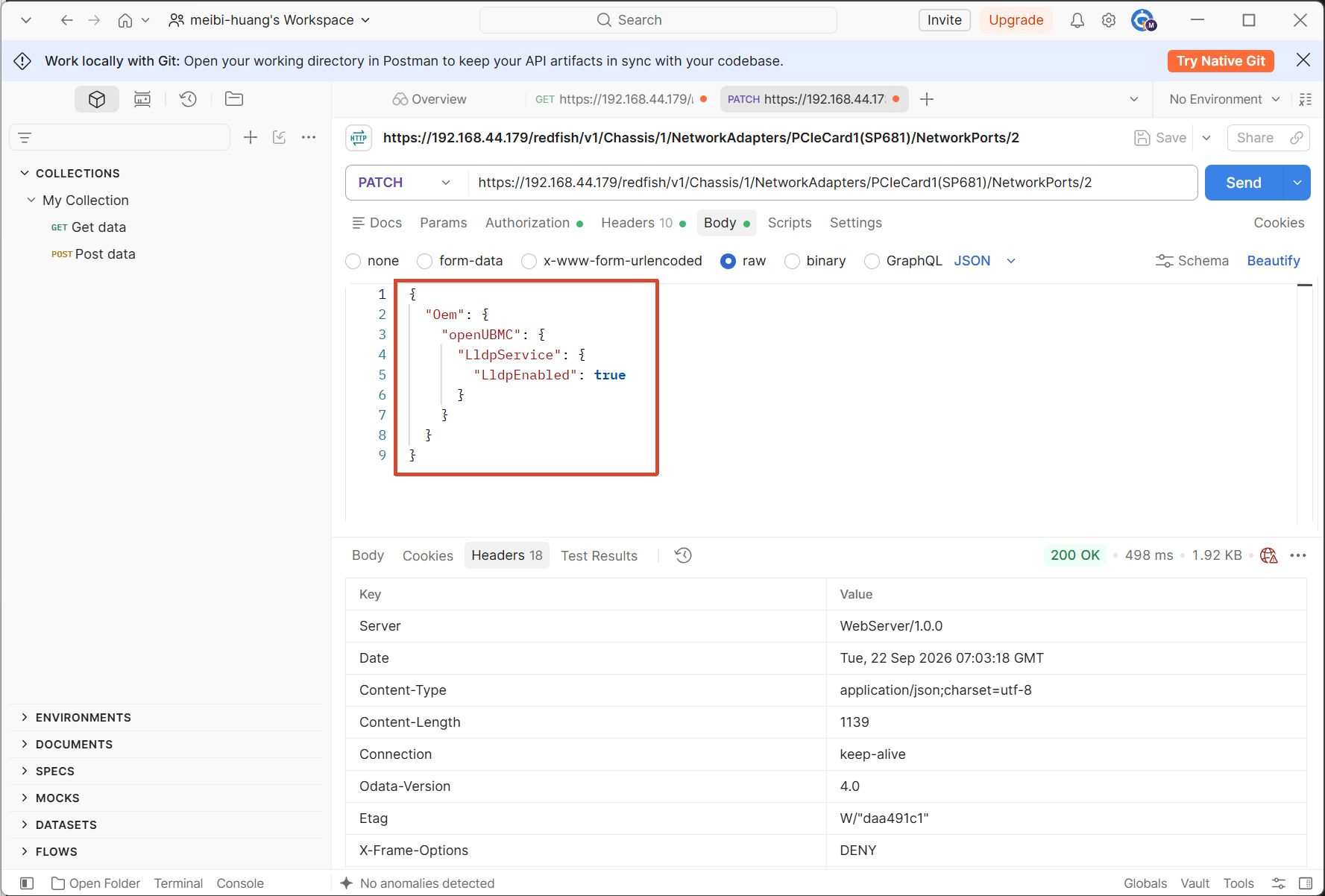
尝试过的解决方案

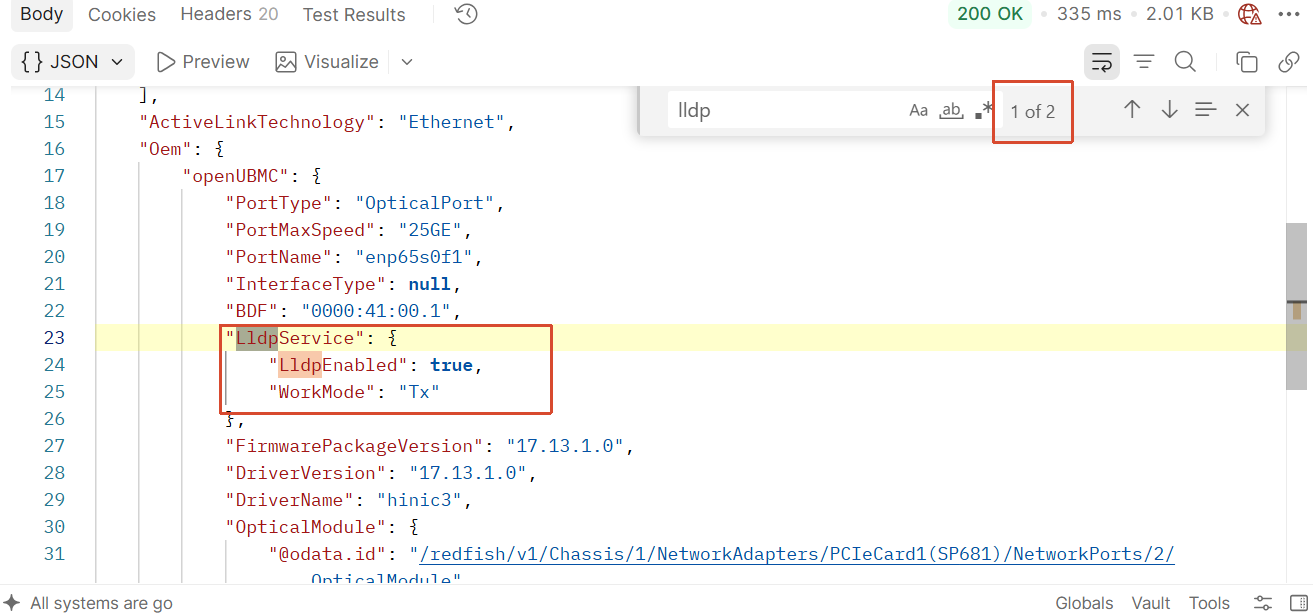
1.通过postman修改LLDPEnabled属性为true
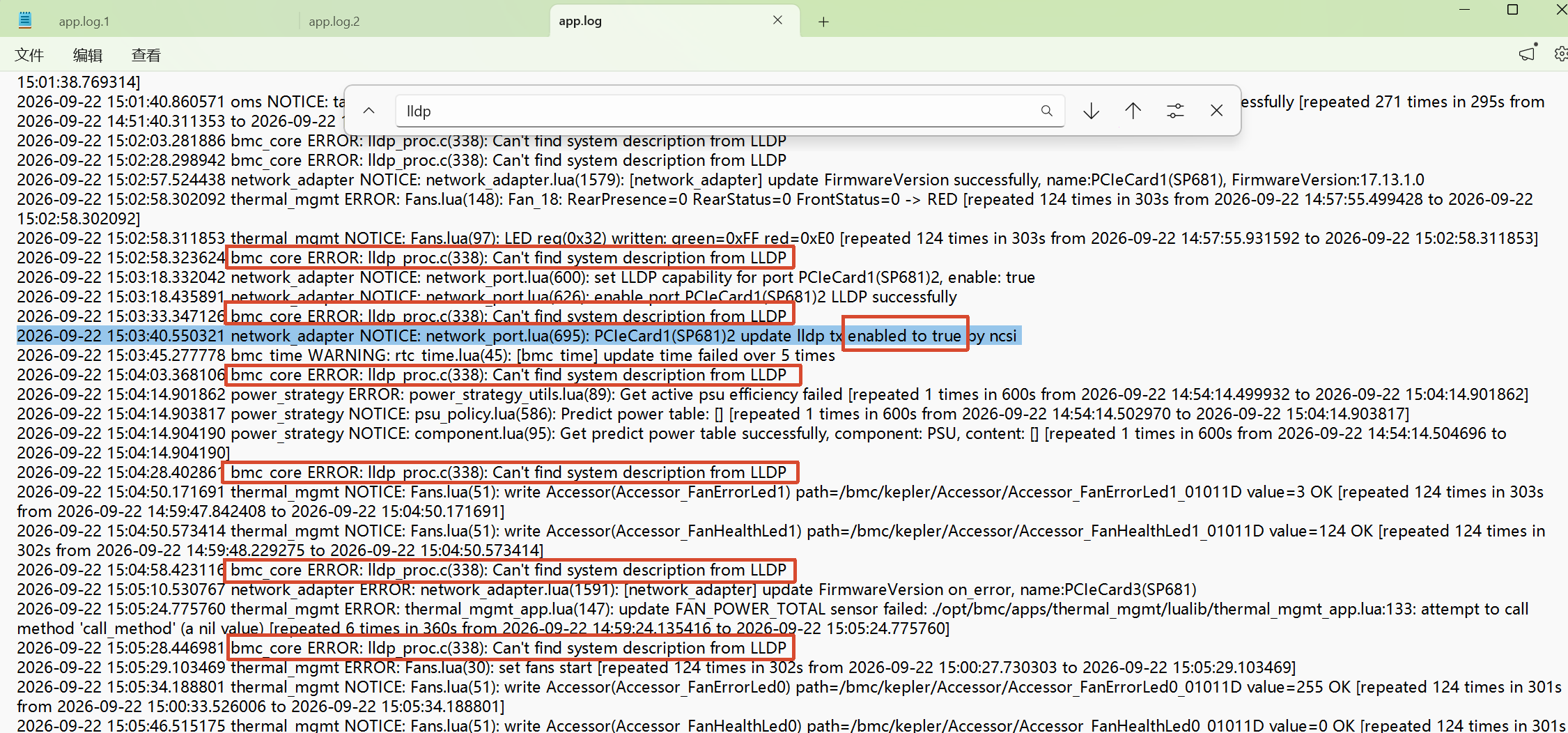
2.查看日志

在设置LLDPEnabled属性为true后,依旧报Can’t find system description from LLDP
3.抓包LLDP报文

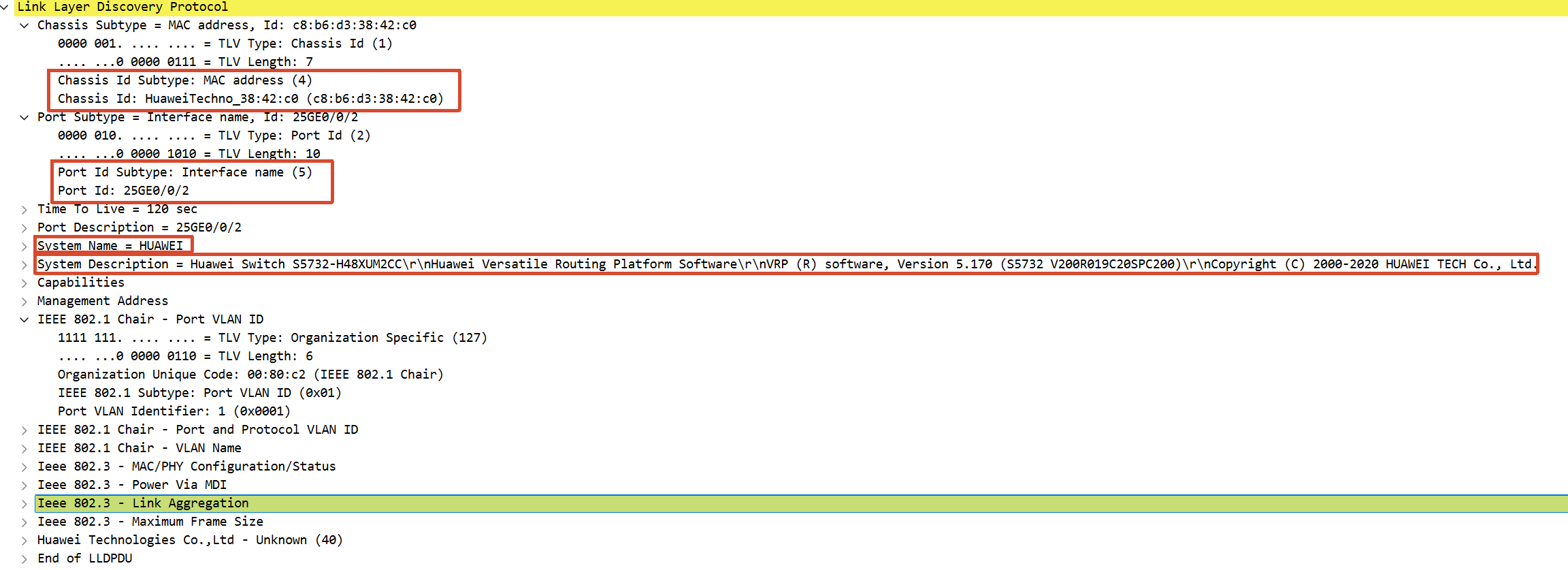
抓包LLDP报文成功,找到ChassisId、ChassisIdSubtype、PortId、PortIdSubtype、SystemName和System Description

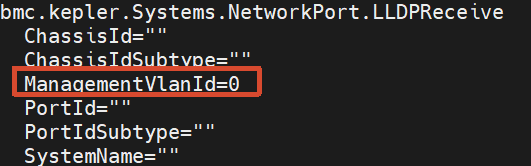
没有ManagementVlanId,但是ManagementVlanId默认为0
image

image

4.追踪抓取通信报文

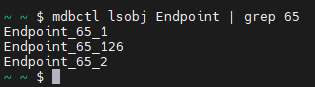
用tracemctp Endpoint_65_2 start抓取BMC 与 SP681 网卡之间,通过 MCTP 通道传输的 NCSI 管理报文

报文中没有lldp相关信息

% tracemctp Endpoint_65_2 start2.txt (435.3 KB)

确定Endpoint
  1. BDF 地址

BDF=“0000:41:00.1”

  1. 把 BDF 映射到 phy_addr

MCTP 的物理地址(phy_addr)和 PCIe 的 BDF 有对应关系。0000:41:00.1 里的设备号是 0x41,换算成十进制就是 65。

  1. 在 MCTP 注册信息里找 phy_addr=65 的条目
idx:12, module_name = network_adapter, phy_addr = 65, msg_src_eid = 24, msg_type = 126, pid = 5611, process_tag = 3224632059
idx:13, module_name = network_adapter, phy_addr = 65, msg_src_eid = 24, msg_type = 1, pid = 5611, process_tag = 3224632059
idx:14, module_name = network_adapter, phy_addr = 65, msg_src_eid = 24, msg_type = 2, pid = 5611, process_tag = 3224632059

phy_addr = 65 对应的 EID 是 24,而 msg_type = 2 正好是 NCSI over MCTP,也就是 LLDP 数据上报用的消息类型。

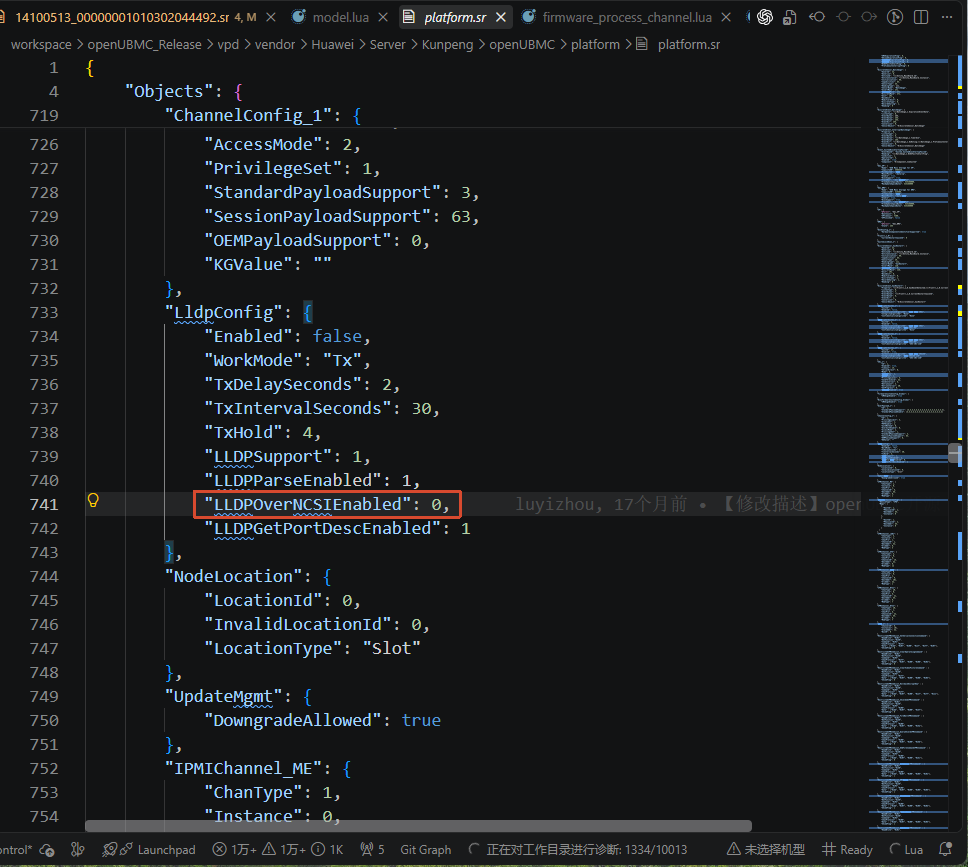
5.修改LLDPOverNCSIEnabled

platform.sr中LLDPOverNCSIEnabled为0,修改为1后,没有变化。
求助

1.app.log中bmc_core的Ildp_proc.c(338)一直报错:Can’t find system description from LLDP 是什么原因
2.LLDP报文中有相应字段,但无法解析和正确显示,如何解决

3.NetworkAdapter_1_01011B01的LLDPSupported=false,而且网卡资源中并没有LLDPSupported这个属性,是什么原因
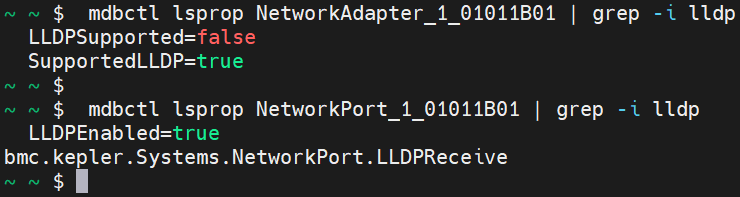
4.LLDPSupported和SupportedLLDP字段有什么区别?

mdb_interface/json/intf/mdb/bmc/kepler/Systems/NetworkAdapter.json
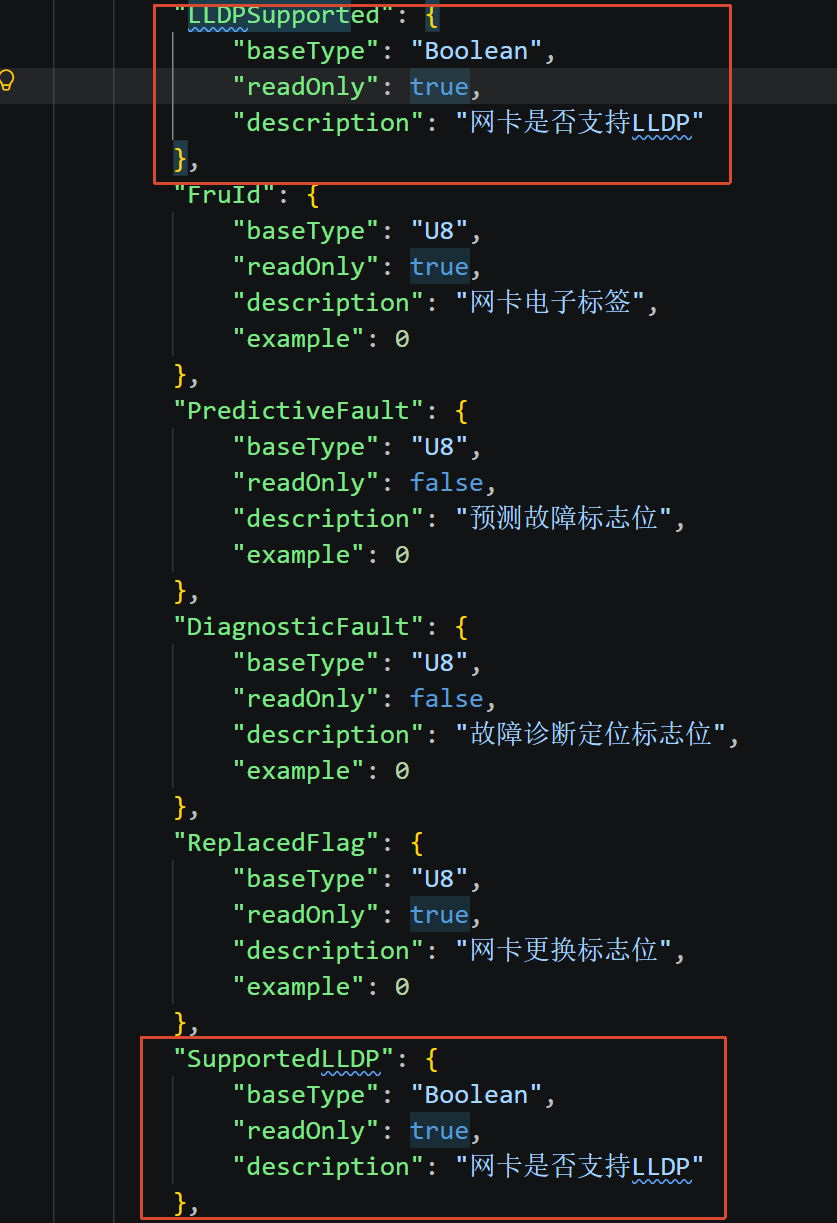
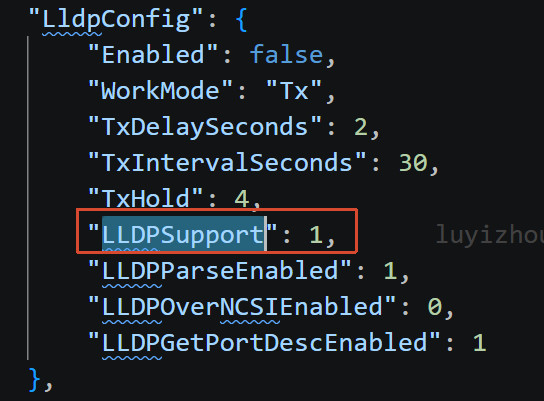
5.LLDPSupported和vpd/vendor/Huawei/Server/Kunpeng/openUBMC/platform/platform.sr中的LLDPSupport又有什么区别
6.请问各位的BMC有没有正确显示交换机信息?可以发截图看一下吗?

答案内容由AI生成,仅供参考:
(无明确标有“问题总结”或“结论”等字样的章节,返回空内容)

点击此处查看详细分析解答

根据提供的知识图谱和文档片段,我将针对您的问题进行分析和解答。请注意,所有结论均严格基于所给上下文,未引入外部信息。


问题原因与排查建议

可能的原因

  1. LLDP 未启用

    • 知识图谱中指出,BMC 通过 LldpConfig 配置和启用 LLDP 协议。
    • 文档片段 6 提供了命令行 ipmcset -t lldp -d status -v <enabled|disabled> 可用于设置 LLDP 状态。
    • 若该状态为 disabled,则 BMC 不会接收或处理 LLDP 报文,导致无法获取交换机信息。
  2. LLDP 接收接口无有效数据

    • 接收到的 LLDP 信息存放在 bmc.kepler.Systems.NetworkPort.LLDPReceive 接口中,其属性包括 ChassisId、PortId、SystemName、ManagementVlanId 等(见知识图谱 “bmc.kepler.Systems.NetworkPort.LLDPReceive” 实体)。
    • 如果该对象不存在或属性值为空,则连接视图自然无法显示。
    • 可通过 busctl 命令检查资源树,例如:
      busctl --user introspect bmc.kepler.bmc_network /bmc/kepler/Managers/1/EthernetInterfaces/<PortId>
      
  3. 网卡驱动或配置问题

    • 知识图谱中记录有 Bmc_Core 多次无法从 LLDP 获取端口名称的情况(实体 Lldp_Proc),这可能导致解析失败。
    • 不同网卡模型(如 Hi182x、Mellanox、Wangxun)在 LLDP 配置上存在差异,网卡需支持 LLDP 接收且正确启用(参见提供的 network_port.lua 代码片段中 set_LLDP_capability_by_ncsi 等函数)。
  4. 属性等级不符

    • 从 LLDP接收信息接口属性说明 表格可知,ChassisId、PortId、SystemName 等均属于 L1 等级,需确保接口支持该等级的数据。

排查步骤

  1. 检查 LLDP 启用状态

    • 使用 ipmcset -t lldp -d status -v enabled 启用 LLDP,或通过 Redfish/Web 界面确认。
  2. 检查接收数据

    • 通过 busctl 查看 bmc.kepler.Systems.NetworkPort.LLDPReceive 对象的属性值是否非空。
  3. 查看日志

    • 搜索 app.log 或 framework.log 中的 LLDP 相关错误,例如 Bmc_Core 的 Lldp_Proc 报错。
  4. 确认网卡模型支持

    • 查看 SupportedLLDP 属性是否为 true(您已提及 SP681 已设置为 true,但需进一步确认实际运行状态)。

模拟方案(无真实交换机时验证)

知识图谱和文档片段未提供具体的模拟工具或方法。但基于现有上下文,可做以下操作:

  • 利用支持 LLDP 的设备(如另一台交换机、路由器或具备 LLDP 功能的网卡)直接连接 BMC 网口,验证是否能够收到 LLDP 报文。
  • 检查接收数据链路:通过 busctl 监视 bmc.kepler.Systems.NetworkPort.LLDPReceive 对象属性变化,确认 BMC 侧解析逻辑是否正常。
  • 手动构造 LLDP 报文:上下文未提供具体脚本,但可通过网络协议分析工具(如 Wireshark)或编程方式发送 LLDP 帧,此部分需自行实现,但未获上下文支持。

若您希望获得更具体的模拟方法,建议补充相关技术文档或社区讨论。


SP681 网卡的驱动适配注意事项

知识图谱中未直接提及 SP681 型号,但提供了类似网卡(如 Hi182x)的 LLDP 配置参考:

  • network_port.lua 代码中,针对 Hi182x 网卡使用了 SetOnLLDPTxEnable / SetOffLLDPTxEnable 命令,且支持新旧命令字回退机制。
  • 对于 Mellanox、Wangxun 等也有专门的 set_LLDP_capability_by_xxx 分支函数,说明不同厂商网卡需适配不同的 LLDP 控制方式。
  • 同时存在通过 MCU 方式设置 LLDP 状态(set_LLDP_capability_by_mcu),适用于特定工作负载(如 LOADED_NIC_OS)。

建议:

  1. 确认 SP681 是否在 LLDP_SUPPORTED_*_MODELS 列表中,或是否走 oem_smbus_config_obj 分支。
  2. 检查网卡固件是否支持 LLDP over MCTP(您提到的 enable_lldp_over_mctp 函数),确保 MCTP 通道可用。
  3. 查看 update_lldp_tx_enabled_by_ncsi 等函数是否正确刷新 LLDPEnabled 状态。

由于上下文未覆盖 SP681 具体适配细节,建议结合网卡厂商提供的驱动说明和 BMC 侧日志进行排查。


以上回答严格基于所给上下文信息。如果问题仍未解决,可能需要获取更详细的日志或咨询 openUBMC 社区,但社区资料也未在本上下文中提供。

  1. 抓取LLDP报文,需要使用wireshark工具抓包分析。
  2. 需要bmc_core组件解释该处报错含义,从network_adapter的打印看设置操作是成功的。
  3. 关于这个问题,能否更具体的描述一下?具体是在担心有什么样的坑呢

1.已抓取lldp报文,用wireshark工具抓包分析后,能发现交换机的信息

2.因为bmc_core组件为闭源的,我暂时不清楚这个报错原因,也不清楚这里的LLDP 解析逻辑是怎样的
3.想问一下这个显示功能是否支持?如果支持 怎么才能出现这些信息?

目前认为可能是因为网卡给BMC上报信息的通道有问题,但不知道如何去解决。

请问您这边的BMC有正确显示交换机信息吗?有截图可以看一下吗?

不同类型网卡对lldp的支持不同。可能是使用了不支持的网卡。
我也设置下LldpEnabled,查下日志。如果有问题我定位下代码逻辑

1.追踪抓取VDPCI通信报文

但是没有报文,也就无法获取

用tracemctp Endpoint_65_126 start 抓取BMC 与 SP681 网卡之间,通过 MCTP 通道传输的 VDPCI 报文,但没有输出。
-- network_adapter/src/lualib/device/class/network_adapter.lua:1245-1252
function c_network_adapter:setup_vdpci_lldp_listener(ports)
    -- 网卡lldp over mctp走的是mctp vdpci(0x7e)通道
    local endpoint = self:create_mctp_endpoint(mctp_lib.MCTP_MESSAGE_TYPE_VDPCI)
    local bus = c_object_manage.get_instance().bus
    local sig =
        MatchRule.signal('MessageReceived', 'bmc.kepler.Systems.Mctp.PCIeEndpoint'):with_path(
            endpoint.path)

image

image

确定Endpoint

  1. BDF 地址

BDF=“0000:41:00.1”

  1. 把 BDF 映射到 phy_addr

MCTP 的物理地址(phy_addr)和 PCIe 的 BDF 有对应关系。0000:41:00.1 里的设备号是 0x41,换算成十进制就是 65。

  1. 在 MCTP 注册信息里找 phy_addr=65 的条目
idx:12, module_name = network_adapter, phy_addr = 65, msg_src_eid = 24, msg_type = 126, pid = 5611, process_tag = 3224632059
idx:13, module_name = network_adapter, phy_addr = 65, msg_src_eid = 24, msg_type = 1, pid = 5611, process_tag = 3224632059
idx:14, module_name = network_adapter, phy_addr = 65, msg_src_eid = 24, msg_type = 2, pid = 5611, process_tag = 3224632059

phy_addr = 65 对应的 EID 是 24,而 msg_type = 126 正好是 NCSI over MCTP,也就是 LLDP 数据上报用的消息类型。

2.手动通过 D-Bus 调用 mctpd 的 Request 方法

~ ~ $ busctl --user introspect bmc.kepler.mctpd /bmc/kepler/Systems/1/Mctp/Endpoint/65/126 bmc.kepler.Systems.Mctp.PCIeEndpoint
NAME TYPE SIGNATURE RESULT/VALUE FLAGS
.Request method a{ss}ayia{ss}a{ss} ay -
.Send method a{ss}aya{ss} - -
.MediumType property y 15 emits-change
.MessageType property y 126 emits-change
.ServiceName property s "network_adapter" emits-change
.Status property y 1 emits-change
.TargetEid property y 23 emits-change
.TargetPhyAddr property q 65 emits-change
.MessageReceived signal a{ss}ay - -
.OnMessage signal a{ss}ay - -
~ ~ $ busctl --user call bmc.kepler.mctpd /bmc/kepler/Systems/1/Mctp/Endpoint/65/126 bmc.kepler.Systems.Mctp.PCIeEndpoint Request a{ss}ayia{ss}a{ss} 0 0 0 0 0
Call failed: {"name":"kepler.mctpd.MctpRequestTimeout","format":"The Mctp request timeout."}

3.在rpc_records.log发现

被调用过 Request 的:只有消息类型为 /2(NC-SI)的 MCTP 端点。

没有被调用过 Request 的:所有消息类型为 /126(0x7E 厂商自定义)和 /1(MCTP 控制)的端点。
SP681 固件 17.13.1.0 是否支持 MCTP 0x7E 交换芯片管理?正确的请求格式是什么?

----------RPC Performance Statistics----------
bmc.kepler.frudata /bmc/kepler/Systems/1/Components/Component_PCIeCard_01011408 bmc.kepler.Object.Properties GetWithContext 2

bmc.kepler.pcie_device /bmc/kepler/Systems/1/PCIeDevices/PCIeCards/PCIeCard_1_01011B01 bmc.kepler.Object.Properties GetWithContext 3

bmc.kepler.hwdiscovery /bmc/kepler/ObjectGroup/01011403 bmc.kepler.ObjectGroup GetBinaryObjects 1

bmc.kepler.mctpd /bmc/kepler/Systems/1/Mctp/Endpoint/65/1 bmc.kepler.Object.Properties GetWithContext 2

bmc.kepler.persistence /bmc/kepler/persistence org.freedesktop.DBus.Peer Ping 2

bmc.kepler.frudata /bmc/kepler/Systems/1/Frus/Fru_PCIeCard_01011B03 bmc.kepler.Object.Properties GetWithContext 2

bmc.kepler.hwdiscovery /bmc/kepler/ObjectGroup/01011405 bmc.kepler.ObjectGroup GetBinaryObjects 1

bmc.kepler.frudata /bmc/kepler/Systems/1/Components/Component_PCIeCard_01011B03 bmc.kepler.Object.Properties GetWithContext 2

bmc.kepler.devmon /bmc/dev/ObjectGroup org.freedesktop.DBus.ObjectManager GetManagedObjects 1

bmc.kepler.hwdiscovery /bmc/kepler/ObjectGroup/0101 bmc.kepler.ObjectGroup GetBinaryObjects 1

bmc.kepler.mctpd /bmc/kepler/Systems/1/Mctp/Endpoint/214/2 bmc.kepler.Systems.Mctp.PCIeEndpoint Request 12767

bmc.kepler.host_agent /bmc/kepler/Systems/1/Sms org.freedesktop.DBus.Properties Get 1

bmc.kepler.mctpd /bmc/kepler/Systems/1/Mctp/Endpoint/65/2 bmc.kepler.Systems.Mctp.PCIeEndpoint Request 12300

bmc.kepler.persistence /bmc/kepler/persistence bmc.kepler.persistence BatchRead 2

bmc.kepler.maca /bmc/kepler/MdbService bmc.kepler.Mdb GetObject 50

bmc.kepler.bios /bmc/kepler/Systems/1/SmBios bmc.kepler.Object.Properties GetWithContext 13

bmc.kepler.pcie_device /bmc/kepler/Systems/1/PCIeDevices/PCIeDevice_1_01011401 bmc.kepler.Object.Properties GetWithContext 20

bmc.kepler.hwdiscovery /bmc/kepler/ObjectGroup/01011407 bmc.kepler.ObjectGroup GetBinaryObjects 1

bmc.kepler.pcie_device /bmc/kepler/Systems/1/PCIeDevices/PCIeDevice_1_01011406 bmc.kepler.Object.Properties GetWithContext 20

bmc.kepler.hwdiscovery /bmc/kepler/ObjectGroup/0101 bmc.kepler.Object.Properties GetAllWithContext 1

bmc.kepler.bmc_network /bmc/kepler/Managers/1/EthernetInterfaces org.freedesktop.DBus.Peer Ping 1

bmc.kepler.mctpd /bmc/kepler/Systems/1/Mctp/Endpoint/66/1 bmc.kepler.Object.Properties GetWithContext 2

bmc.kepler.hwdiscovery /bmc/kepler/ObjectGroup org.freedesktop.DBus.ObjectManager GetManagedObjects 1

bmc.kepler.hwdiscovery /bmc/kepler/ObjectGroup/01011B01 bmc.kepler.ObjectGroup GetBinaryObjects 1

bmc.kepler.pcie_device /bmc/kepler/Systems/1/PCIeDevices/PCIeDevice_1_01011403 bmc.kepler.Object.Properties GetWithContext 20

bmc.kepler.hwdiscovery /bmc/kepler/ObjectGroup/01011B02 bmc.kepler.ObjectGroup GetBinaryObjects 1

bmc.kepler.hwdiscovery /bmc/kepler/ObjectGroup/01011B03 bmc.kepler.ObjectGroup GetBinaryObjects 1

bmc.kepler.host_agent /bmc/kepler/Systems/1/Sms/1/ComputerSystem/Systems/1/InfiniBands org.freedesktop.DBus.ObjectManager GetManagedObjects 1

bmc.kepler.mctpd /bmc/kepler/Systems/1/Mctp/Endpoint/206/126 bmc.kepler.Object.Properties GetWithContext 1

bmc.kepler.hwproxy /bmc/kepler/Scanner/Scanner_OcpPrsnt_0101 bmc.kepler.Object.Properties GetWithContext 1

bmc.kepler.hwproxy /bmc/kepler/Accessor/Accessor_NCSI_0101 bmc.kepler.Object.Properties GetWithContext 2276

bmc.kepler.frudata /bmc/kepler/Systems/1/Frus/Fru_CX7_01011401 bmc.kepler.Object.Properties GetWithContext 2

bmc.kepler.frudata /bmc/kepler/Systems/1/Frus/Fru_CX7_01011406 bmc.kepler.Object.Properties GetWithContext 2

bmc.kepler.host_agent /bmc/kepler/Systems/1/Sms/1/ComputerSystem/Systems/1/Storage/1/FC org.freedesktop.DBus.ObjectManager GetManagedObjects 1

bmc.kepler.pcie_device /bmc/kepler/Systems/1/PCIeDevices/PCIeDevice_1_01011402 bmc.kepler.Object.Properties GetWithContext 20

bmc.kepler.hwdiscovery /bmc/kepler/ObjectGroup/01011B02 bmc.kepler.Object.Properties GetAllWithContext 1

bmc.kepler.hwdiscovery /bmc/kepler/ObjectGroup/01011B02 bmc.kepler.Object.Properties GetWithContext 1

bmc.kepler.frudata /bmc/kepler/Systems/1/Components/Component_PCIeCard_01011406 bmc.kepler.Object.Properties GetWithContext 2

bmc.kepler.hwdiscovery /bmc/kepler/ObjectGroup/01011B01 bmc.kepler.Object.Properties GetAllWithContext 1

bmc.kepler.hwdiscovery /bmc/kepler/ObjectGroup/01011B01 bmc.kepler.Object.Properties GetWithContext 1

bmc.kepler.hwdiscovery /bmc/kepler/ObjectGroup/01011C02 bmc.kepler.Object.Properties GetAllWithContext 1

bmc.kepler.hwdiscovery /bmc/kepler/ObjectGroup/01011C02 bmc.kepler.Object.Properties GetWithContext 1

bmc.kepler.pcie_device /bmc/kepler/Systems/1/PCIeDevices/PCIeCards/PCIeCard_1_01011406 bmc.kepler.Object.Properties GetWithContext 4

bmc.kepler.hwdiscovery /bmc/kepler/ObjectGroup/01011C03 bmc.kepler.ObjectGroup GetBinaryObjects 1

bmc.kepler.hwdiscovery /bmc/kepler/ObjectGroup/01011401 bmc.kepler.ObjectGroup GetBinaryObjects 1

bmc.kepler.hwdiscovery /bmc/kepler/ObjectGroup/01011402 bmc.kepler.ObjectGroup GetBinaryObjects 1

bmc.kepler.mctpd /bmc/kepler/Systems/1/Mctp/Endpoint/66/2 bmc.kepler.Object.Properties GetWithContext 2

bmc.kepler.hwdiscovery /bmc/kepler/ObjectGroup/01011404 bmc.kepler.Object.Properties GetAllWithContext 1

bmc.kepler.hwdiscovery /bmc/kepler/ObjectGroup/01011404 bmc.kepler.Object.Properties GetWithContext 1

bmc.kepler.mctpd /bmc/kepler/Systems/1/Mctp/Endpoint/66/126 bmc.kepler.Object.Properties GetWithContext 1

bmc.kepler.hwdiscovery /bmc/kepler/ObjectGroup/01011407 bmc.kepler.Object.Properties GetAllWithContext 1

bmc.kepler.hwdiscovery /bmc/kepler/ObjectGroup/01011407 bmc.kepler.Object.Properties GetWithContext 1

bmc.kepler.frudata /bmc/kepler/Systems/1/Frus/Fru_CX7_01011402 bmc.kepler.Object.Properties GetWithContext 2

bmc.kepler.mctpd /bmc/kepler/Systems/1/Mctp/Endpoint/65/126 bmc.kepler.Object.Properties GetWithContext 1

bmc.kepler.mctpd /bmc/kepler/Systems/1/Mctp/Endpoint/204/2 bmc.kepler.Object.Properties GetWithContext 2

bmc.kepler.mctpd /bmc/kepler/Systems/1/Mctp/Endpoint/206/1 bmc.kepler.Object.Properties GetWithContext 2

bmc.kepler.frudata /bmc/kepler/Systems/1/Components/Component_PCIeCard_01011402 bmc.kepler.Object.Properties GetWithContext 2

bmc.kepler.frudata /bmc/kepler/Systems/1/Frus/Fru_CX7_01011C02 bmc.kepler.Object.Properties GetWithContext 2

bmc.kepler.pcie_device /bmc/kepler/Systems/1/PCIeDevices/PCIeCards/PCIeCard_1_01011402 bmc.kepler.Object.Properties GetWithContext 4

bmc.kepler.pcie_device /bmc/kepler/Systems/1/PCIeDevices/PCIeDevice_1_01011404 bmc.kepler.Object.Properties GetWithContext 20

bmc.kepler.frudata /bmc/kepler/Systems/1/Components/Component_PCIeCard_01011C02 bmc.kepler.Object.Properties GetWithContext 2

bmc.kepler.mctpd /bmc/kepler/Systems/1/Mctp/Endpoint/66/2 bmc.kepler.Systems.Mctp.PCIeEndpoint Request 12351

bmc.kepler.pcie_device /bmc/kepler/Systems/1/PCIeDevices/PCIeDevice_1_01011C02 bmc.kepler.Object.Properties GetWithContext 20

bmc.kepler.mctpd /bmc/kepler/Systems/1/Mctp/Endpoint/8/2 bmc.kepler.Systems.Mctp.PCIeEndpoint Request 11365

bmc.kepler.pcie_device /bmc/kepler/Systems/1/PCIeDevices/PCIeDevice_1_01011B02 bmc.kepler.Object.Properties GetWithContext 20

bmc.kepler.pcie_device /bmc/kepler/Systems/1/PCIeDevices/PCIeCards/PCIeCard_1_01011C02 bmc.kepler.Object.Properties GetWithContext 4

bmc.kepler.persistence /bmc/kepler/persistence bmc.kepler.persistence Save 85

bmc.kepler.mctpd /bmc/kepler/Systems/1/Mctp/Endpoint/206/2 bmc.kepler.Systems.Mctp.PCIeEndpoint Request 12392

bmc.kepler.mctpd /bmc/kepler/Systems/1/Mctp/Endpoint/204/2 bmc.kepler.Systems.Mctp.PCIeEndpoint Request 12863

bmc.kepler.hwdiscovery /bmc/kepler/ObjectGroup/01011403 bmc.kepler.Object.Properties GetAllWithContext 1

bmc.kepler.hwdiscovery /bmc/kepler/ObjectGroup/01011403 bmc.kepler.Object.Properties GetWithContext 1

bmc.kepler.frudata /bmc/kepler/Systems/1/Frus/Fru_CX7_01011404 bmc.kepler.Object.Properties GetWithContext 2

bmc.kepler.frudata /bmc/kepler/Systems/1/Frus/Fru_CX7_01011407 bmc.kepler.Object.Properties GetWithContext 2

bmc.kepler.hwproxy /bmc/kepler/Accessor/Accessor_NCSIChannel_0101 bmc.kepler.Object.Properties GetWithContext 2

bmc.kepler.frudata /bmc/kepler/Systems/1/Frus/Fru_CX7_01011403 bmc.kepler.Object.Properties GetWithContext 2

bmc.kepler.frudata /bmc/kepler/Systems/1/Components/Component_PCIeCard_01011404 bmc.kepler.Object.Properties GetWithContext 2

bmc.kepler.hwdiscovery /bmc/kepler/ObjectGroup/01011C03 bmc.kepler.Object.Properties GetAllWithContext 1

bmc.kepler.hwdiscovery /bmc/kepler/ObjectGroup/01011C03 bmc.kepler.Object.Properties GetWithContext 1

bmc.kepler.frudata /bmc/kepler/Systems/1/Frus/Fru_CX7_01011B02 bmc.kepler.Object.Properties GetWithContext 2

bmc.kepler.frudata /bmc/kepler/Systems/1/Components/Component_PCIeCard_01011403 bmc.kepler.Object.Properties GetWithContext 2

bmc.kepler.pcie_device /bmc/kepler/Systems/1/PCIeDevices/PCIeCards/PCIeCard_1_01011404 bmc.kepler.Object.Properties GetWithContext 4

bmc.kepler.pcie_device /bmc/kepler/Systems/1/PCIeDevices/PCIeCards/PCIeCard_1_01011407 bmc.kepler.Object.Properties GetWithContext 4

bmc.kepler.maca /bmc/kepler/MdbService bmc.kepler.Mdb GetSubPaths 3

bmc.kepler.frudata /bmc/kepler/Systems/1/Components/Component_PCIeCard_01011B02 bmc.kepler.Object.Properties GetWithContext 1

bmc.kepler.pcie_device /bmc/kepler/Systems/1/PCIeDevices/PCIeCards/PCIeCard_1_01011B02 bmc.kepler.Object.Properties GetWithContext 2

bmc.kepler.hwdiscovery /bmc/kepler/ObjectGroup/01011405 bmc.kepler.Object.Properties GetAllWithContext 1

bmc.kepler.hwdiscovery /bmc/kepler/ObjectGroup/01011408 bmc.kepler.Object.Properties GetAllWithContext 1

bmc.kepler.hwdiscovery /bmc/kepler/ObjectGroup/01011408 bmc.kepler.Object.Properties GetWithContext 1

bmc.kepler.pcie_device /bmc/kepler/Systems/1/PCIeDevices/PCIeDevice_1_01011C03 bmc.kepler.Object.Properties GetWithContext 20

bmc.kepler.hwproxy /bmc/kepler/Scanner/Scanner_PowerGood_01011C03 bmc.kepler.Object.Properties GetWithContext 1

bmc.kepler.ipmi_core /bmc/kepler/IpmiCore bmc.kepler.IpmiCore Request 14262

bmc.kepler.hwproxy /bmc/kepler/Chip/Complex/Chip_Hi1822_01011B01 bmc.kepler.Chip.BlockIO WriteRead 657

bmc.kepler.frudata /bmc/kepler/Systems/1/Components/Component_PCIeCard_01011401 bmc.kepler.Object.Properties GetWithContext 2

bmc.kepler.mctpd /bmc/kepler/Systems/1/Mctp/Endpoint/85/2 bmc.kepler.Systems.Mctp.PCIeEndpoint Request 12800

bmc.kepler.hwdiscovery /bmc/kepler/ObjectGroup/01011B03 bmc.kepler.Object.Properties GetAllWithContext 1

bmc.kepler.hwdiscovery /bmc/kepler/ObjectGroup/01011B03 bmc.kepler.Object.Properties GetWithContext 1

bmc.kepler.pcie_device /bmc/kepler/Systems/1/PCIeDevices/PCIeDevice_1_01011405 bmc.kepler.Object.Properties GetWithContext 20

bmc.kepler.pcie_device /bmc/kepler/Systems/1/PCIeDevices/PCIeDevice_1_01011408 bmc.kepler.Object.Properties GetWithContext 20

bmc.kepler.pcie_device /bmc/kepler/Systems/1/PCIeDevices/PCIeCards/PCIeCard_1_01011401 bmc.kepler.Object.Properties GetWithContext 4

bmc.kepler.bmc_network /bmc/kepler/Managers/1/EthernetInterfaces bmc.kepler.Object.Properties GetWithContext 5

bmc.kepler.hwdiscovery /bmc/kepler/ObjectGroup/01011C02 bmc.kepler.ObjectGroup GetBinaryObjects 1

bmc.kepler.hwproxy /bmc/kepler/Scanner/Scanner_PowerGood_01011B01 bmc.kepler.Object.Properties GetWithContext 2

bmc.kepler.mctpd /bmc/kepler/Systems/1/Mctp/Endpoint/97/2 bmc.kepler.Object.Properties GetWithContext 2

bmc.kepler.mctpd /bmc/kepler/Systems/1/Mctp/Endpoint/87/2 bmc.kepler.Systems.Mctp.PCIeEndpoint Request 12787

bmc.kepler.frudata /bmc/kepler/Systems/1/Frus/Fru_PCIeCard_01011C03 bmc.kepler.Object.Properties GetWithContext 2

bmc.kepler.host_agent /bmc/kepler/Systems/1/Sms/1/ComputerSystem/Systems/1/EthernetInterfaces org.freedesktop.DBus.ObjectManager GetManagedObjects 1

bmc.kepler.hwproxy /bmc/kepler/Chip/Complex/Chip_Hi1822_01011C03 bmc.kepler.Chip.BlockIO WriteRead 813

bmc.kepler.mctpd /bmc/kepler/Systems/1/Mctp/Endpoint/217/2 bmc.kepler.Systems.Mctp.PCIeEndpoint Request 11297

bmc.kepler.mctpd /bmc/kepler/Systems/1/Mctp/Endpoint/214/2 bmc.kepler.Object.Properties GetWithContext 2

bmc.kepler.mctpd /bmc/kepler/Systems/1/Mctp/Endpoint/99/2 bmc.kepler.Object.Properties GetWithContext 2

bmc.kepler.frudata /bmc/kepler/Systems/1/Components/Component_PCIeCard_01011C03 bmc.kepler.Object.Properties GetWithContext 2

bmc.kepler.mctpd /bmc/kepler/Systems/1/Mctp/Endpoint/97/2 bmc.kepler.Systems.Mctp.PCIeEndpoint Request 12824

bmc.kepler.mctpd /bmc/kepler/Systems/1/Mctp/Endpoint/87/2 bmc.kepler.Object.Properties GetWithContext 2

bmc.kepler.mctpd /bmc/kepler/Systems/1/Mctp/Endpoint/85/2 bmc.kepler.Object.Properties GetWithContext 2

bmc.kepler.mctpd /bmc/kepler/Systems/1/Mctp/Endpoint/229/2 bmc.kepler.Object.Properties GetWithContext 2

bmc.kepler.hwdiscovery /bmc/kepler/hwdiscovery/MicroComponent org.freedesktop.DBus.Properties Get 1

bmc.kepler.pcie_device /bmc/kepler/Systems/1/PCIeDevices/PCIeCards/PCIeCard_1_01011C03 bmc.kepler.Object.Properties GetWithContext 4

bmc.kepler.frudata /bmc/kepler/Systems/1/Frus/Fru_CX7_01011405 bmc.kepler.Object.Properties GetWithContext 2

bmc.kepler.hwdiscovery /bmc/kepler/ObjectGroup/01011402 bmc.kepler.Object.Properties GetWithContext 1

bmc.kepler.mctpd /bmc/kepler/Systems/1/Mctp/Endpoint/226/2 bmc.kepler.Object.Properties GetWithContext 2

bmc.kepler.pcie_device /bmc/kepler/Systems/1/PCIeDevices/PCIeDevice_1_01011B01 bmc.kepler.Object.Properties GetWithContext 12

bmc.kepler.pcie_device /bmc/kepler/Systems/1/PCIeDevices/PCIeDevice_1_01011B03 bmc.kepler.Object.Properties GetWithContext 20

bmc.kepler.fructrl /bmc/kepler/Systems/1/FruCtrl/FruCtrl_1_0_00 bmc.kepler.Object.Properties GetWithContext 7076

bmc.kepler.frudata /bmc/kepler/Systems/1/Components/Component_PCIeCard_01011405 bmc.kepler.Object.Properties GetWithContext 2

bmc.kepler.mctpd /bmc/kepler/Systems/1/Mctp/Endpoint/226/2 bmc.kepler.Systems.Mctp.PCIeEndpoint Request 12795

bmc.kepler.mctpd /bmc/kepler/Systems/1/Mctp/Endpoint/206/2 bmc.kepler.Object.Properties GetWithContext 2

bmc.kepler.mctpd /bmc/kepler/Systems/1/Mctp/Endpoint/229/2 bmc.kepler.Systems.Mctp.PCIeEndpoint Request 12790

bmc.kepler.hwdiscovery /bmc/kepler/ObjectGroup/01011405 bmc.kepler.Object.Properties GetWithContext 1

bmc.kepler.maca /bmc/kepler/MdbService bmc.kepler.Mdb GetInterfaceOwners 7101

bmc.kepler.pcie_device /bmc/kepler/Systems/1/PCIeDevices/PCIeCards/PCIeCard_1_01011405 bmc.kepler.Object.Properties GetWithContext 4

bmc.kepler.hwproxy /bmc/kepler/Scanner/Scanner_PowerGood_01011B03 bmc.kepler.Object.Properties GetWithContext 1

bmc.kepler.hwproxy /bmc/kepler/Chip/Complex/Chip_Hi1822_01011B03 bmc.kepler.Chip.BlockIO WriteRead 741

bmc.kepler.pcie_device /bmc/kepler/Systems/1/PCIeDevices/PCIeDevice_1_01011407 bmc.kepler.Object.Properties GetWithContext 20

bmc.kepler.hwdiscovery /bmc/kepler/ObjectGroup/01011404 bmc.kepler.ObjectGroup GetBinaryObjects 1

bmc.kepler.mctpd /bmc/kepler/Systems/1/Mctp/Endpoint/99/2 bmc.kepler.Systems.Mctp.PCIeEndpoint Request 12835

bmc.kepler.mctpd /bmc/kepler/Systems/1/Mctp/Endpoint/217/2 bmc.kepler.Object.Properties GetWithContext 2

bmc.kepler.hwdiscovery /bmc/kepler/ObjectGroup/0101 bmc.kepler.Object.Properties GetWithContext 1

bmc.kepler.frudata /bmc/kepler/Systems/1/Components/Component_PCIeCard_01011407 bmc.kepler.Object.Properties GetWithContext 2

bmc.kepler.hwdiscovery /bmc/kepler/ObjectGroup/01011408 bmc.kepler.ObjectGroup GetBinaryObjects 1

bmc.kepler.hwdiscovery /bmc/kepler/ObjectGroup/01011401 bmc.kepler.Object.Properties GetAllWithContext 1

bmc.kepler.hwdiscovery /bmc/kepler/ObjectGroup/01011401 bmc.kepler.Object.Properties GetWithContext 1

bmc.kepler.pcie_device /bmc/kepler/Systems/1/PCIeDevices/PCIeCards/PCIeCard_1_01011B03 bmc.kepler.Object.Properties GetWithContext 4

bmc.kepler.hwdiscovery /bmc/kepler/ObjectGroup/01011402 bmc.kepler.Object.Properties GetAllWithContext 1

bmc.kepler.pcie_device /bmc/kepler/Systems/1/PCIeDevices/PCIeCards/PCIeCard_1_01011403 bmc.kepler.Object.Properties GetWithContext 4

bmc.kepler.hwdiscovery /bmc/kepler/ObjectGroup/01011406 bmc.kepler.ObjectGroup GetBinaryObjects 1

bmc.kepler.frudata /bmc/kepler/Systems/1/Frus/Fru_PCIeCard_01011B01 bmc.kepler.Object.Properties GetWithContext 2

bmc.kepler.frudata /bmc/kepler/Systems/1/Frus/Fru_CX7_01011408 bmc.kepler.Object.Properties GetWithContext 2

bmc.kepler.pcie_device /bmc/kepler/Systems/1/PCIeDevices/PCIeCards/PCIeCard_1_01011408 bmc.kepler.Object.Properties GetWithContext 4

bmc.kepler.mctpd /bmc/kepler/Systems/1/Mctp/Endpoint/8/2 bmc.kepler.Object.Properties GetWithContext 2

bmc.kepler.hwdiscovery /bmc/kepler/ObjectGroup/01011406 bmc.kepler.Object.Properties GetAllWithContext 1

bmc.kepler.hwdiscovery /bmc/kepler/ObjectGroup/01011406 bmc.kepler.Object.Properties GetWithContext 1

bmc.kepler.mctpd /bmc/kepler/Systems/1/Mctp/Endpoint/65/2 bmc.kepler.Object.Properties GetWithContext 2

bmc.kepler.frudata /bmc/kepler/Systems/1/Components/Component_PCIeCard_01011B01 bmc.kepler.Object.Properties GetWithContext 2

求助:

network_adapter 组件触发 0x7E 请求的条件是什么?需要 SR 中定义哪些对象?

如何确认网卡是否通过 VDPCI 主动上报?network_adapter 是否订阅了 MessageReceived 信号?

是否有可用的调试命令、工具或资料,能进一步验证网卡固件对 0x7E 的处理能力?

好的。请问有什么资料可以查到网卡是否对lldp支持呢?
目前我尝试了追踪抓取VDPCI通信报文(tracemctp Endpoint_65_126 start,有代码提到网卡lldp over mctp走的是mctp vdpci(0x7e)通道),但是没有获取到报文,不知道是不是这个通道的问题。

-- network_adapter/src/lualib/device/class/network_adapter.lua:1245-1252
function c_network_adapter:setup_vdpci_lldp_listener(ports)
    -- 网卡lldp over mctp走的是mctp vdpci(0x7e)通道
    local endpoint = self:create_mctp_endpoint(mctp_lib.MCTP_MESSAGE_TYPE_VDPCI)
    local bus = c_object_manage.get_instance().bus
    local sig =
        MatchRule.signal('MessageReceived', 'bmc.kepler.Systems.Mctp.PCIeEndpoint'):with_path(
            endpoint.path)

{

"Name": "SP681",

...

"SupportedMctp": true,

"SupportedLLDP": true,

}
由此可见,SP681支持LLDP和MCTP。0x7E的我先看一下

请问您那边情况怎么样?web上可以显示出交换机信息吗

我这里网卡最全的环境里有网口名称,驱动名称,速率,MAC地址,固件版本,驱动版本,总线信息,永久MAC地址,没有交换机信息。这个得用LLDP命令看吧

请问用什么LLDP命令可以看到呢?
在bmc上点击问号有这样的描述,感觉是可以显示的,难道是这个功能还没有做出来?

我去问一下

我需要捋清楚思路,WEB上的交换机是从哪个资源树属性获取的,该资源树属性和LLDP是什么关系

交换机邻居信息对应的资源树接口是 bmc.kepler.Systems.NetworkPort.LLDPReceive

我理解的代码链路大致是:
网卡通过 MCTP VDPCI(消息类型 0x7e)接收 LLDP 报文;代码解析报文和 TLV 后,根据报文里的网口 ID 找到对应的本地网口,并调用 update_lldp_receive。
网口对象把解析出的字段写入 LLDP Receive 属性;报文 TTL 到期或收到 TTL 为 0 时,会清除这些属性。
设备树侧接口是 bmc.dev.NetworkPort.LLDPReceive;端口管理代码读取它的属性并同步到资源树对象。

资源树属性 含义
SystemName 邻居通告的系统名称;北向映射为 SwitchName
ChassisId 邻居的机箱标识;映射为 SwitchConnectionID
PortId 邻居端口标识;映射为 SwitchConnectionPortID
ManagementVlanId 邻居通告的管理 VLAN;映射为 SwitchPortVlanID
  1. 我查到的资源树属性包括
    bmc.kepler.Systems.NetworkPort.LLDPReceive
    ChassisId=“”
    ChassisIdSubtype=0
    PortId=“”
    PortIdSubtype=0
    SystemName=“”
    SystemDescription=“”
    SystemCapabilities=
    ManagementAddressIPv4=“”
    ManagementVlanId=0
    空值是因为没配置好,这些配好了有值,交换机信息应该就都能获取到了。
  2. 断点应关注LLDP的而不是NCSI的。Endpoint_65_2 是 NCSI 通道;LLDP 数据走的是Endpoint_65_126 (VDPCI,0x7E)。

请问这些属性的值是谁在配置?
我后面用tracemctp Endpoint_65_126 start 抓取了VDPCI 报文,但没有输出。

华为回复说

  1. 交换机信息显示只能是华为的hi182x系列 810项目的就是sp670 sp681的网卡

2. 交换机侧lldp要打开

  1. 这些属性是从南向设备树同步到资源树的
  2. 预期是应该支持sp681的MCTP和LLDP吗

预期是支持的