问题描述
我在rackmount的代码里面开发redfish,收集日志定制化命令,我们新建了一个组件CTCC,现在在rackmount调通的代码移植到CTCC那边去,移动改动的部分,好像不行,plugin的函数,不能调用,让CtCC和rackmount保持一致,好像就可以,麻烦各位大佬看一下呢,rackmount部分代码如下:
/workspace/rackmount/interface_config/redfish/mapping_config/Managers/LogServices/LogServices.json
{
“Resources”: [
{
“Uri”: “/redfish/v1/Managers/:managerid/LogServices/CollectAllLogActionInfo”,
“Interfaces”: [
{
“Type”: “GET”,
“ResourceExist”: {
“${Statements/IsValidManagersId()}”: true
},
“Statements”: {
“IsValidManagersId”: {
“Steps”: [
{
“Type”: “Plugin”,
“Formula”: “ctcc_utils.is_valid_managers_id(Uri.managerid)”
}
]
}
},
“RspBody”: {
“@odata.contextodata.context”: “/redfish/v1/$metadata#ActionInfo.Ac@odata.idionInfo”,
“@odata.id”: “/redfish/v1/Managers/1/LogServices/Collect@odata.typellLogActionInfo”,
“@odata.type”: “#ActionInfo.v1_0_0.ActionInfo”,
“Id”: “CollectAllLogActionInfo”,
“Name”: “Collect Log Action Info”,
“Parameters”: [
{
“Name”: “Type”,
“Required”: true,
“DataType”: “String”,
“AllowableValues”: [
“URI”
]
},
{
“Name”: “Content”,
“Required”: true,
“DataType”: “String”
}
]
}
}
]
},
{
“Uri”: “/redfish/v1/Managers/:managerid/LogServices/:logtype/Actions/Oem/{{OemIdentifier}}/LogService.ExportLog”,
“Interfaces”: [
{
“Type”: “POST”,
“LockdownAllow”: true,
“ResourceExist”: {
“${Statements/IsValidManagersId()}”: true,
“${Statements/IsValidLogType()}”: true
},
“ReqBody”: {
“Type”: “object”,
“Required”: true,
“Properties”: {
“Type”: {
“Type”: “string”,
“Required”: true,
“Validator”: [
{
“Type”: “Regex”,
“Formula”: “^(text|URI)$”
}
]
},
“Content”: {
“Type”: “string”,
“Required”: true,
“Sensitive”: true
}
}
},
“Statements”: {
“IsValidManagersId”: {
“Steps”: [
{
“Type”: “Plugin”,
“Formula”: “ctcc_utils.is_valid_managers_id(Uri.managerid)”
}
]
},
“IsValidLogType”: {
“Steps”: [
{
“Type”: “Script”,
“Formula”: “if string.lower(Uri.logtype) == ‘operatelog’ or string.lower(Uri.logtype) == ‘runlog’ or string.lower(Uri.logtype) == ‘securitylog’ then return true end return false”
}
]
},
“LogType”: {
“Steps”: [
{
“Type”: “Script”,
“Formula”: “Managers/LogServices/get_log_type.lua”
}
]
}
},
“ProcessingFlow”: [
{
“Type”: “Task”,
“Path”: “/bmc/kepler/Managers/1/LogServices/${Statements/LogType()}”,
“Interface”: “bmc.kepler.Managers.LogService”,
“Name”: “ExportLog”,
“Params”: [
“${ReqBody/Content}”,
“”
],
“Destination”: {
“TaskId”: “TaskId”
},
“PostTaskProcess”: [
{
“Type”: “ChangeOwner”,
“Params”: [
“${ReqBody/Content}”
]
}
]
}
]
}
]
},
{
“Uri”: “/redfish/v1/Managers/:managerid/LogServices/:logtype/ExportLogActionInfo”,
“Interfaces”: [
{
“Type”: “GET”,
“ResourceExist”: {
“${Statements/IsValidManagersId()}”: true,
“${Statements/IsValidLogType()}”: true
},
“Statements”: {
“IsValidManagersId”: {
“Steps”: [
{
“Type”: “Plugin”,
“Formula”: “ctcc_utils.is_valid_managers_id(Uri.managerid)”
}
]
},
“IsValidLogType”: {
“Steps”: [
{
“Type”: “Script”,
“Formula”: “if string.lower(Uri.logtype) == ‘operatelog’ or string.lower(Uri.logtype) == ‘runlog’ or string.lower(Uri.logtype) == ‘securitylog’ then return true end return false”
}
]
},
“LogType”: {
“Steps”: [
{
“Type”: “Script”,
“Formula”: “Managers/LogServices/get_lo@odata.context_type.lua”
}
]
}
},
“RspB@odata.contextdy”: {
@odata.id@odata.context”: “/redfish/v1/$metadata#ActionInfo.Actio@odata.idInfo”,
“@odata.id”: “/redfish/v1/Managers/@odata.type/LogServices/${Statements/LogType()}/ExportLogActio@odata.typeInfo”,
“@odata.type”: “#ActionInfo.v1_0_0.ActionInfo”,
“Id”: “ExportLogActionInfo”,
“Name”: “Export Log Action Info”,
“Parameters”: [
{
“Name”: “Type”,
“Required”: true,
“DataType”: “String”,
“AllowableValues”: [
“URI”
]
},
{
“Name”: “Content”,
“Required”: true,
“DataType”: “String”
}
],
“Oem”: {}
}
}
]
},
{
“Uri”: “/redfish/v1/Managers/:managerid/LogServices/Actions/Oem/{{OemIdentifier}}/CollectAllLog”,
“Interfaces”: [
{
“Type”: “POST”,
“Statements”: {
“IsValidManagersId”: {
“Steps”: [
{
“Type”: “Plugin”,
“Formula”: “ctcc_utils.is_valid_managers_id(Uri.managerid)”
}
]
}
},
“ResourceExist”: {
“${Statements/IsValidManagersId()}”: true
},
“ReqBody”: {
“Type”: “object”,
“Required”: true,
“Properties”: {
“Type”: {
“Type”: “string”,
“Required”: true,
“Validator”: [
{
“Type”: “Regex”,
“Formula”: “^(text|URI)$”
}
]
},
“Content”: {
“Type”: “string”,
“Required”: true,
“Sensitive”: true
}
}
},
“ProcessingFlow”: [
{
“Type”: “Task”,
“Path”: “/bmc/kepler/Managers/${Uri/managerid}/LogServices”,
“Interface”: “bmc.kepler.Managers.LogServices”,
“Name”: “Dump”,
“Params”: [
0,
“${ReqBody/Content}”
],
“Destination”: {
“TaskId”: “TaskId”
},
“PostTaskProcess”: [
{
“Type”: “ChangeOwner”,
“Params”: [
“${ReqBody/Content}”
]
}
]
}
]
}
]
},
{
“Uri”: “/redfish/v1/Managers/:managerid/LogServices/Actions/Oem/{{OemIdentifier}}/CollectAllLog.Status”,
“Interfaces”: [
{
“Type”: “GET”,
“Statements”: {
“IsValidManagersId”: {
“Steps”: [
{
“Type”: “Plugin”,
“Formula”: “ctcc_utils.is_valid_managers_id(Uri.managerid)”
}
]
},
“TaskStatusCode”: {
“Input”: “${Statements/CollectAllLogState()}”,
“Steps”: [
{
“Type”: “Switch”,
“Formula”: [
{
“Case”: “New”,
“To”: 2
},
{
“Case”: “Starting”,
“To”: 1
},
{
“Case”: “Running”,
“To”: 1
},
{
“Case”: “Suspended”,
“To”: 1
},
{
“Case”: “Interrupted”,
“To”: 1
},
{
“Case”: “Pending”,
“To”: 1
},
{
“Case”: “Stopping”,
“To”: 1
},
{
“Case”: “Completed”,
“To”: 0
},
{
“Case”: “Killed”,
“To”: 3
},
{
“Case”: “Exception”,
“To”: 3
},
{
“Case”: “Service”,
“To”: 1
},
{
“Case”: “UN”,
“To”: 2
},
{
“To”: 2
}
]
}
]
},
“StatusDescription”: {
“Input”: “${Statements/TaskStatusCode()}”,
“Steps”: [
{
“Type”: “Switch”,
“Formula”: [
{
“Case”: 0,
“To”: “succeeded”
},
{
“Case”: 1,
“To”: “running”
},
{
“Case”: 2,
“To”: “unstart”
},
{
“Case”: 3,
“To”: “failed”
},
{
“To”: “unknown”
}
]
}
]
},
“GetCollectionProgress”: {
“Input”: “${ProcessingFlow[1]/Destination/TaskIdList}”,
“Steps”: [
{
“Type”: “Expand”
},
{
“Type”: “Plugin”,
“Formula”: “ctcc_utils.get_log_collection_progress(Input)”
}
]
},
“CollectAllLogProgress”:{
“Input”: “${Statements/GetCollectionProgress()}”,
“Steps”: [
{
“Type”: “Script”,
“Formula”: “return Input.Progress”
}
]
},
“CollectAllLogState”: {
“Input”: “${Statements/GetCollectionProgress()}”,
“Steps”: [
{
“Type”: “Script”,
“Formula”: “return Input.State”
}
]
},
“CollectAllLogStartTime”: {
“Input”: “${Statements/GetCollectionProgress()}”,
“Steps”: [
{
“Type”: “Script”,
“Formula”: “return Input.StartTime”
}
]
}
},
“ResourceExist”: {
“${Statements/IsValidManagersId()}”: true
},
“ProcessingFlow”: [
{
“Type”: “List”,
“Path”: “/bmc/kepler/Managers/${Uri/managerid}/LogServices/TaskService/Tasks”,
“P@odata.idrams”: [1],
“Destination”: {
“Members”: “TaskIdList”
}
}
@odata.id],
“RspBody”: {
“@odata.id”: “/redfish/v1/Ma@odata.typeagers/${Uri/managerid}/LogServices/Actions/Oem/{{OemIdentifier}}/Colle@odata.typetAllLog.Status”,
“@odata.type”: “#ActionInfo.v1_0_0.ActionInfo”,
“Id”: “CollectAllLog.Status”,
“Name”: “Export Dump File Task”,
“StartTime”:“${Statements/CollectAllLogStartTime()}”,
“Oem”: {
“{{OemIdentifier}}”:{
“TaskPercentage”:“${Statements/CollectAllLogProgress()}”,
“Status”@odata.context“${Statements/TaskStatusCode()}”,
“StatusDescription”:“${Statements/S@odata.contextatusDescription()}”
}
},
“@odata.context”: “/redfish/v1/$metadata#TaskService/Tasks/Members/$entity”,
“TaskState”:“${Statements/CollectAllLogState()}”
}
}
]
},
{
“Uri”: “/bmc/kepler/Managers/1/LogServices/TaskService/Tasks/:id”,
“Interfaces”: [
{
“Type”: “GET”,
“RspBody”: {
“Progress”: “${ProcessingFlow[1]/Destination/Progress}”,
“StartTime”: “${ProcessingFlow[1]/Destination/StartTime}”,
“State”: “${ProcessingFlow[1]/Destination/State}”,
“Name”: “${ProcessingFlow[1]/Destination/Name}”
},
“ProcessingFlow”: [
{
“Type”: “Property”,
“Path”: “/bmc/kepler/Managers/1/LogServices/TaskService/Tasks/${Uri/id}”,
“Interface”: “bmc.kepler.TaskService.Task”,
“Destination”: {
“Progress”: “Progress”,
“StartTime”: “StartTime”,
“State”: “State”,
“Name”: “Name”
}
}
]
}
]
}
]
}
/workspace/rackmount/interface_config/redfish/plugins/utils.lua
function m.is_valid_managers_id(id)
local path = ‘/bmc/kepler/Managers/’ .. id
local ok, rsp = pcall(mdb_service.is_valid_path, bus, path)
if not ok then
log:error(‘is_valid_managers_id failed, err(%s)’, rsp.message)
error(rsp)
end
return rsp.Result
end
-- Convert ISO 8601 datetime string to UTC timestamp
-- Input: “2024-01-18T08:00:00+08:00”
-- Output: Unix timestamp (seconds since epoch)
function m.parse_iso8601_to_timestamp(datetime_str)
– Validate input
if not datetime_str or datetime_str == “” then
log:debug(“parse_iso8601_to_timestamp: empty input, return 0”)
return 0
end
– Parse ISO 8601 format
local y, mo, d, h, mi, s, tz_sign, tz_h, tz_m =
datetime_str:match(“^(%d+)-(%d+)-(%d+)T(%d+):(%d+):(%d+)([%+%-])(%d+):(%d+)$”)
if not y then
log:error(“parse_iso8601_to_timestamp: invalid format ‘%s’”, datetime_str)
return 0
end
log:debug(“parse_iso8601_to_timestamp: input=‘%s’”, datetime_str)
– Convert to numbers
y, mo, d = tonumber(y), tonumber(mo), tonumber(d)
h, mi, s = tonumber(h), tonumber(mi), tonumber(s)
tz_h, tz_m = tonumber(tz_h), tonumber(tz_m)
– Calculate timezone offset in seconds
local tz_offset = tz_h * 3600 + tz_m * 60
if tz_sign == ‘-’ then
tz_offset = -tz_offset
end
– Get timestamp and adjust for timezone
local timestamp = utils.get_timestamp(y, mo, d, h, mi, s)
local utc_timestamp = timestamp - tz_offset
log:debug(“parse_iso8601_to_timestamp: %s%02d:%02d → UTC timestamp %d”,
tz_sign, tz_h, tz_m, utc_timestamp)
return utc_timestamp
end
-- Find the latest “Export Dump File Task” by comparing UTC timestamps
function m.get_log_collection_progress(Input)
log:debug(“get_log_collection_progress: start (input type: %s)”, type(Input))
– Default empty result
local default_result = {
Progress = 0,
StartTime = “”,
State = “”,
Name = “”
}
– Validate input
if Input == cjson.null then
log:debug(“get_log_collection_progress: input is null”)
return default_result
end
– Find latest task by UTC timestamp
local latest_task = nil
local latest_timestamp = 0
for _, task in pairs(Input) do
– Filter by task name
if task.Name == “Export Dump File Task” and task.StartTime and task.StartTime ~= “” then
local timestamp = m.parse_iso8601_to_timestamp(task.StartTime)
– Update if this is the latest
if timestamp > latest_timestamp then
latest_timestamp = timestamp
latest_task = {
Progress = task.Progress,
StartTime = task.StartTime,
State = task.State,
Name = task.Name
}
log:debug(“get_log_collection_progress: new latest task at UTC=%d”, timestamp)
end
end
end
return latest_task or default_result
end
CTCC配置
/workspace/CTCC/interface_config/redfish/config.json

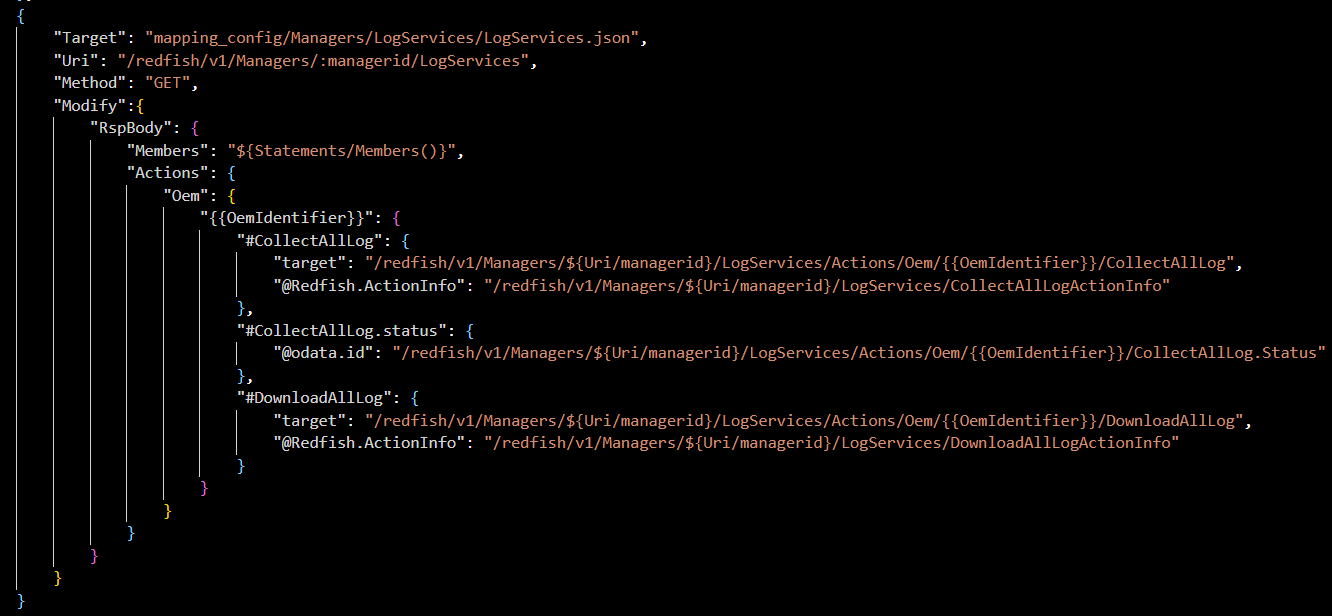
然后我把rackmount的LogServices.json复制到了/workspace/CTCC/interface_config/redfish/Managers/Oem/LogServices/LogServices.json
把utils.lua复制到/workspace/CTCC/interface_config/redfish/plugins/ctcc_utils.lua
注:我都只复制的修改部分,没有完全复制
 问题核心:Plugin函数调用失败
 背景知识支持(来自知识库)
 原因分析:为何“看似一致”的移植仍失败?
 文件未通过构建系统部署
 必须确保
必须确保  若不存在 → 检查
  注意:不要使用
  根据开放文档,某些
  附加调试建议