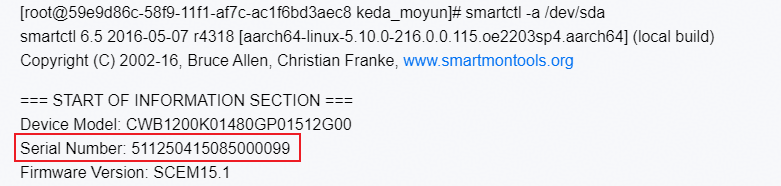
您这边提供的 smartctl -a /dev/sda 盘的信息,里面的Serial Number,和之前提供的BMA日志中该盘的Serial Number不太一致,请问下这确定是同一台环境下的信息吗?有点奇怪——不是同一个环境的但是也有这个问题用的都是同一个型号的ssd—–有需要的话我把同环境的ssd读取信息贴出来
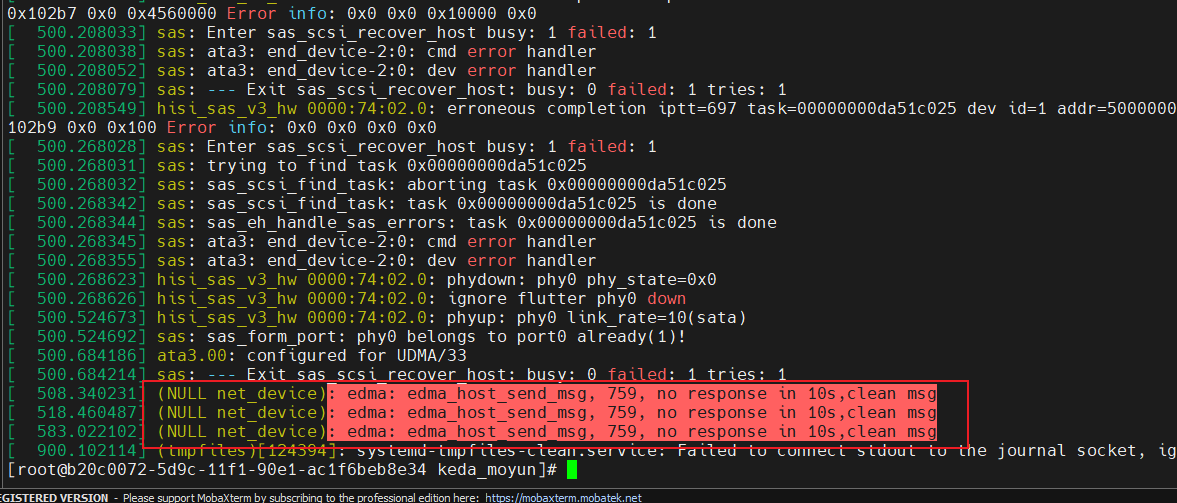
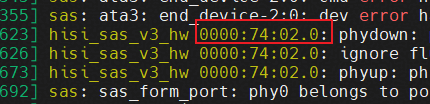
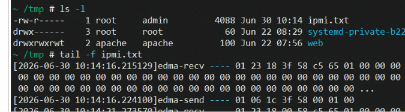
分析dmesg日志中这个hisi_sas_v3_hw每10s钟的日志打印,认为应该是BMA在做硬盘信息查询发送SCSI命令时触发的故障提示,想来如果停掉BMA,手动发送相同的命令也会触发——–那这个问题有办法解决吗,因为我们想使用ibma服务但是由于这个会刷很多打印给我们带来了些困扰,另外这个问题原因是否和sata盘有关系,之前920l上面我们使用的是pcie的盘没有这个问题,但是由于我们这边920l的硬件设计没有预留sata接口所以我也不清楚920l接sata是否也会出这个问题
[root@6586c6d8-6896-11f1-8ac8-ac1f6beb8e34 keda_moyun]# smartctl -a /dev/sda
smartctl 6.5 2016-05-07 r4318 [aarch64-linux-5.10.0-216.0.0.115.oe2203sp4.aarch64] (local build)
Copyright (C) 2002-16, Bruce Allen, Christian Franke, www.smartmontools.org
=== START OF INFORMATION SECTION ===
Device Model: CWB1200K01480GP01512G00
Serial Number: 511251106275000014
Firmware Version: SCEM15.1
User Capacity: 480,103,981,056 bytes [480 GB]
Sector Size: 512 bytes logical/physical
Rotation Rate: Solid State Device
Form Factor: M.2
Device is: Not in smartctl database [for details use: -P showall]
ATA Version is: ACS-3 (minor revision not indicated)
SATA Version is: SATA 3.1, 6.0 Gb/s (current: 6.0 Gb/s)
Local Time is: Wed Jun 17 09:22:50 2026 CST
SMART support is: Available - device has SMART capability.
SMART support is: Enabled
=== START OF READ SMART DATA SECTION ===
SMART overall-health self-assessment test result: PASSED
General SMART Values:
Offline data collection status: (0x00) Offline data collection activity
was never started.
Auto Offline Data Collection: Disabled.
Self-test execution status: ( 0) The previous self-test routine completed
without error or no self-test has ever
been run.
Total time to complete Offline
data collection: ( 30) seconds.
Offline data collection
capabilities: (0x79) SMART execute Offline immediate.
No Auto Offline data collection support.
Suspend Offline collection upon new
command.
Offline surface scan supported.
Self-test supported.
Conveyance Self-test supported.
Selective Self-test supported.
SMART capabilities: (0x0003) Saves SMART data before entering
power-saving mode.
Supports SMART auto save timer.
Error logging capability: (0x01) Error logging supported.
General Purpose Logging supported.
Short self-test routine
recommended polling time: ( 1) minutes.
Extended self-test routine
recommended polling time: ( 2) minutes.
Conveyance self-test routine
recommended polling time: ( 3) minutes.
SMART Attributes Data Structure revision number: 16
Vendor Specific SMART Attributes with Thresholds:
ID# ATTRIBUTE_NAME FLAG VALUE WORST THRESH TYPE UPDATED WHEN_FAILED RAW_VALUE
1 Raw_Read_Error_Rate 0x0032 100 100 000 Old_age Always - 0
5 Reallocated_Sector_Ct 0x0012 100 100 000 Old_age Always - 0
9 Power_On_Hours 0x0012 100 100 000 Old_age Always - 545
12 Power_Cycle_Count 0x0012 100 100 000 Old_age Always - 827
168 Unknown_Attribute 0x0012 100 100 000 Old_age Always - 0
170 Unknown_Attribute 0x0003 100 100 010 Pre-fail Always - 75
171 Unknown_Attribute 0x0032 100 100 000 Old_age Always - 0
172 Unknown_Attribute 0x0032 100 100 000 Old_age Always - 0
173 Unknown_Attribute 0x0012 100 100 000 Old_age Always - 10
184 End-to-End_Error 0x0012 100 100 000 Old_age Always - 0
187 Reported_Uncorrect 0x0032 100 100 000 Old_age Always - 0
192 Power-Off_Retract_Count 0x0012 100 100 000 Old_age Always - 822
194 Temperature_Celsius 0x0022 069 047 000 Old_age Always - 31 (Min/Max 25/53)
198 Offline_Uncorrectable 0x0012 100 100 000 Old_age Always - 0
199 UDMA_CRC_Error_Count 0x0012 100 100 050 Old_age Always - 0
218 Unknown_Attribute 0x0012 100 100 050 Old_age Always - 0
231 Temperature_Celsius 0x0013 100 100 000 Pre-fail Always - 99
233 Media_Wearout_Indicator 0x0012 100 100 000 Old_age Always - 1159
234 Unknown_Attribute 0x0012 100 100 000 Old_age Always - 1100003376
235 Unknown_Attribute 0x0012 100 100 000 Old_age Always - 2432068576
241 Total_LBAs_Written 0x0012 100 100 000 Old_age Always - 998
242 Total_LBAs_Read 0x0012 100 100 000 Old_age Always - 482
SMART Error Log Version: 1
No Errors Logged
SMART Self-test log structure revision number 1
No self-tests have been logged. [To run self-tests, use: smartctl -t]
SMART Selective self-test log data structure revision number 1
SPAN MIN_LBA MAX_LBA CURRENT_TEST_STATUS
1 0 0 Not_testing
2 0 0 Not_testing
3 0 0 Not_testing
4 0 0 Not_testing
5 0 0 Not_testing
Selective self-test flags (0x0):
After scanning selected spans, do NOT read-scan remainder of disk.
If Selective self-test is pending on power-up, resume after 0 minute delay.